Why Your AI Images Look Like Everyone Else’s (and How to Fix It)
Do your AI-generated images look like everyone else's? Wondering how to create AI visuals that match your brand and stand out? In this article, you'll discover a seven-pillar prompt framework for creating original AI images in ChatGPT, how to...
 JimMin
Do your AI-generated images look like everyone else's? Wondering how to create AI visuals that match your brand and stand out?
In this article, you'll discover a seven-pillar prompt framework for creating original AI images in ChatGPT, how to use reference images effectively, and why multi-model tools like Magnific give marketers more creative control over AI image generation.
This article was co-created by Lauren deVane and Michael Stelzner. For more about Lauren, scroll to the end of this article.
Why Most AI-Generated Images Look Generic
One of the biggest misconceptions about AI imagery right now is that everything AI produces is AI slop. Lauren deVane compares the situation to judging all piano music by watching a five-year-old bang keys in a dentist's office. “Mozart exists,” she says. “We just are judging it based on this kid smashing keys.” The best AI imagery is already indistinguishable from real photography. The problem isn't the technology; it's the skill level of the people using it.
AI image generation has changed dramatically in just a few years. When Lauren first experimented with DALL-E, the results were so poor that she dismissed the technology entirely. A few years later, the old tells, such as six-fingered hands, uncanny valley eyes, and plastic-looking skin, have largely disappeared.
Previous models were diffusion-based, starting with noise and chipping away like a sculptor to reveal an image.
The current generation of AI image models, particularly OpenAI’s GPT Image, represents a fundamental shift in how AI generates images. These models learned statistical patterns of pixels from billions of images and their text descriptions, so when a user asks for “a cat on a surfboard,” the model doesn't search a library of cat and surfboard photos. It generates something entirely new based on learned patterns.
ChatGPT Image is backed by a large language model, which means it can think, analyze, and process context. It can pull from current events, read and interpret reference images, and understand what it sees. If a user uploads a photo of peach-pineapple-mango sparkling water and asks the model to “create a world around it,” the model can identify the peach, pineapple, and mango and build a scene with those elements. Previous diffusion models would have required the user to explicitly describe every detail.
The text rendering capabilities have also improved significantly.
GPT Image can handle paragraphs of text with specific font directions, style instructions, and compositional placement. The catch is that most people aren't giving it those details. They're saying “make me a flyer, here's the information,” which produces the generic-looking results Lauren calls “ChatGPT slop flyers.” The model defaults to average fonts, predictable icon placement, and safe layouts because it hasn't been told to do anything different.
#1: Practical Use Cases for AI Images in Marketing
For product-based businesses, AI image generation solves a content volume problem that traditional photography can't address. A CPG brand with one product in ten flavors can write a single prompt template, feed in each flavor's reference image, and generate a unique scene for each variation. The model reads the product, identifies the flavor, and builds a matching environment, all from a single core prompt.
Lauren cites her family's company, Club Critterz, which sells 3D-printed animals across 800 SKUs.
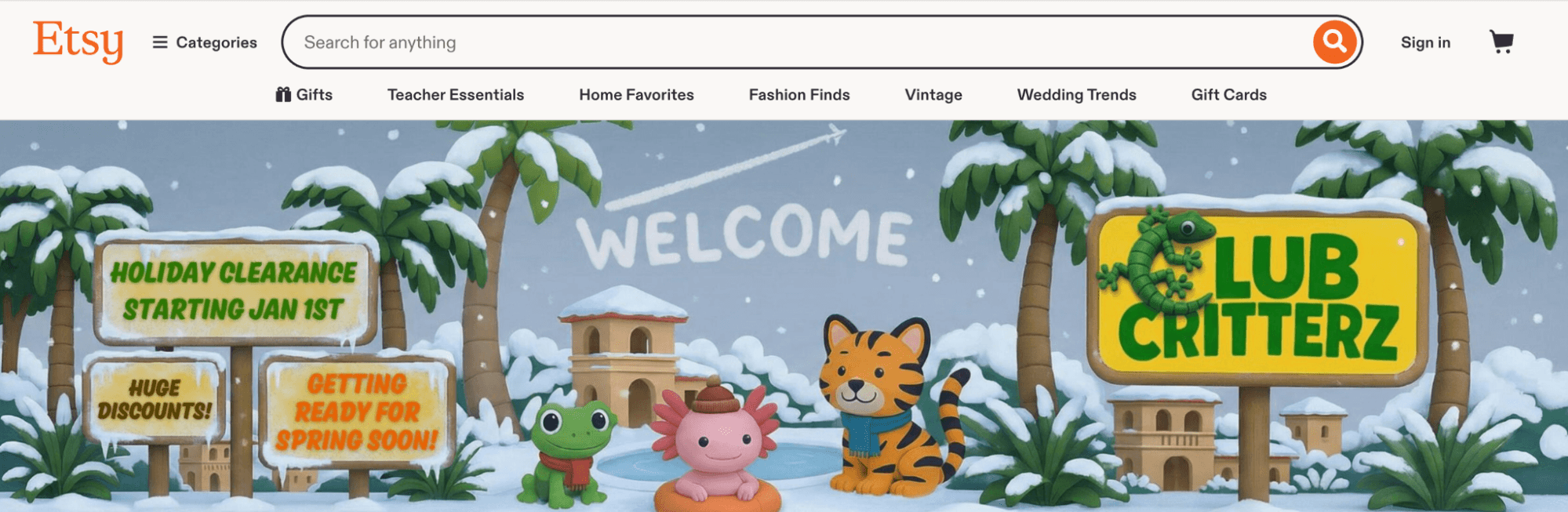
She built prompt templates that accept a reference image of each animal. The model identifies the animal, reads its colors, and generates a matching 3D-rendered environment. One prompt produces 800 unique product images that all feel cohesive because they share the same template structure.
The practical impact extends beyond product photography. Brands that need to refresh ad creative every six weeks, rather than relying on quarterly shoots, can now generate new imagery weekly. Lauren notes that this keeps products looking fresh across new flavors, colors, and seasonal campaigns without requiring a full brand shoot each time.
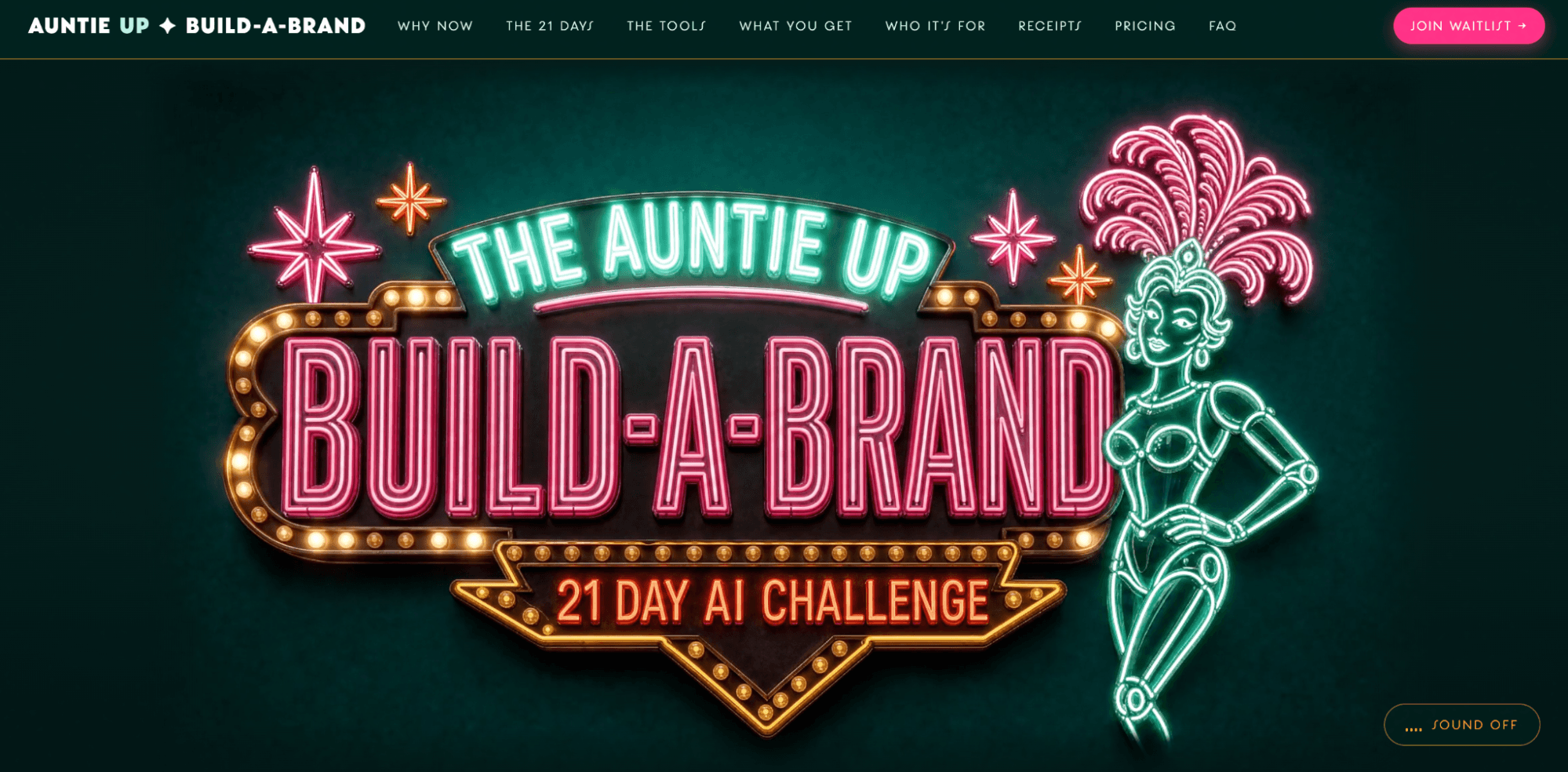
B2B businesses benefit too, even without a physical product. Lauren built an entire sales page around a futuristic casino theme for her sub-brand Auntie Up. Every image, from hero banners to section illustrations, shares the same color palette, style, and world because each generation uses the same reference material.

Which AI Moves Actually Matter?
That's what every marketer is wrestling with now. New AI strategies, new tools, new takes every week — but no clarity. Most marketers and business owners are trying to figure out AI alone.
The AI Business Society is your trusted guide. Get expert-led training you can put to work immediately. Plus a community of marketers sharing what's actually working.
Pro Tip: The key advantage of AI image generation for both product and service businesses is the ability to create a cohesive visual world from a single prompt template. Once the template captures the brand's look and feel, every new image inherits that consistency automatically.
#2: Preparing Before Prompting
Before opening ChatGPT, marketers need two things: a clear understanding of what their brand should look and feel like, and the ability to articulate that understanding in words.
Lauren draws a distinction between having taste and being able to express it. “Understanding that taste and articulating that taste are two different things,” she explains. A marketer might recognize good design intuitively but struggle to describe what makes it work, and that description is exactly what AI needs to produce the right output.
Building taste requires deliberate practice. Lauren recommends spending time looking at design and imagery, actively asking, “Do I like this, and why?” For those who haven't spent years immersed in design, she's built a custom GPT and Claude skill that breaks down uploaded images, identifying what works and why. It acts as a “taste accelerator,” helping users understand whether they're drawn to certain lighting, camera angles, perspectives, or color palettes.
Once a marketer identifies images they like, AI can reverse-engineer the visual style. Uploading a collection of inspiration images to ChatGPT or Claude and asking it to analyze the common elements produces a description of the user's aesthetic preferences. That analysis then becomes the foundation for repeatable prompts.
Reference images are critical, but they need to match the specific task. For images featuring a person, one clear face photo and one full-body image (if the body will be visible) are sufficient. Lauren advises against uploading 20 photos when two will do. For product images, the actual product, logo, and brand patterns should be included. For well-known brands like Nike or Adidas, the model already knows the logo from its training data. Smaller brands need to upload their logo and explicitly instruct the model not to alter it.
Brand colors should be specified as hex values rather than generic color names. Telling the model “blue and orange” leaves too much to interpretation. Providing exact hex codes ensures the output matches brand standards.
For character-based images that will appear from multiple angles, Lauren recommends asking the model to create a character contact sheet with front-, side-, and full-body views in a single image. That one reference can then be fed into all future prompts, giving the model everything it needs for any angle.
On file formats, Lauren keeps it simple: JPEGs and PNGs are the standard inputs. Designers wondering about vector formats like EPS or SVG don't need to worry about converting files. “It's honestly simple enough that you can screenshot stuff,” Lauren says. “As long as it can see it, that's what it needs.”
3 Days of World-Class Training—Zero Travel!
Couldn't make it to Social Media Marketing World and AI Business World this year? Get all of the great content at a fraction of the price with a Virtual ticket.
That’s full access to recordings of every keynote, workshop, and session—the ones people travel thousands of miles to see. Don't wait. Get your Virtual ticket and enjoy actionable content that you can watch anytime, anywhere.
Lauren emphasizes providing only the references relevant to the specific image being created. Uploading a full-body photo when the image will be a close-up headshot creates confusion. The model wonders whether to show the full body or the close-up, and the result suffers.
#3: The Seven Pillar Prompt Framework
Lauren's seven-pillar prompt framework is a structured approach to AI image prompting that covers seven distinct dimensions of an image: medium, subject and action, setting, composition, lighting, aesthetic, and intent. It isn't a checklist that requires all seven elements every time. It functions more like a control panel. The more detail provided in each pillar, the more the output reflects the user's intention. Any detail left out is a decision the model makes on its own, and it will default to the most average, generic version of that element.
Medium: What type of image is being created? A photograph, an illustration, a 3D render, a logo? If it's an illustration, what kind? Sharpie line art, fine art, crayon drawing? Specificity here sets the foundation for everything that follows.
Subject and Action: What is in the image, and what is it doing? Not just “a person” but “a person looking into a mirror with a content expression.” Not just “a can of soda” but “a can of soda dripping wet and balancing on its edge.” The action is what tells the story.
Setting and Scene: What surrounds the subject? “A retro diner” produces a generic jukebox-and-brown-leather result. “A retro diner with wooden panels and neon beer signs” produces something specific. Every detail the user provides displaces a default the model would have chosen.
Composition: How is the image framed? Wide shot, close-up, overhead, low angle? For graphic design, is the layout symmetrical, minimalist, or maximalist? Without composition guidance, the model defaults to a straight-on, centered shot.
Lighting: Warm or cool? Natural light through curtains at daybreak or a single lamp in the corner? Lighting changes the mood of an image more than almost any other element, and getting specific about it is one of the fastest ways to create a more original result.
Aesthetic and Vibe: This is where broader stylistic references come in. Rather than naming a specific artist to copy, Lauren recommends understanding why a particular style appeals and translating that into descriptive language. Liking Wes Anderson's aesthetic doesn't mean copying his work. It means articulating the elements that define it: symmetry, saturated colors, centered framing. AI can help break down why a style works and translate it into prompt language.
Intent: What is the image supposed to make the viewer feel or do? For a skincare ad, should the viewer feel the product's efficacy, or feel urgency to buy? This pillar matters more now than it would have two years ago because the language model backing GPT Image can actually process emotional intent and translate it into visual choices like facial expressions, lighting warmth, and color temperature.
#4: Using Magnific for AI Image Generation Across Multiple Models
Lauren's primary tool for AI image creation isn't the standalone version of ChatGPT, It's Magnific, formerly known as Freepik.
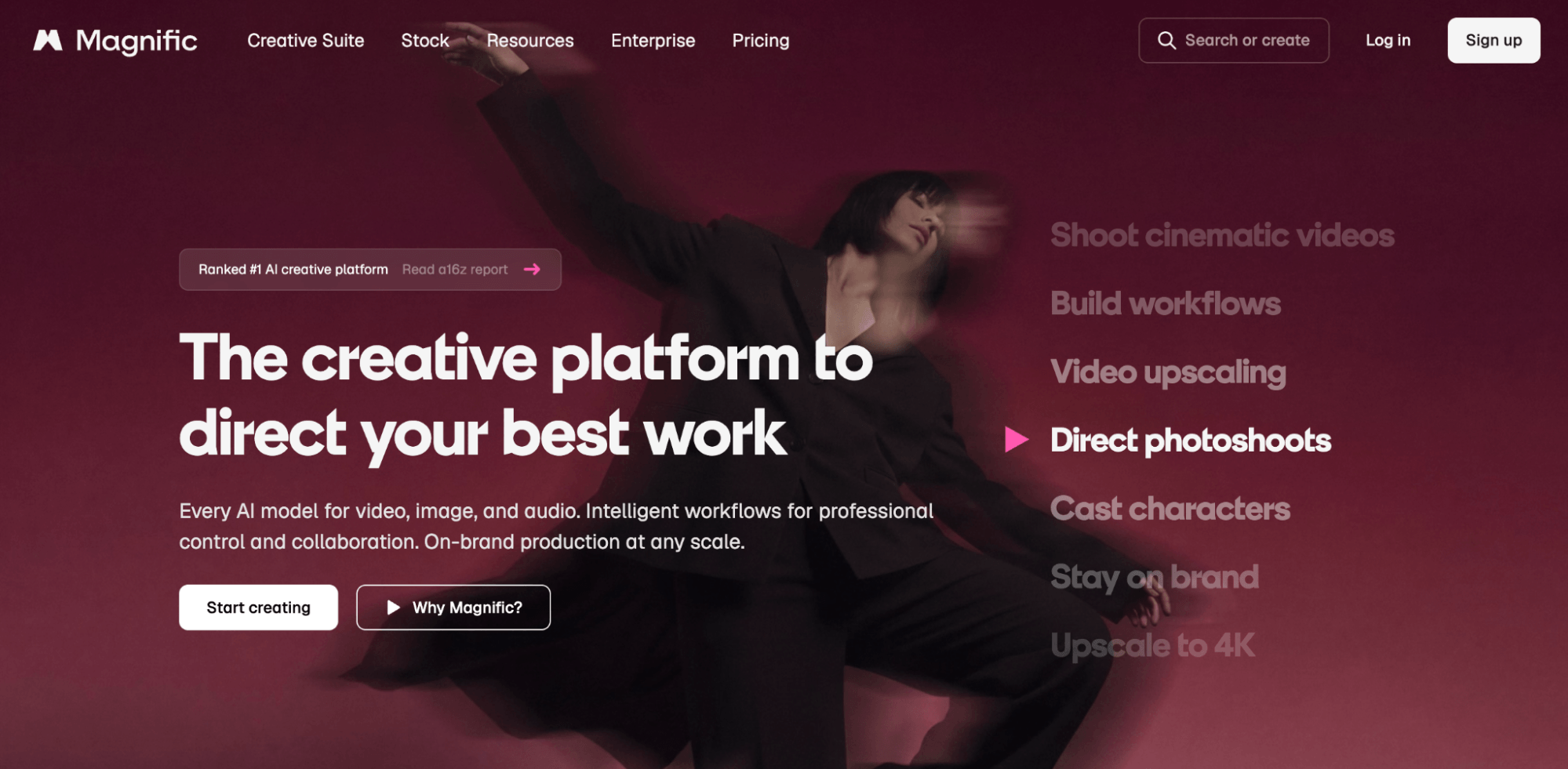
The practical advantage over working directly in ChatGPT is volume and variation. ChatGPT returns one image per prompt by default. Getting multiple variations requires turning on extended thinking and specifically requesting them, and even then, the variations are limited. Magnific generates up to eight images from a single prompt simultaneously.
That volume matters because AI image generation is inherently imperfect. Lauren pushes back against the misconception that prompting produces perfect results on the first try. Lighting, text rendering, product placement, and compositional details are rarely exactly right. Each generation is unique, and small elements shift each time. Having eight options instead of one dramatically increases the odds of finding a usable result, or at least an image that's close enough to refine.
Magnific also enables model comparison. Users can run the same prompt through GPT Image and Google's Imagen (Nano Banana) side by side. Each model handles different tasks differently, and being able to compare outputs helps users find the best fit.
Pro Tip: Lauren notes that using unlimited Imagen generations on certain plans preserves credits for GPT Image, video, or upscaling.
The platform recently added MCP (Model Context Protocol) connectors, including integration with Claude. This means users can work entirely within Claude, using a skill to write prompts and generate images through Magnific without switching tools.
The generated images appear in both the Claude chat and the Magnific library. Notably, this works in the standard Claude chat interface, not just Claude Code or Cowork. Users working in Cowork mode get the added benefit of saving generated images directly to a folder on their computer.
When working in Magnific through Claude, the skill handles model selection and prompt formatting automatically. Lauren's Prompty Poppins skill instructs Claude to think like a creative director, director of photography, lighting expert, and stylist. Assigning those roles produces more sophisticated prompts than a generic request.
Lauren describes building her Auntie Up sales page entirely through this workflow: Claude wrote the website code; she requested a hero image of a neon sign with a robot; the system wrote the prompt, generated the image with Magnific, and dropped it into the page. When she wanted motion, it wrote a video prompt, generated the video using models like Seedance or Google Omni, and added it, all within the same conversation.
Magnific has also launched plugins for Adobe Photoshop and Adobe Illustrator, letting users pull generated images directly into their design tools and send images back for AI processing.
Other Notes From This Episode
Connect with Michael Stelzner @Stelzner on Facebook and @Mike_Stelzner on X. Watch this interview and other exclusive content from Social Media Examiner on YouTube.Listen to the Podcast Now
This article is sourced from the AI Explored podcast. Listen or subscribe below.
Where to subscribe: Apple Podcasts | Spotify | YouTube Music | YouTube | Amazon Music | RSS
✋🏽 If you enjoyed this episode of the AI Explored podcast, please head over to Apple Podcasts, leave a rating, write a review, and subscribe.
Stay Up-to-Date: Get New Marketing Articles Delivered to You!
Don't miss out on upcoming social media marketing insights and strategies! Sign up to receive notifications when we publish new articles on Social Media Examiner. Our expertly crafted content will help you stay ahead of the curve and drive results for your business. Click the link below to sign up now and receive our annual report!
Curious About How to Use AI?
Our newest show, AI Explored, might be just what you're looking for. It's for marketers, creators, and entrepreneurs who want to understand how to use AI in their business.
It's hosted by Michael Stelzner and explores this exciting new frontier in easy-to-understand terms.
Pull up your favorite podcast app and search for AI Explored. Or click the button below for more information.










![How Much Does a Super Bowl Ad Cost [& Does It Get ROI]? A Data-Backed Deep Dive](https://www.hubspot.com/hubfs/how-much-does-a-super-bowl-ad-cost-1-20250120-9019772.webp)