YouTube Tools That Scale Attention
Is your YouTube content failing to gain traction? Wondering if YouTube has tools and features you’re not using to full advantage? In this article, you'll learn how to use new AI-powered content creation tools, a voice reply feature, and...
 Konoly
Is your YouTube content failing to gain traction? Wondering if YouTube has tools and features you’re not using to full advantage?
In this article, you'll learn how to use new AI-powered content creation tools, a voice reply feature, and a newly Gemini-powered creator partnerships platform to get more attention and build better relationships on YouTube.
This article was co-created by Liron Segev with Michael Stelzner and Jerry Potter. For more about Liron, scroll to the end of this article.
How YouTube Is Helping Small Businesses With a YouTube Channel Compete
YouTube is rolling out AI tools at a pace that would have been unimaginable a few years ago, and unusually many of these updates apply to organic content creation, not just ads. For small business owners and marketers who are already stretched thin, this matters. Less production friction means more room to experiment, test ideas, and stay consistent without a full creative team.
But tools alone don't guarantee results. According to Liron Segev, the governing principle behind all of these updates is the same: ideation still matters most. The tools lower the cost of execution. The thinking still has to come from you.
That said, the right tools in the right hands can dramatically change what's possible. Here's what's live, how each feature works, and how to decide whether it belongs in your strategy.
#1: Use Add Motion to Create No-Video Shorts
YouTube's Add Motion tool lets marketers and creators turn a single still photo into an 8-second Short using preset motion effects. You upload the image, select a motion style, and the tool animates the photo by adding movement, zoom effects, and, in some configurations, ambient sound. The result is a short-form video clip you can use as a standalone Short or dress up further with text overlays.
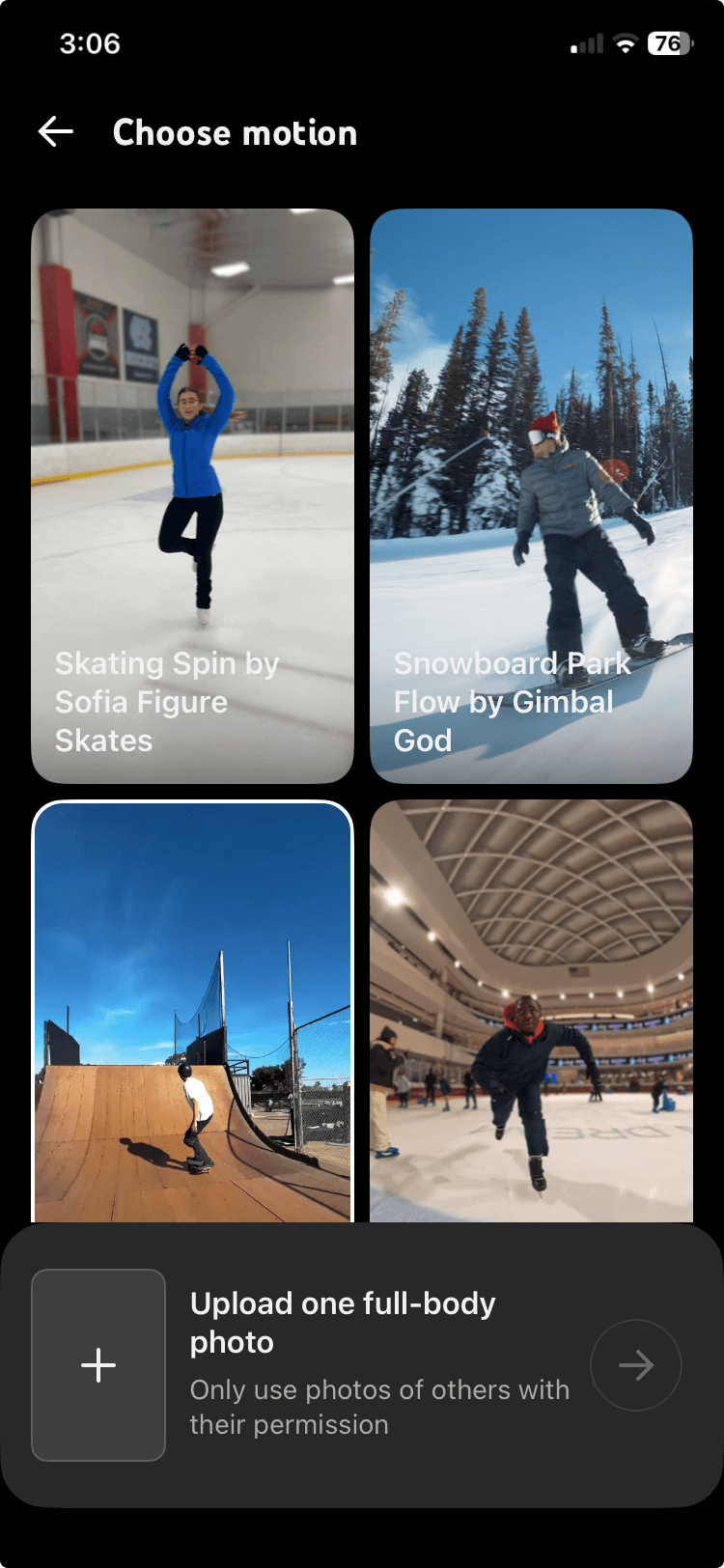
Liron points out that many business owners have experimented with image animation tools and found that a still photo coming to life even slightly adds enough visual energy to grab attention in a scroll.
For businesses that have product photography but no video budget, this is a meaningful unlock.
Use Case Examples for Add Motion
A bakery with strong food photography, a construction company with job-site shots, or a consultant with a professional headshot can now produce animated short-form content without filming anything new.
The tool also opens an interesting door for brands not comfortable putting a person on camera. Upload a photo of yourself or a team member, animate it with Add Motion, add a voiceover, and you have a presence on YouTube Shorts without a single second of filmed footage. This is a practical solution for businesses that know they should be on video but keep stalling because the production feels too demanding.
Add Motion's animation also works in reverse, which means other users can take any single frame from your YouTube Short and use the tool to animate it into their own eight-second clip. Attribution stays intact, meaning the derivative video links back to your original, but the feature creates a user-generated content opportunity worth considering: inviting your audience to grab a frame from one of your videos, turn it into something new, and pick a winner.
#2: Use Reimagine to Amplify Product Mentions
Reimagine lets you take a frame from someone else's Short and use it as the visual foundation for your own new clip.
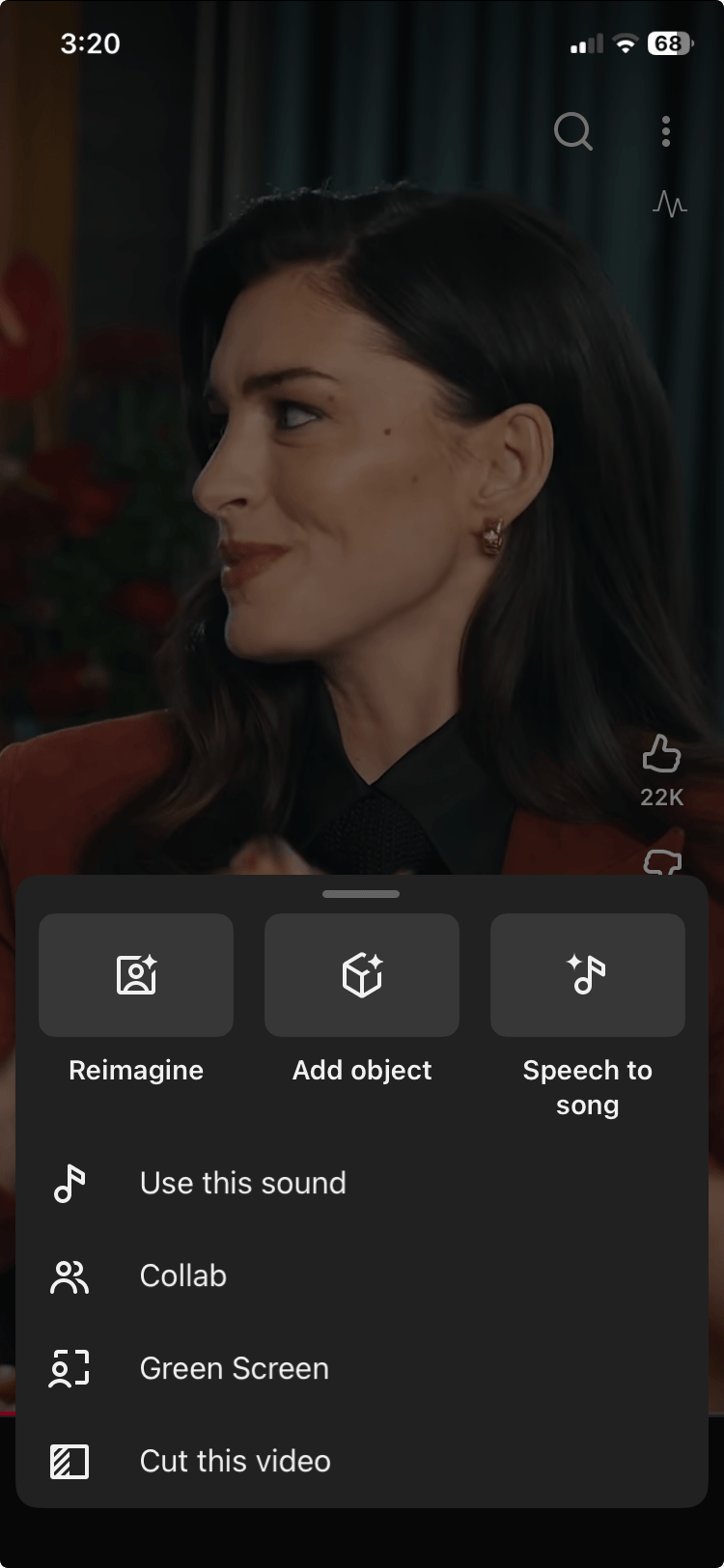
Liron's rule for this format: whatever you do, don't just slap your logo on a remixed clip and publish. Either add genuine context that your audience can't get from the original, or don't remix at all.
The pattern to avoid is taking someone else's clip, dropping your face into the bottom corner as a green-screen cutout, and silently pointing at their content above your head. In this style, you haven't said anything or added anything of value, and that kind of remix erodes your brand's reputation rather than building it.
3 Days of World-Class Training—Zero Travel!

Couldn't make it to Social Media Marketing World and AI Business World this year? Get all of the great content at a fraction of the price with a Virtual ticket.
That’s full access to recordings of every keynote, workshop, and session—the ones people travel thousands of miles to see. Don't wait. Get your Virtual ticket and enjoy actionable content that you can watch anytime, anywhere.
🔥 Save $200 on Virtual tickets. Sale Ends Friday! 🔥
Use Case Example for Reimagine
Say you're a food brand, and a creator used your ingredient in their cooking video. Pause the clip right there and explain: what the product is, why it works at that stage, what the health benefit is, etc. The goal is to add your authority so the attention shifts from the original creator's content back to you as the expert.
#3: Use Voice Replies for Strategic Engagement
YouTube has now rolled out Voice Replies to all marketers and creators on the platform.
The feature works through both the standard YouTube app and YouTube Studio's mobile app on Android and iOS and gives marketers and creators up to 30 seconds to record a voice reply directly in response to any comment. A transcript of the voice note is generated automatically, though playback is only available on mobile, not desktop.
Liron had high expectations for this feature before trying it and came back with a more measured take. The concept is strong: voice carries tone, warmth, and personality in a way that text rarely does. A quick spoken reply can do in 15 seconds what would take three paragraphs of writing to replicate. But the execution has to match the moment.
Before using it, two things are worth understanding.
First, these replies are completely public and function exactly like text replies in the comments, visible to anyone who visits the thread. This isn't a DM or a private message; it's a reply on the public record.
Second, there's a friction consideration for listeners. Many people scroll through comments while a video is still playing. A voice reply requires them to stop what they're watching, hit play on your audio clip, and listen. That's an interruption, so the reply has to be valuable enough to justify that pause. Generic responses will fail this test almost every time.
What Business Channels Can Benefit From Voice Replies?
Hearing a voice reply from a faceless brand feels strange, so if your channel doesn’t have a face to connect to the voice, this feature may not work well for you.
But if you're a solo consultant, a local business owner, or a thought leader who appears in every video and your audience already knows your face, a voice reply from you carries real weight. Getting a personalized audio message from someone you follow is a different experience than getting a standard text reply.
For channels where voice replies are appropriate, Liron's advice is to match the energy of the comment. If someone leaves a thoughtful, heartfelt message, then record a thoughtful, conversational reply. If someone leaves an enthusiastic comment, bring energy to your response.

Want to Unlock AI Marketing Breakthroughs?
If you’re like most of us, you are trying to figure out how to use AI in your marketing. Here's the solution: The AI Business Society—from your friends at Social Media Examiner.
The AI Business Society is the place to discover how to apply AI in your work. When you join, you'll boost your productivity, unlock your creativity, and make connections with other marketers on a similar journey.
For example, check every commenter’s profile before you reply. If someone leaves a positive comment and their profile reveals a YouTube channel or an interest area that connects to what you do, that's the moment to act.
Record a voice note that acknowledges them by name, notes the connection you spotted, and expresses genuine interest: “Thanks so much for watching! I noticed you're into [topic], and that's actually a big part of what I cover, too. Really glad you're here.”
You're not pitching. You're making a real connection, a touchpoint with lasting memory attached, the kind that's genuinely hard to replicate with a typed response.
Strategic Execution Considerations for Voice Replies on YouTube
The best summary of this feature: if you're not already replying to comments in text, don't skip ahead to voice. Get into the habit of writing replies first. When you're consistent there, use voice selectively for the comments that genuinely deserve a more human response.
One realistic constraint to keep in mind: voice replies scale poorly. Liron worked with a channel that decided to reply to every comment via voice, and the community pushed back; some viewers actively disliked it and said so publicly. The community had formed around video content and didn't want voice notes in the comments. The lesson: test it with a handful of high-value comments before making it a policy, and pay attention to how your audience responds.
#4: Use the New Creator Partnerships Platform to Reach New Audiences
YouTube's Creator Partnerships platform, an evolution of what was previously called Brand Connect, is now integrated across YouTube Studio, Google Ads, and Display.
The platform now uses Google Gemini to help brands identify potential creator partners from a pool of over 3 million YouTube channels, surfacing matches based on signals such as audience overlap and organic brand mentions. From there, brands can build creator lists and, in the near term, send bulk partnership inquiries directly through the platform.

Liron sees this as a genuine barrier removal. Previously, a brand that wanted to work with YouTube marketers and creators had exactly two paths:reach out cold and hope for a response, or hire an agency to manage the relationship.
Both options carry cost and uncertainty.
The Creator Partnerships platform offers a third option: discover marketers and creators whose audiences already overlap with your customer base, review their data before committing, and initiate contact without an intermediary.
For brands that have been curious about influencer marketing but hesitant about the risk, the data-first discovery model matters. Gemini surfaces marketers and creators whose audiences statistically resemble your target customer. That's useful, but Liron is quick to point out it's only the starting point, not the decision. A statistical match tells you whether there's overlap. It doesn't tell you whether the creator's voice, values, and tone will actually resonate with your audience.
How to Evaluate a Creator for Brand Fit Before Your Commit
Once Gemini identifies a potential match, Liron recommends a four-step due diligence process before reaching out.
Watch the last ten videos on the creator's channel. Don't evaluate them from your own perspective as a subject matter expert. Instead, evaluate them through your customer's eyes. Does the creator explain things the way your customer would understand? Do they come across in a way that would make your customer trust them?
Read through the comments on multiple videos. Comments give you a rough sense of the audience's sentiment and personality. Liron notes that the most vocal commenters tend to be either the most passionate fans or the most vocal critics, so keep that in perspective, but a section full of genuine, supportive engagement is a strong positive signal.
Look for previous sponsored content. Good marketers and creators who follow platform rules will mark their sponsored videos as such, making them easy to find. Watch how they handle the integration. You want marketers and creators who integrate the product naturally, so the audience actually engages with the branded segment rather than skipping it.
Pay attention to how the analytics sharing works. YouTube actively encourages marketers and creators to make their channel analytics visible to potential brand partners within the platform. Marketers and creators who turn this on get 60% more visibility inside the Creator Partnerships platform and double the brand inquiry rate, according to what YouTube has shared with marketers and creators. As a brand, this means you can review a creator's real performance data, not just subscriber count, before ever initiating contact.
How to Leverage Creator Partnerships for Marketing
Liron drives home one point: regardless of how you find a creator, influencer marketing isn't a one-and-done transaction.
You're not buying an ad placement. You're accessing a relationship that a creator has built with their audience. That relationship runs on trust, and trust takes more than a single mention to transfer.
Liron advises thinking in terms of three to five appearances rather than a single sponsorship video. Your audience needs to see your brand mentioned naturally and in context across multiple videos before the connection starts to feel familiar. A single placement might generate awareness. A series of contextually integrated mentions generates credibility.
Liron Segev is a YouTube strategist who helps businesses turn YouTube channels into lead-generation machines through growth strategy and content optimization. Follow him on YouTube and LinkedIn.
Other Notes From This Episode
Connect with Michael Stelzner @Stelzner on Instagram and @Mike_Stelzner on X. Connect with Jerry Potter on LinkedIn and YouTube. Watch this interview and other exclusive content from Social Media Examiner on YouTube.Where to subscribe: Apple Podcasts | Spotify | YouTube Music | YouTube | Amazon Music | RSS
✋🏽 If you enjoyed this episode of the Social Media Marketing podcast, please head over to Apple Podcasts, leave a rating, write a review, and subscribe.
Stay Up-to-Date: Get New Marketing Articles Delivered to You!
Don't miss out on upcoming social media marketing insights and strategies! Sign up to receive notifications when we publish new articles on Social Media Examiner. Our expertly crafted content will help you stay ahead of the curve and drive results for your business. Click the link below to sign up now and receive our annual report!

Curious About How to Use AI?
Our newest show, AI Explored, might be just what you're looking for. It's for marketers, creators, and entrepreneurs who want to understand how to use AI in their business.
It's hosted by Michael Stelzner and explores this exciting new frontier in easy-to-understand terms.
Pull up your favorite podcast app and search for AI Explored. Or click the button below for more information.











![20 Predictions for Social Media in 2025 [Infographic]](https://imgproxy.divecdn.com/HMVhRh2JvYwAse_QsxNWdYtb_Of31-oCF2OnUe4eZqA/g:ce/rs:fit:770:435/Z3M6Ly9kaXZlc2l0ZS1zdG9yYWdlL2RpdmVpbWFnZS9zb2NpYWxfbWVkaWFfdHJlbmRzXzIwMjVfMi5wbmc=.webp)













.jpg&h=630&w=1200&q=100&v=7abd35f457&c=1)