How to Show Up in ChatGPT Results and Get Noticed by Customers
There’s a lot of conjecture out there about how to show up in ChatGPT results, but if you want advice from a practitioner who’s actually done it, keep reading.
 JimMin
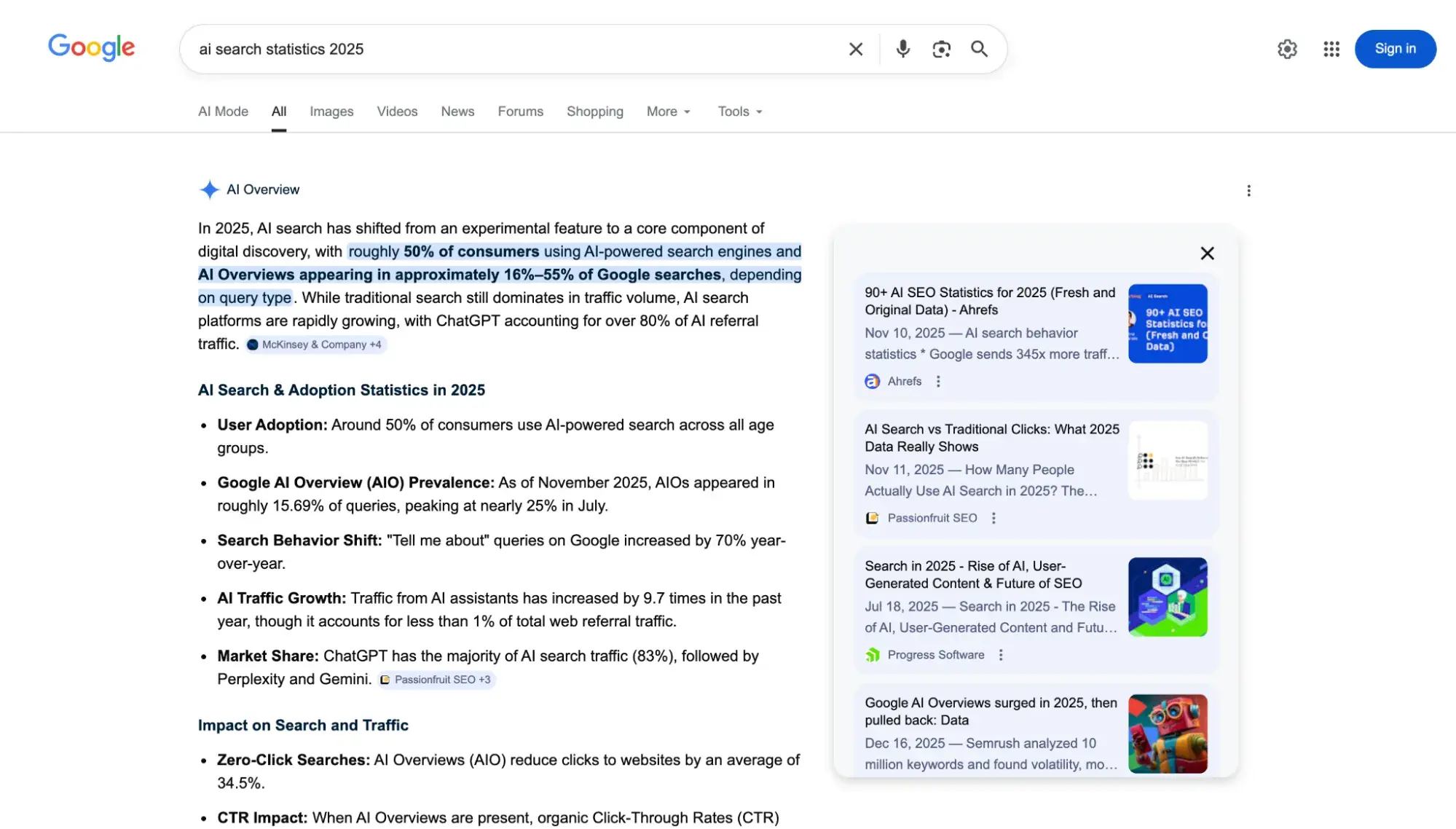
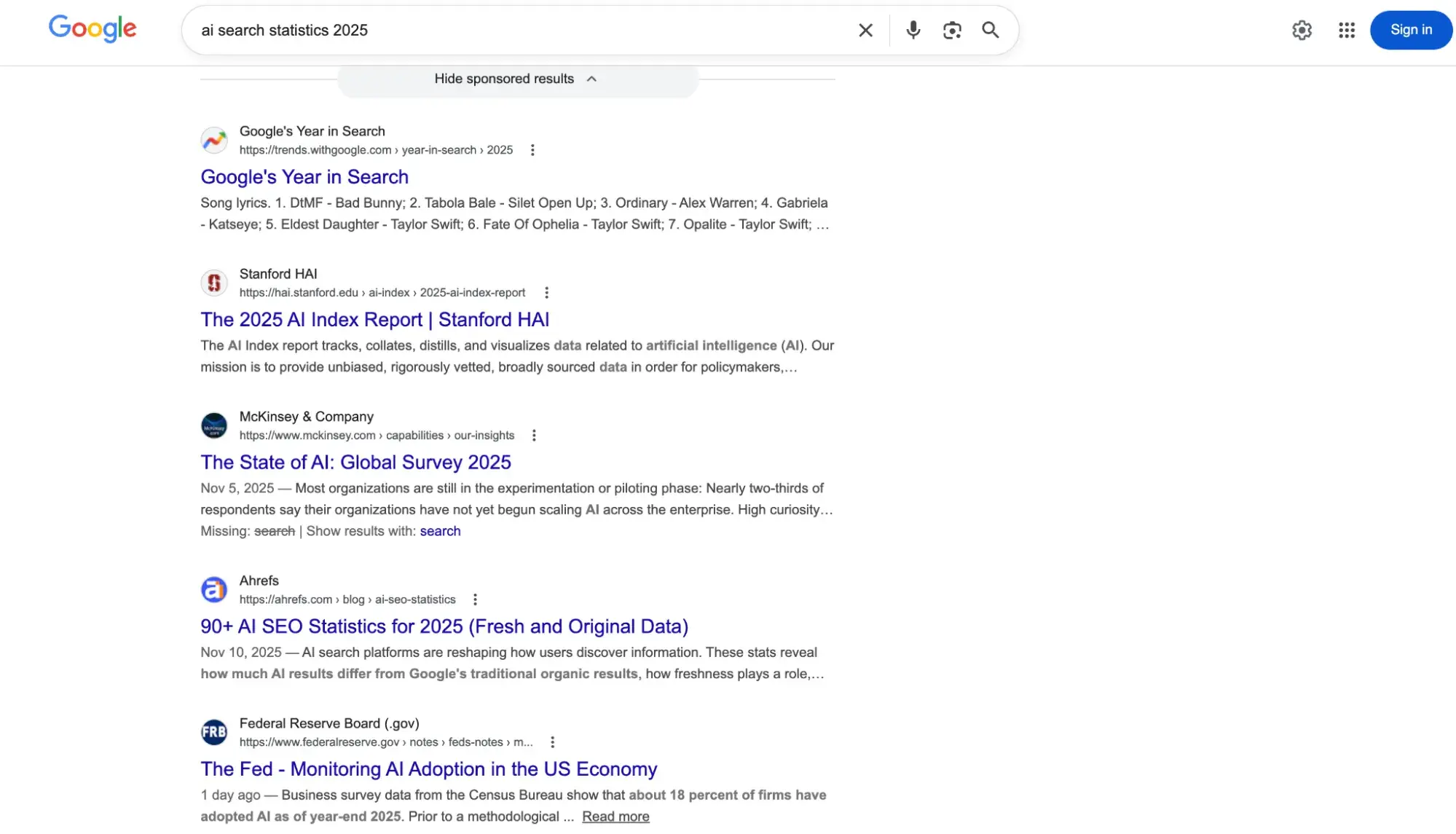
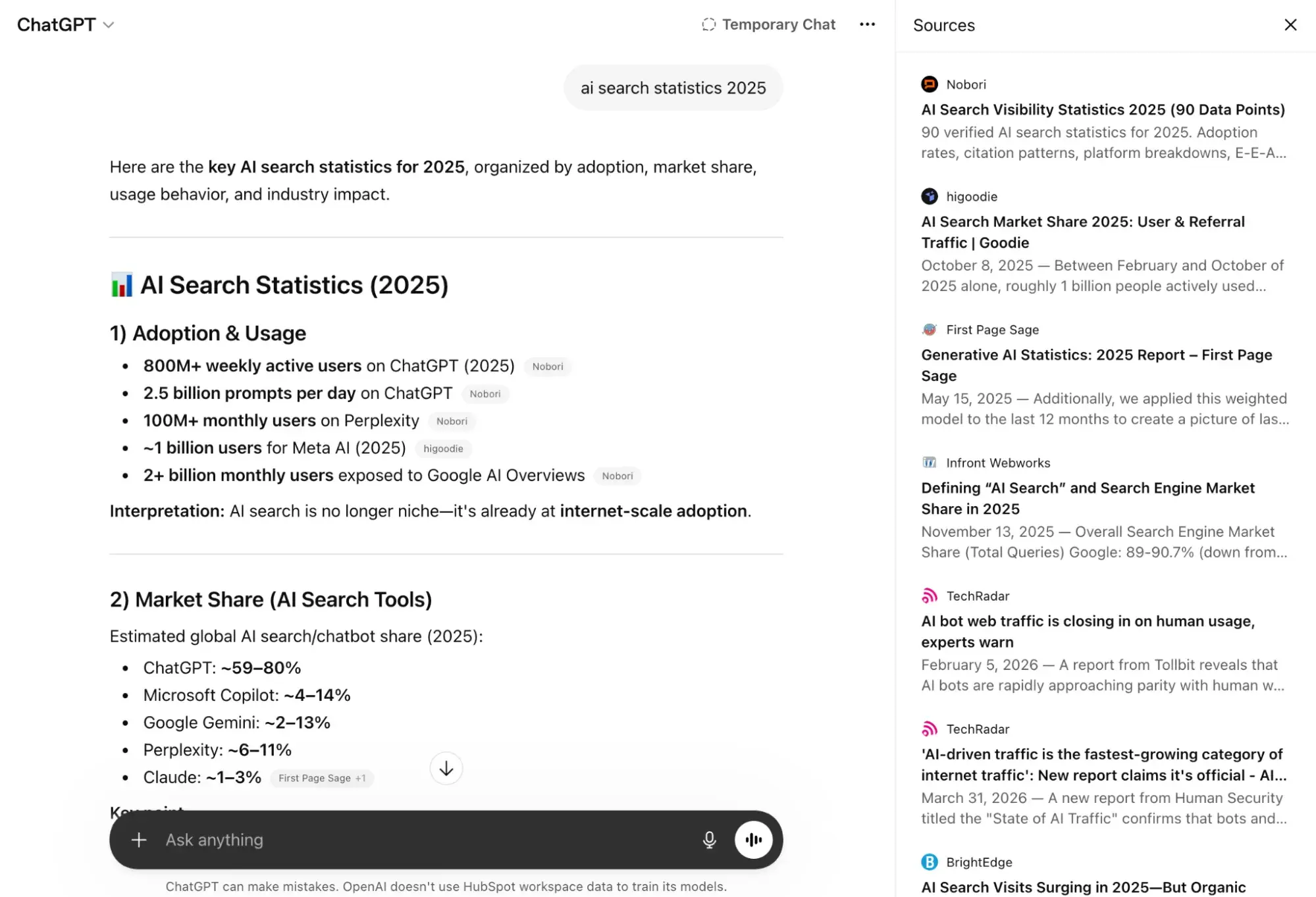
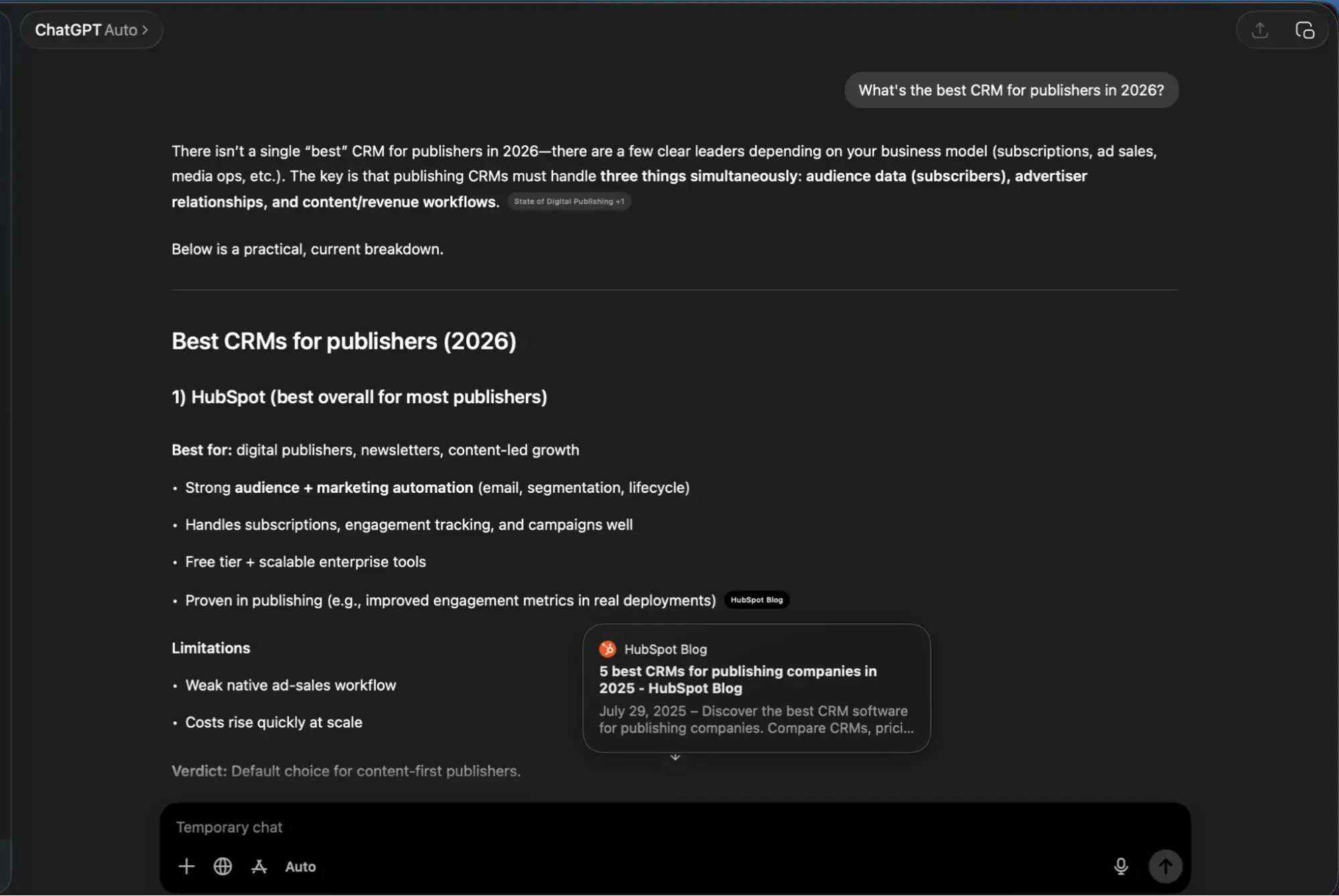
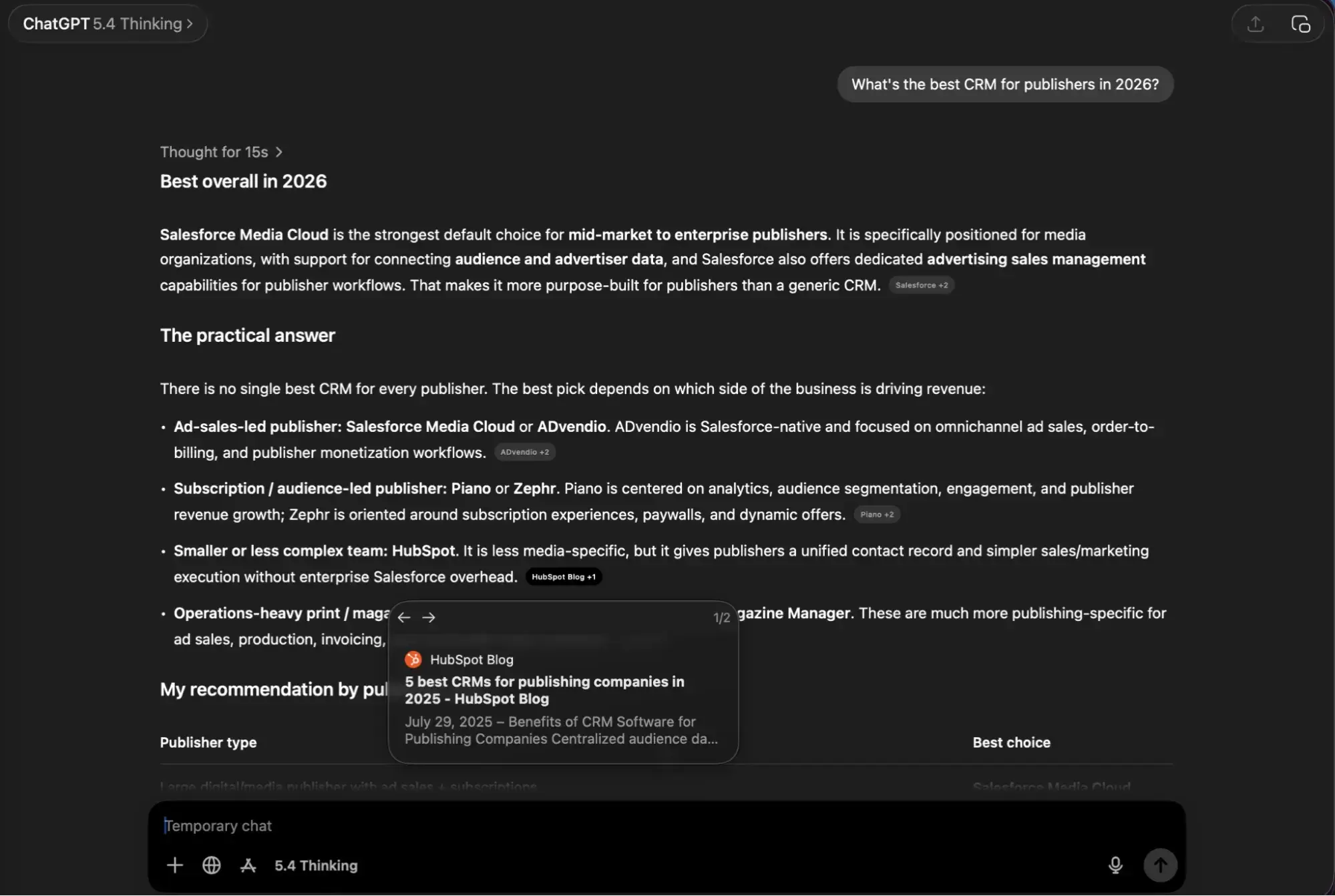
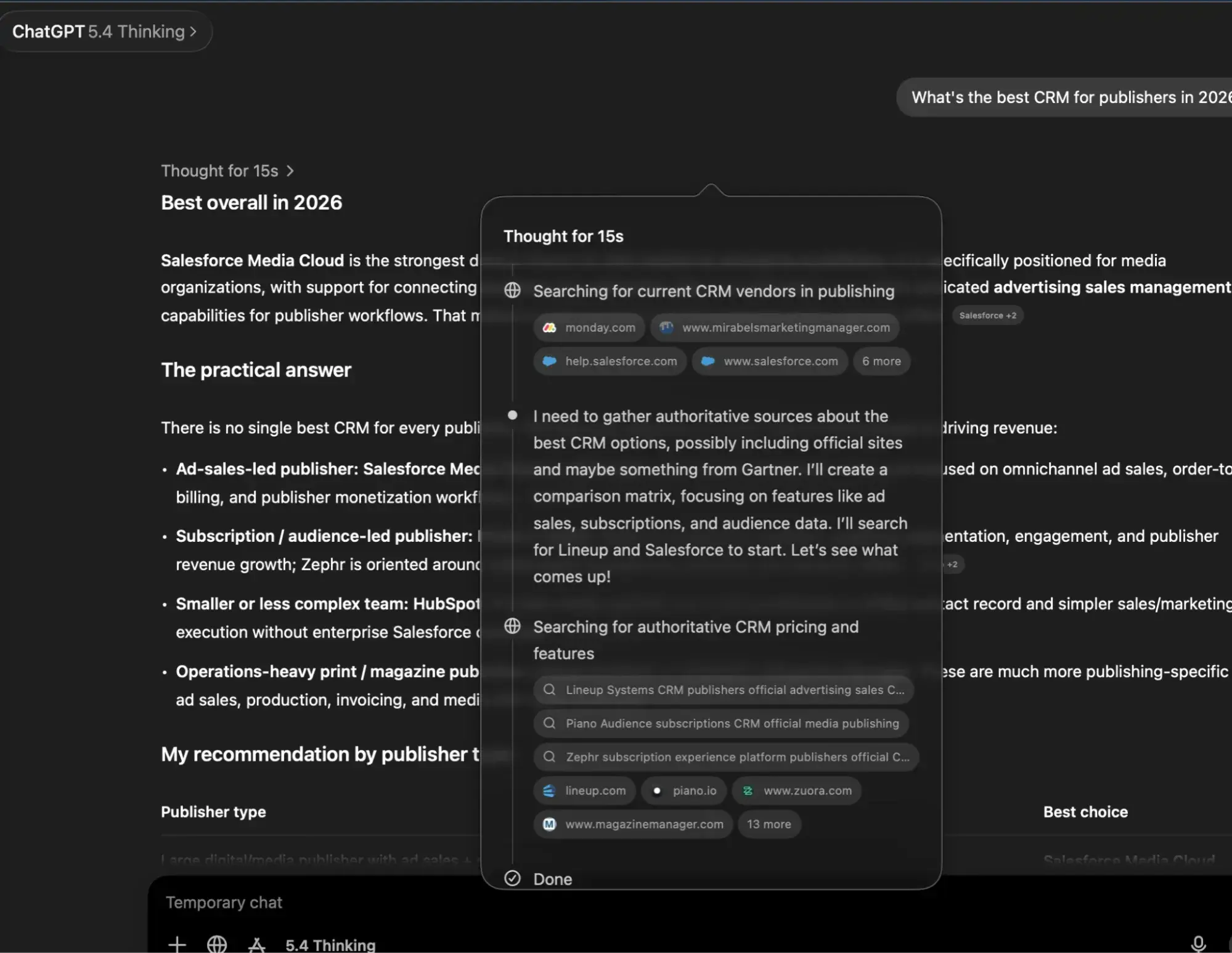
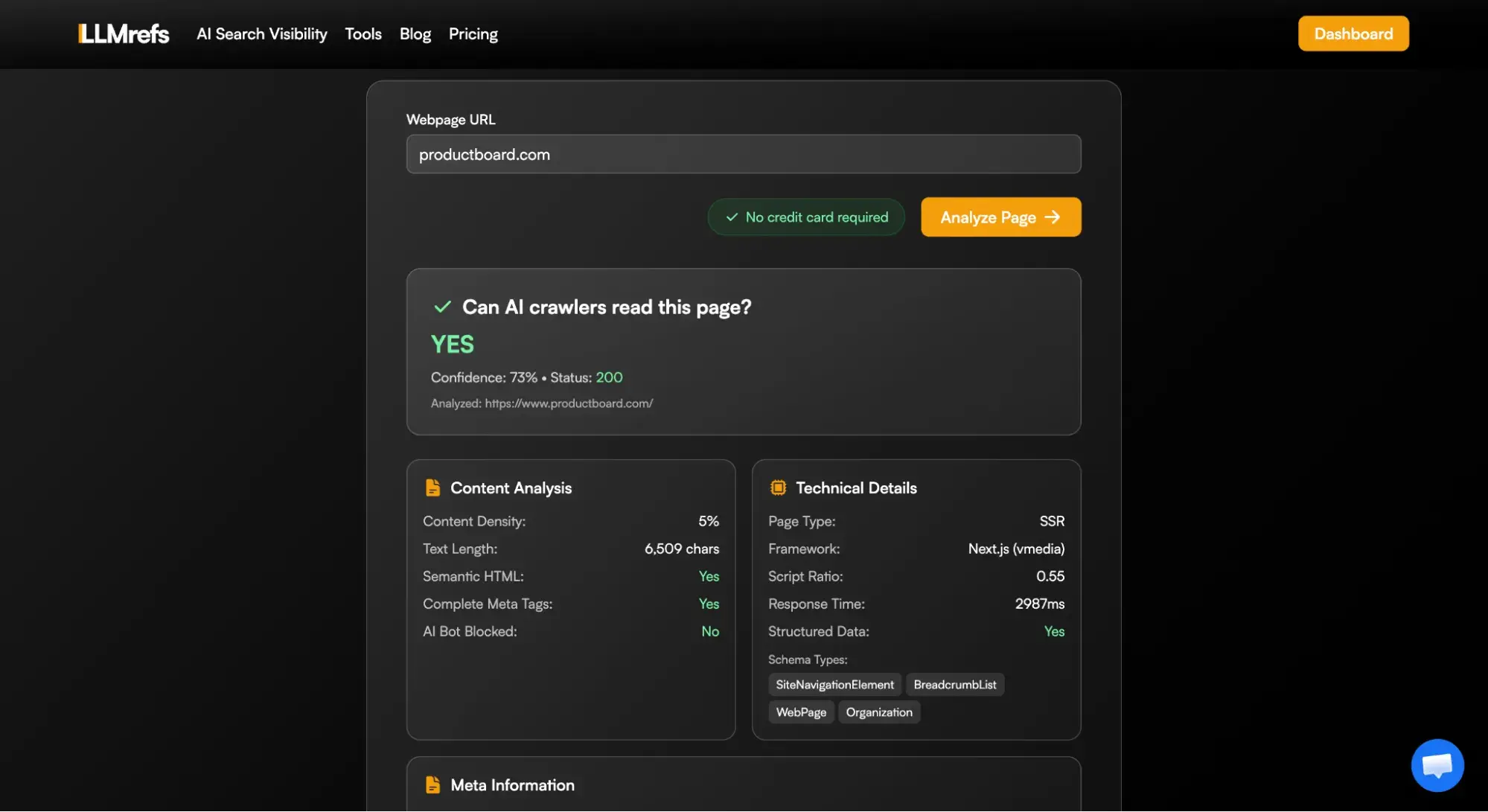
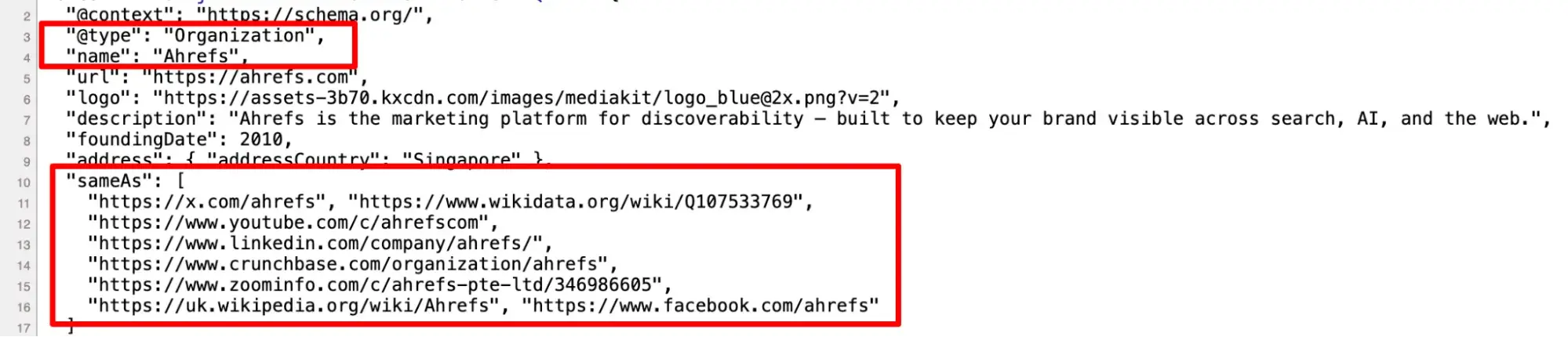
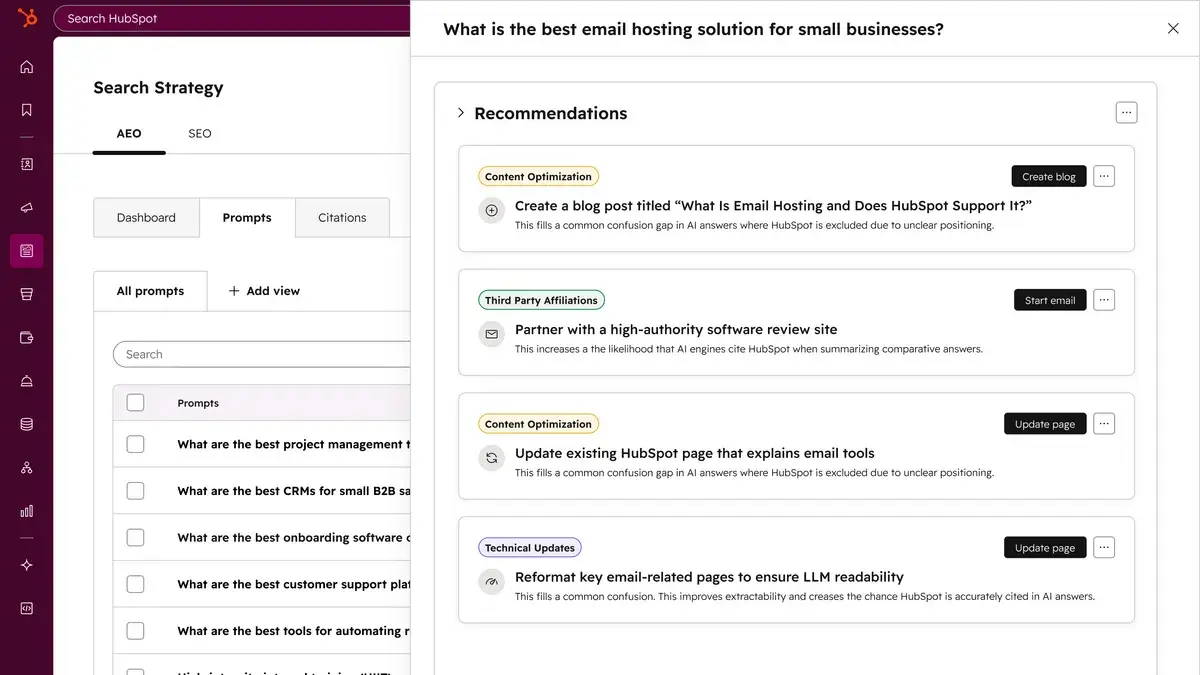
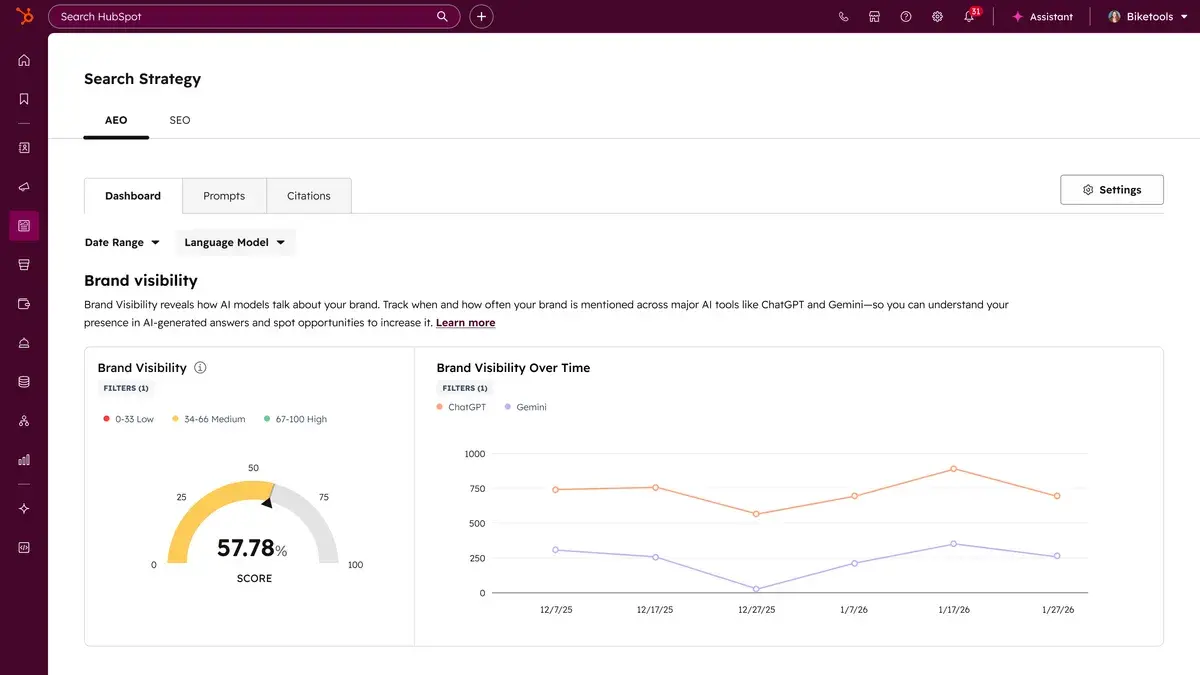
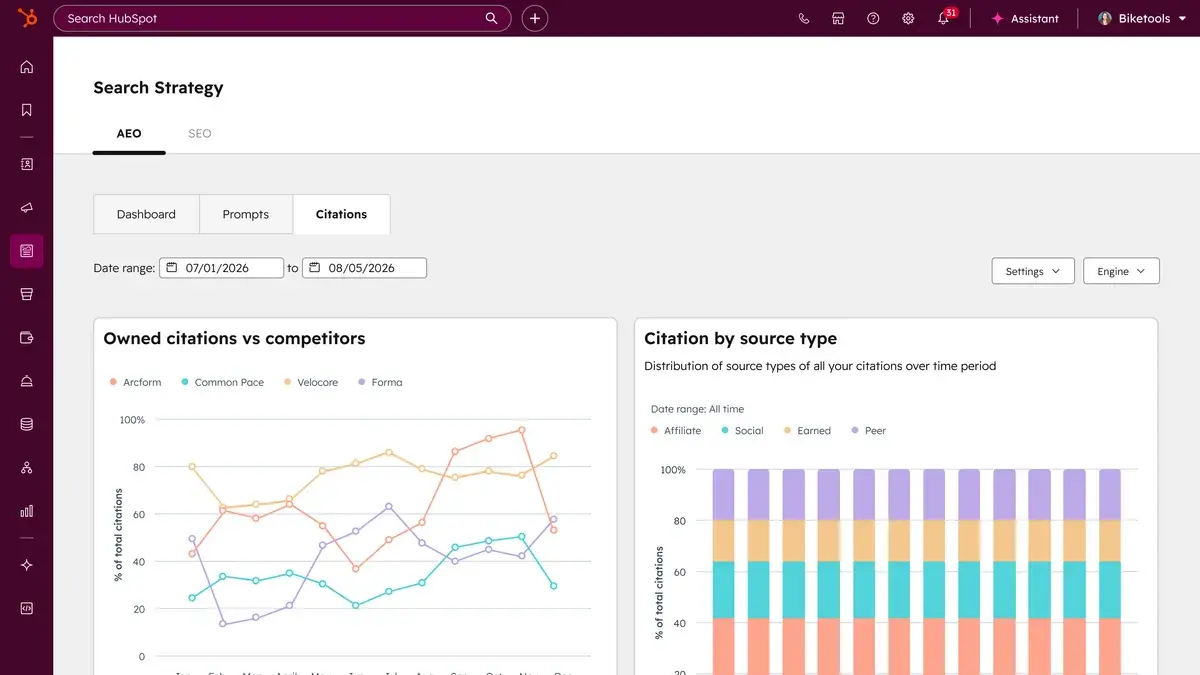
There’s a lot of conjecture out there about how to show up in ChatGPT results, but if you want advice from a practitioner who’s actually done it, keep reading. As a professional blogger, I’ve been snagging top positions in Google for well over a decade, but when answer engine optimization (AEO) started taking off last year, I dove in headfirst. Since then, I’ve gotten posts to show up in ChatGPT, and I’m proud to be part of a team that’s helped HubSpot become number one in AI visibility in its category, with a 1,850% increase in qualified leads in 2025 driven by our AEO strategy. Below, I’ll break down the essentials of how to show up in AI answers (particularly ChatGPT), including how the answer engine sources information, tactics for increasing your AI visibility, and common mistakes to avoid. Table of Contents There’s more than one way to appear in ChatGPT results. Two main sources for answers are relevant here: ChatGPT training data and live web search. Let’s break down each of these sources below. OpenAI trains ChatGPT’s models on immense amounts of data (hence the term “large language model” or “LLM”) from publicly available sources from the internet, third-party partnerships, and user-provided data (depending on the user’s privacy settings). From this training data, ChatGPT learns patterns, how words and concepts are related to each other. From these learned patterns, the model is able to predict the next word in a string of words (an oversimplification, I admit). ChatGPT is not like a library, where its model stores all of its training data in “books” and pulls them from the shelves based on user prompts. Instead, it’s more like a human brain that has done extensive studying and can form an answer based on what it has learned. The “knowledge cut-off date” refers to the date at which the training data was last pulled. At the time of writing, ChatGPT’s latest model, GPT-5.4, has a knowledge cut-off date of August 2025. This fact is important to understand the next way ChatGPT figures out its answer for you: live web search. Let’s say new information that’s relevant to your question dropped in January 2026, but the current knowledge cut-off date is August 2025. In that case, ChatGPT can run a live web search to find the latest info online instead of relying only on its training data. Another interesting thing is that ChatGPT’s web search results are not usually the same as Google’s SERP. See below for my Google versus ChatGPT results for the phrase “ai search statistics 2025.” There is no overlap. Here’s the Google AI Overview: Here are the top five non-sponsored Google Search results: And ChatGPT’s results from conducting a web search: To me, this indicates a couple of things: One, Google Search and ChatGPT weigh things differently. And two, because of that, even if SEO has let you down because you can’t seem to get to the top of the search engine results page, you might see success with answer engine optimization (AEO) by showing up in ChatGPT answers. To illustrate, I ran the same prompt (“What’s the best CRM for publishers in 2026?”) in two ChatGPT configurations to see if an AEO-optimized article of mine would show up. First, I ran the prompt in a temporary chat with Auto selected (which means ChatGPT will decide which model to use). You can see that ChatGPT recommends HubSpot first in its list of best CRMs for publishers, and when I hover over the citation bubble, you’ll see it’s the HubSpot blog post that I wrote. To better understand how ChatGPT’s live web search approaches queries, I find it helpful to run the prompt with Thinking mode on. You’ll see it answers a little differently, though HubSpot is still mentioned and my HubSpot blog post is still cited. The really interesting part, though, is clicking to expand and view some of its thinking process. To me, it’s like a partial peek under the hood. You’ll see that it broke out my single prompt into multiple queries. This is called query fan-out, and it has a practical implication for marketers: The prompt your customer types into ChatGPT is not necessarily the query that determines whether your site gets found. ChatGPT may break that prompt into sub-queries you wouldn’t have predicted from the original wording alone. That’s one reason why prompt research (which I’ll talk about below) is such a critical part of AEO strategy. Unlike Google Search, OpenAI doesn’t publish any detailed guidelines on how to rank in ChatGPT search results, which makes leaning on internal and external experimentation necessary. That’s why I’ll try to back all my recommended tactics in this article with research and experiments from marketing pros. To be fair, OpenAI has said this: “Any public website can appear in ChatGPT search.” It also said to make sure your site isn’t blocking its crawler (I’ll go into detail on how to do that below). Think of this section as a checklist before you move on to the other three content and authority tactics below. Verify that: Proper indexing and crawler access form the foundational layer of showing up in ChatGPT results. Indexing and crawling are SEO terms, yes, but they affect AEO, too. Here are the three ways they affect ChatGPT answers: As I mentioned above, ChatGPT pulls live results through search engines like Bing and Google. That means traditional search engine indexing is still a prerequisite for AI visibility. If your pages aren’t indexed, they won’t appear in ChatGPT’s live search results. OpenAI also operates its own web crawlers, and each one serves a different purpose. Here’s what you need to know about them: OAI-SearchBot affects ChatGPT’s live web search. According to OpenAI’s crawler documentation, sites that opt out of OAI-SearchBot won’t appear in ChatGPT’s search answers (though they may still show up as navigational links). If you want to be cited in ChatGPT responses, this bot needs access to your site. Your robots.txt file controls access to these two OpenAI web crawlers. Each bot is configured independently, which means you can allow OAI-SearchBot (so your pages appear in search results) while blocking GPTBot (so your content isn’t used for model training), or vice versa. Here’s what that looks like in practice within your robots.txt file (note that the lines preceded by “#” are comments that are ignored by crawlers): # Allow ChatGPT search to surface your pages User-agent: OAI-SearchBot Allow: / # Allow training data collection (optional — your call) User-agent: GPTBot Allow: / Pro Tip: After updating your robots.txt, it takes about 24 hours for OpenAI’s systems to reflect the changes, per OpenAI’s documentation. Don’t panic if results aren’t immediate. Simply put, they can’t “see” your content, and if they can’t see it, they can’t add it to ChatGPT’s answers. The fix: If you want to make your website appear in ChatGPT (though there’s no guarantee), ensure your most important content is available in the initial HTML response. Server-side rendering (SSR) or pre-rendering are the most reliable approaches here. This isn’t just good practice for AI crawlers — it also helps with traditional SEO, since Googlebot can struggle with JS-heavy pages too. Pro Tip: Unsure if ChatGPT can see your webpage? Use this free AI Crawlability Checker. Yes, it’s a pain to have to register, but once you do, you can use it for free. And it’s the best AI crawlability/JavaScript checker I tested, as it gives the most detail and focuses specifically on JS issues and fixes. Put the most important information at the top of your article, and begin each paragraph with the key point the paragraph seeks to answer. Don’t make readers (or ChatGPT) dig for it. After you give the direct answer, you can dive into the details. At least two independent analyses have found that AI citations trend heavily toward the top of a page. Kevin Indig’s February 2026 analysis of 18,012 verified ChatGPT citations found that 44.2% came from the top 30% of a page’s content. Citation likelihood dropped sharply after that. A separate CXL analysis of Google AI Overviews found a similar distribution: 55% of citations came from the top 30% of a page. An important caveat: Both studies are observational and establish correlation (a connection), not causation (the reason for the connection). This means they show that cited content tends to be near the top of a page but don’t prove that putting content higher causes it to be cited. It’s possible that ChatGPT favors direct definitions, entity-rich statements, and clear answers, and that those are the same qualities that good writing naturally puts up front. My take: Put key information upfront because it’s a strong editorial and UX practice (it makes it easier for busy readers to skim), and it may improve the odds of being cited by ChatGPT. Below is a before-and-after example of how you might change the way you write so that you can show up in ChatGPT results. The “before” is an actual excerpt from an article I wrote pre-AI about design thinking. Before: Heading: Body paragraph: The five methods of design thinking are more aptly called the five ‘stages’ or ‘phases.’ Let’s briefly touch on those five phases before I jump into the exact tactical methods you can use to apply design thinking. Here’s the most important thing, though: The design thinking stages are not linear. The problem: Notice how it rambles and doesn’t immediately answer the question posed in the heading above it: “What are the 5 methods or stages of design thinking?” After (using answer-first phrasing): Heading: Body paragraph: The five stages of design thinking are empathize, define, ideate, prototype, and test. These stages are not linear — there’s no fixed order, and they often overlap or repeat. You don’t stop empathizing with users once you move to defining the problem; empathy carries through the entire process. The fix: State the answer in the first sentence, then go on to explain the nuance. The subsequent paragraphs, where I break down each stage, remain exactly the same — they’re the supporting evidence. But I’ve given ChatGPT’s crawler the most important information right at the start. Another way to help make content visible on ChatGPT is to implement schema markup. Schema markup is code that you add to your site’s source code that tells search engines and answer engines exactly what your content represents (who wrote it, what type of content it is, and what entities it references). Your readers won’t be able to see it, though. I like to think of it as speaking the AI model’s native language instead of forcing it to understand ours. It enhances what we’ve written in plain language. For a deeper primer, check out HubSpot’s beginner’s guide to structured data and our walkthrough on how to use schema markup. Why it matters for ChatGPT visibility: Adding schema markup doesn’t guarantee you’ll be cited, but it reduces the ambiguity answer engines face when deciding whether to trust and reference your content. Some schema types that matter for AI visibility: Here’s a real-life example of organization schema in action on Ahrefs.com: My take: Schema is added infrastructure, but it won’t save weak content. It simply removes friction for AI models trying to understand strong content. Pro Tip: Start with Organization and Article schema on your most important pages, then add FAQPage to any content with genuine Q&A sections. Next, run the code through Google’s Rich Results Test and Schema Markup Validator to make sure it works before you add it to your webpages. Check out our answer engine optimization guide to see how schema fits into a broader AEO strategy. And then read about entity-based SEO to understand how schema has long been a core part of search. ChatGPT considers external factors when evaluating whether to cite your site as a source in its answers. Similar to how Google established EEAT to identify helpful content, ChatGPT looks for signals that indicate your brand is trustworthy. It does that by looking for consensus (or recurring information) in sources across the web. That’s why it’s crucial to think beyond your website. Here are some external sources to consider getting good brand mentions in: How much does this matter? A McKinsey analysis found that only 5-10% of Google AI Overview citations come from a brand’s own website. That means what other people say about you online matters more to AI than what you say about yourself. Here’s how to address that across two areas: brand mentions and reviews. Entity strength is how clearly and consistently AI models recognize your brand as a distinct, real-world thing — not just a name on a website, but a known entity with verified attributes and a track record across multiple independent sources. Here’s what to prioritize: Reviews and business directories are a separate signal from brand mentions. They’re structured, platform-specific identity records that AI models can use to verify your business is legitimate and to assess how customers perceive you. Domains with a presence on major review platforms earn triple the amount of ChatGPT citations of domains without such a presence, according to November 2025 research by SE Ranking. Your action list: Prompt research is crucial to doing good AEO. If you were trying to rank in Google, you could conduct keyword research for free by manually entering keywords into Google Search and seeing what search results popped up. But to show up in ChatGPT, you need to do prompt research by manually entering prompts into ChatGPT and seeing how it answers. This means testing the questions your target audience is asking the LLM chatbot and evaluating whether your brand shows up in its responses. Pro tip: To do this process manually, be sure to log out of ChatGPT or use a temporary chat. Why? ChatGPT’s memory remembers important details about you so it can tailor its answers specifically to you. You want a clean slate when you do prompt research in ChatGPT. This is similar to the guidance to use Google in Incognito Mode when you do keyword research so that it doesn’t personalize results based on your data. Here’s the process I’d recommend: Think about the questions a prospective customer would type into ChatGPT before buying. This is part of how you figure out how to appear in ChatGPT for your industry. For a pest control company, that might look like, “Why am I seeing more ants in my apartment in the summer?” or “What’s the best pest control company in Atlanta that uses eco-friendly methods?” These are the prompts you need to track. In my experience, measuring AI visibility is wildly different from measuring Google rankings. After all, there isn’t a “position 1” to track, and unlike Google Search Console, which shares keyword data, OpenAI doesn’t share that kind of data with us. Here’s the core tension: Frustrating? A little bit. But the right tool makes it less so. For instance, for Marketing Hub Pro and Enterprise customers, the AEO tool can tap into CRM data and suggest prompts based on your customer segments, industries, content library, and competitors. Note whether your brand appears, and if it doesn’t, look at who does and what content ChatGPT is pulling from. Is it a competitor’s blog post? A review site? A Reddit thread? That tells you exactly which content types and authority signals are winning for that prompt. If ChatGPT is citing a competitor’s comparison page and you don’t have one, that’s your next content priority. If it’s pulling from a G2 category page where your profile is thin, that’s a review strategy gap. For more info, be sure to check out our guide on how ChatGPT decides which products to recommend. Of course, doing those three steps manually every day takes up a lot of time. It’s why SEOs use Ahrefs or Semrush instead of Googling keywords all day. In a similar vein, marketers use HubSpot AEO to streamline their entire prompt research workflow. The tool tracks your brand’s visibility across ChatGPT, Perplexity, and Gemini from a single dashboard, shows you where competitors are being cited instead of you, and gives you prioritized recommendations for what to fix. If you want a free starting point, AEO Grader gives you a baseline snapshot of where your brand stands today. The tactics above — proper indexing, answer-first content, schema, and off-site authority — won’t help much if you’re undermining them with avoidable mistakes. Here are the most common ChatGPT visibility mistakes and how to fix them. SEO taught us this lesson early: Cramming keywords into your content doesn’t boost rankings — it gets you penalized. The same goes for AI. ChatGPT isn’t interested in seeing how many times you can mention a keyword; it’s looking for credible content that directly and clearly answers a user’s question. This also means you should avoid unsupported claims. If you state that your product is “the best” or “the fastest” without evidence, you’re not giving ChatGPT anything useful to cite. Aim for content that’s specific, verifiable, and backed by data or concrete examples. SEOs know that Google rewards freshness for certain queries, but with ChatGPT, that signal is even stronger. An Ahrefs study found that, among the five AI platforms it tested, ChatGPT was the one that cared most about content recency. Ahrefs analyzed roughly 17 million cited URLs across ChatGPT, Perplexity, Gemini, Copilot, Google AI Overviews, and traditional organic Google results. I recommend at least updating your top 10 pages, whether that’s by traffic or revenue, every three to six months. Try to add new, valuable details. Typically, the lowest-hanging fruit are your product’s pricing and any cited statistics — both of which go stale quickly. I covered this in the indexing and crawler access section above, but it bears repeating here because it’s one of the most common technical mistakes that hinders AI visibility. If your key content only loads via client-side JavaScript, OpenAI’s crawlers (OAI-SearchBot and GPTBot) can’t access or interpret it reliably, which could hurt your chances of showing up in ChatGPT’s answers. A good fix is server-side rendering (SSR) or pre-rendering, which ensures your content is available in the initial HTML response. ChatGPT’s crawler cannot “see” images in your blog posts, and it can’t cite what it can’t see. So don’t put important information like pricing in an infographic. Instead, convert it to plain text, such as a bulleted list or a table. There’s data to back this up. A March 2026 Writesonic study that tested 60+ webpage elements across six major AI platforms confirmed that ChatGPT, Claude, and Gemini only fetch raw HTML and extract text from it. They can’t interpret graphics. Pro tip: When optimizing for showing up in ChatGPT specifically, do not rely on image alt text to convey the important information from an image. Unlike Claude and Gemini, ChatGPT doesn’t receive the alt text, according to Writesonic’s study. Therefore, make sure you write it out in visible text in your article rather than putting it in the metadata. Lastly, Graph Digital’s analysis of 200+ B2B websites found that image-rendered specifications were among the most common structural failures blocking AI visibility. Its takeaway: A page can rank number one on Google while providing almost nothing for an AI model to extract if the critical content lives in images rather than parsable text. Measuring ChatGPT success requires a mental shift from SEO metrics to AEO metrics. Marketers used to care intensely about rankings and clicks, but now we need to add zero-click metrics like brand visibility, share of voice, and citations to the mix. Here are the metrics that will help you measure what matters with showing up in ChatGPT: Once you’re tracking those metrics, the next step is citation analysis, where you dig into which domains, content types, and source categories AI engines are pulling from when they answer prompts in your space. This is where measurement turns into strategy. So, for instance, if listicles dominate the citations for your key prompts but you don’t have any, it’s time to start creating some. HubSpot AEO surfaces this in its Citation Analysis view, broken out by top domains and content channels. Pro tip: If you want a free baseline before committing to any tool, HubSpot AEO offers a free trial where you can track 10 prompts on ChatGPT for 28 days. The fastest way to get cited in ChatGPT is to show up as a result when ChatGPT performs a live web search (as opposed to waiting to be added to its training data). For that reason, start by confirming that your key pages are indexed in Google and Bing, allowing OAI-SearchBot in your robots.txt, and making sure your content loads in crawlable HTML rather than relying on client-side JavaScript. These steps remove the barriers that could prevent ChatGPT from ever seeing your content in the first place. From there, the highest-impact content change is restructuring your existing pages to lead with direct answers. As I mentioned earlier, independent analyses have found that AI citations skew heavily toward the top of a page, so putting your key information upfront could improve the odds. Off-site, the fastest lever is usually your review and directory profiles. Claiming and completing listings on platforms like Google Business Profile, G2, or Yelp gives answer engines structured identity data they can verify immediately — and it doesn’t require creating any new content. If you have a Bing Places listing, prioritize that too, since ChatGPT’s live search pulls from Bing’s index. If you want a quick read on where you stand right now, AEO Grader gives you a free baseline snapshot of your brand’s current AI visibility. No, you don’t need to create separate pages, markdown files, or “AI-friendly” versions of your content to show up in ChatGPT. Both Google and Bing have publicly advised against creating separate markdown for LLMs. For every piece of content, create just one SEO- and AEO-friendly version, and you’re good to go. There’s no official statement from OpenAI, but small-scale studies by SEO practitioners confirm that ChatGPT can show new information in its results within hours if it uses its web search feature. That means you could publish a blog post and, within the same day, start seeing information from that blog post cited in ChatGPT’s answers that are pulled from the web. (Note: This is different from showing up for prompts that rely on ChatGPT’s training data alone. For that, how quickly you show up depends on future model updates, which might happen a couple of times per year.) Gus Pelogia, Sr. SEO & AI Product Manager at Indeed, documented this in a test where he published a new blog post and queried ChatGPT about it at two different times. At 7 a.m., ChatGPT had no relevant information. By 1 p.m. the same day, it was citing the new post in its answer. Pelogia noted that both URLs were submitted via IndexNow, so Bing’s index knew about them within minutes. This aligns with Conductor’s crawl frequency research, which found that ChatGPT crawled its pages about eight times more often than Google. Having said that, don’t expect your brand to show up immediately in ChatGPT results. Give it time, especially if you’re new. Schema markup is worth it for a small team to implement: It’s simple to do, doesn’t cost anything, can help traditional search, and might have value for AI engines too. However, I do not want to overstate the importance of schema markup for ChatGPT search specifically. OpenAI hasn’t made any official statements on whether schema helps ChatGPT, but again, it’s such a low-lift task, and it can at least help your SEO. I’ve added schema myself by using Claude to generate the schema markup, validating the code in both Google Rich Results Test and Schema.org’s validator, and then adding the code snippets to individual posts in the CMS. For llms.txt, however, I personally wouldn’t bother — especially if you’re a small team with limited time. The llms.txt file is a proposed standard that acts as a kind of AI sitemap, listing your most important pages in a simple text file so AI models can find them more easily. It sounds promising in theory, but the evidence says otherwise. In November 2025, SE Ranking analyzed nearly 300,000 domains and found no correlation between having an llms.txt file and being cited by answer engines. Only about 10% of the sites in the study had one, and when researchers removed llms.txt as a variable from their predictive model, the model’s accuracy actually got better. More importantly, the major platforms haven’t confirmed they use llms.txt to influence their LLMs. Google’s John Mueller addressed this directly on Reddit and Bluesky in January 2026. My take: If you’re a small team, your time is better spent on schema, answer-first content, and off-site authority — all of which have clearer evidence behind them. The llms.txt standard may evolve into something useful down the road, but right now, I haven’t seen any AI platform confirm that it influences citations or visibility. Don’t add it to your to-do list unless that changes. Start with the questions a prospective customer would ask before they’re ready to buy, and work backward from the purchase decision. Comparison prompts (“How does BambooHR compare to Rippling?”) and solution-aware prompts (“What’s the best HR software for mid-size companies?”) should rank higher than broad problem-aware prompts because they’re closer to buying. From there, prioritize prompts where ChatGPT is already citing competitors but not you, since those are gaps you can close. If you’re doing this manually, pick 5-10 prompts, run them in ChatGPT (logged out or in a temporary chat), and document who’s getting cited and what content types are winning. If you want to skip the guesswork, HubSpot’s Marketing Hub Professional and Enterprise plans get you access to AEO, a tool that can suggest relevant prompts based on your CRM data — your customer segments, industries, and competitors — so you’re tracking prompts that reflect your actual business rather than starting from a blank list.
How to show up in ChatGPT results starts with how answers are sourced.
Training Data
Live Web Search
What This Looks Like in Practice
Tactics for Increasing Visibility in ChatGPT Searches
Ensure proper indexing and crawler access.
1. ChatGPT’s Web Search
2. OpenAI’s Own Crawlers
3. OAI-SearchBot and GPTBot struggle to crawl JavaScript-heavy sites.
Lead with the answer, then expand.
Add schema markup to help AI parse your content.
Build up a good reputation outside of your website.
Strengthen your brand’s entity through third-party mentions.
Claim your review profiles and directory listings.
Identifying Gaps in ChatGPT & AI Visibility
1. Map the prompts that matter to your business.
2. Run those prompts in ChatGPT and study what gets cited.
3. Close the gaps with targeted content and authority work.
How to Show Up in ChatGPT Results Without Common Missteps
Don’t keyword stuff or game the system.
Frequently update your content.
Avoid JavaScript-only sites (or implement server-side rendering).
Don’t put important information in images alone.
How to Measure What Matters When Showing Up in ChatGPT Results
Frequently Asked Questions About Showing Up in ChatGPT
What’s the fastest way to increase visibility in ChatGPT searches?
Do I need separate content for ChatGPT search SEO?
How long does it take to get noticed on the ChatGPT platform?
Should I build llms.txt and schema if I’m a small team?
How do I prioritize prompts for my industry?