
What Are Secondary Keywords? (And How to Use Them)
Secondary keywords are how you capture that extra traffic. They’re the supporting terms that help your page rank for more searches without creating separate content for each variation. In this guide, you’ll learn what secondary keywords are, how to...
 KickT
KickT

Article Performance
Data from Ahrefs
The number of websites linking to this post.
This post's estimated monthly organic search traffic.
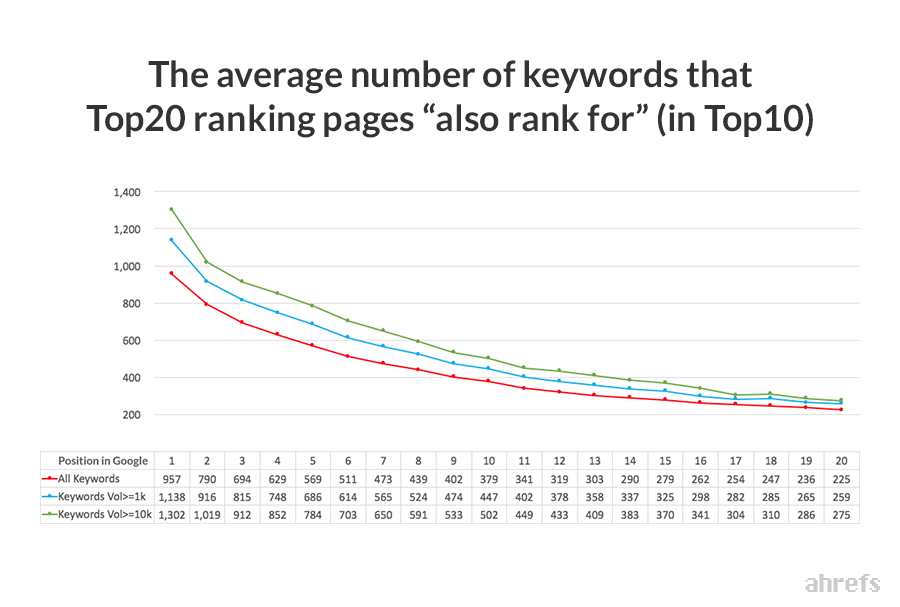
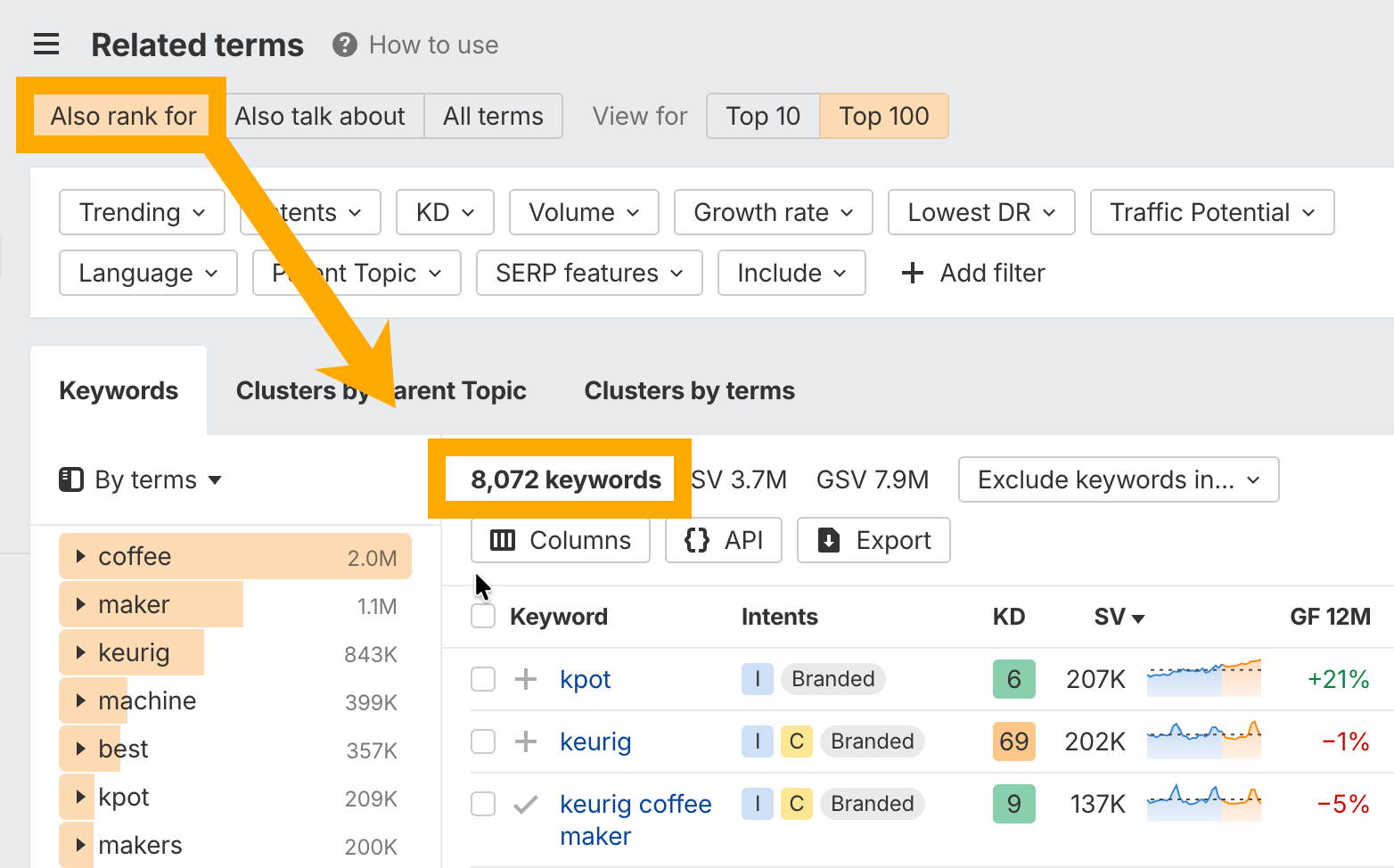
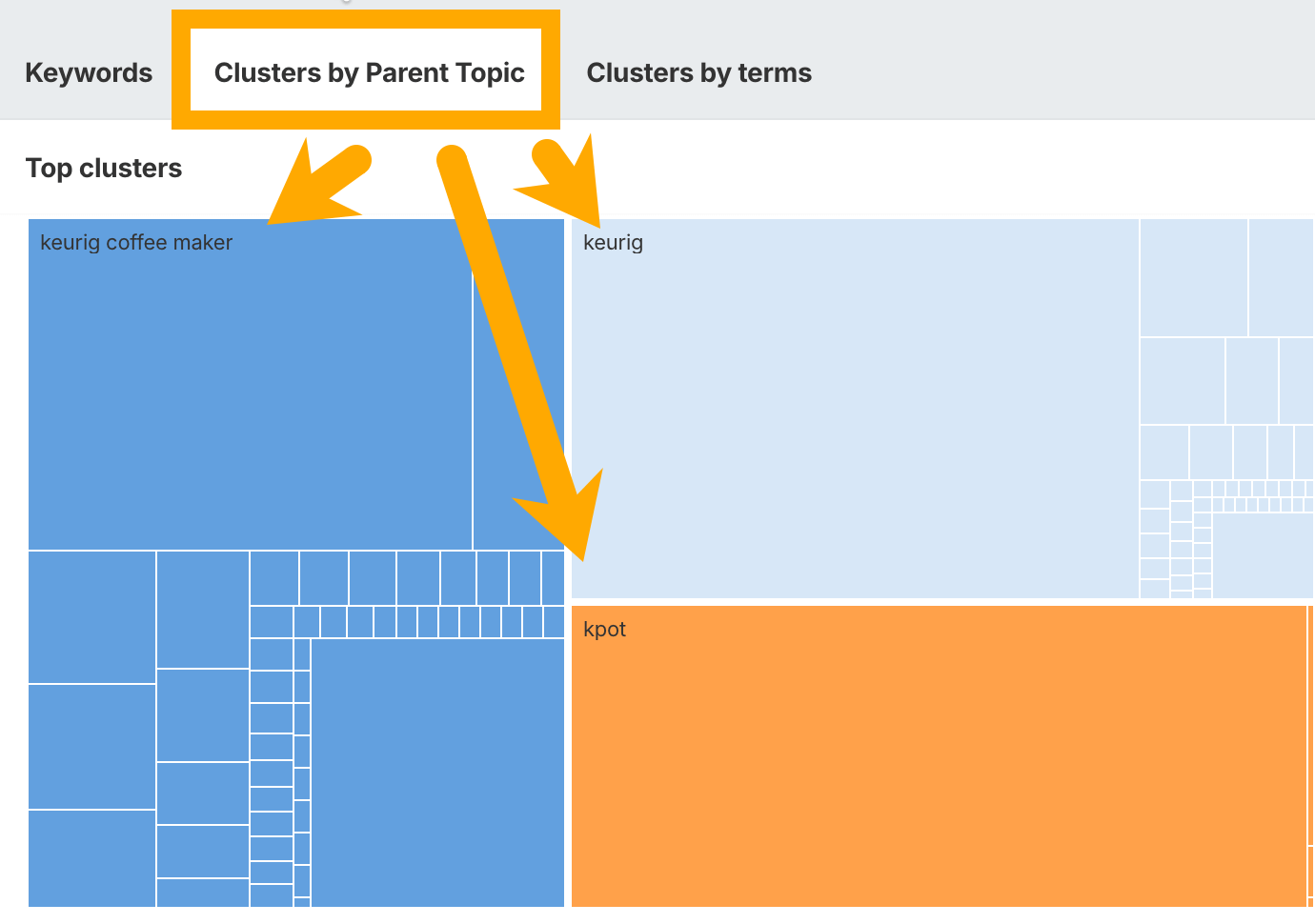
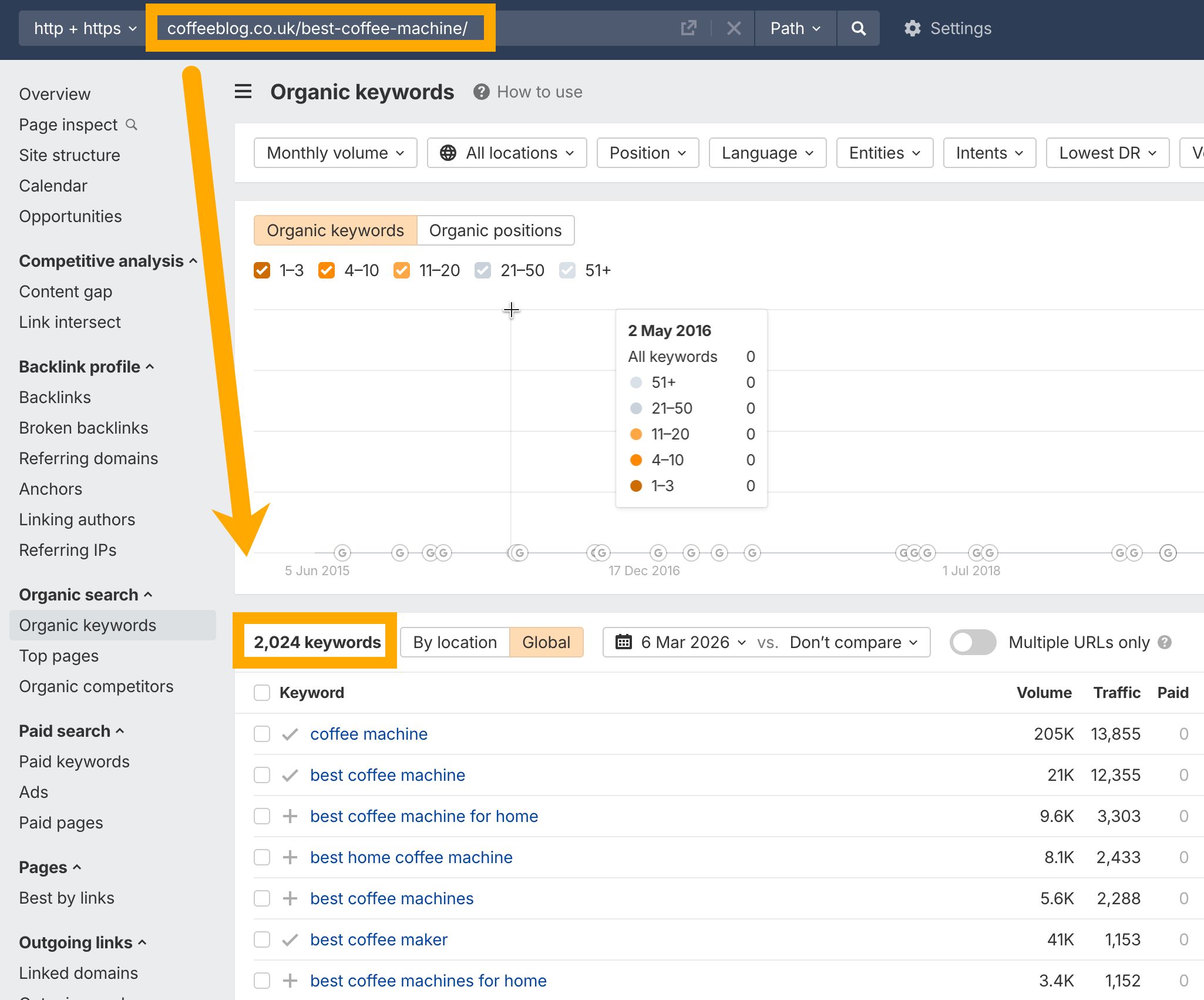
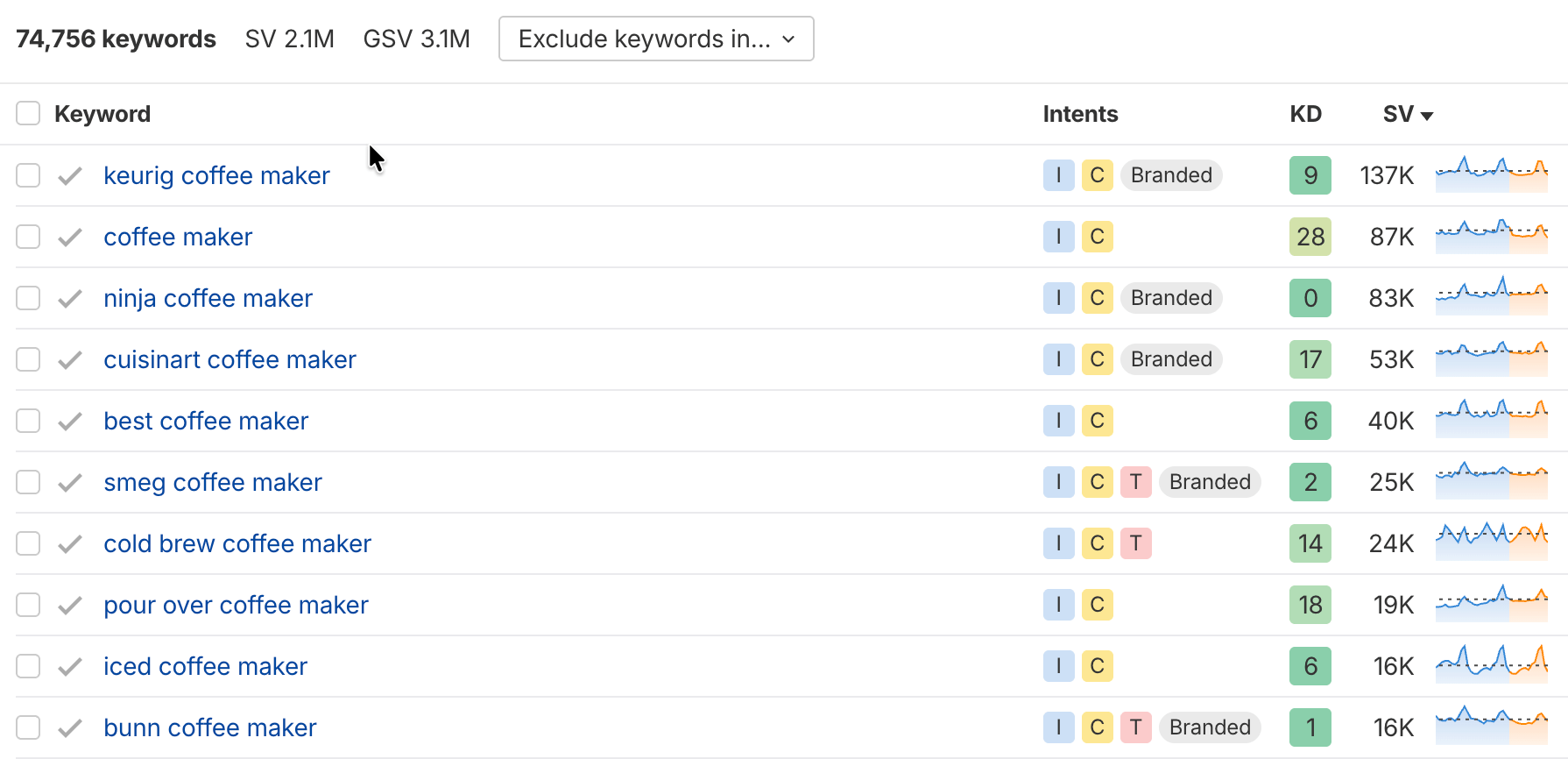
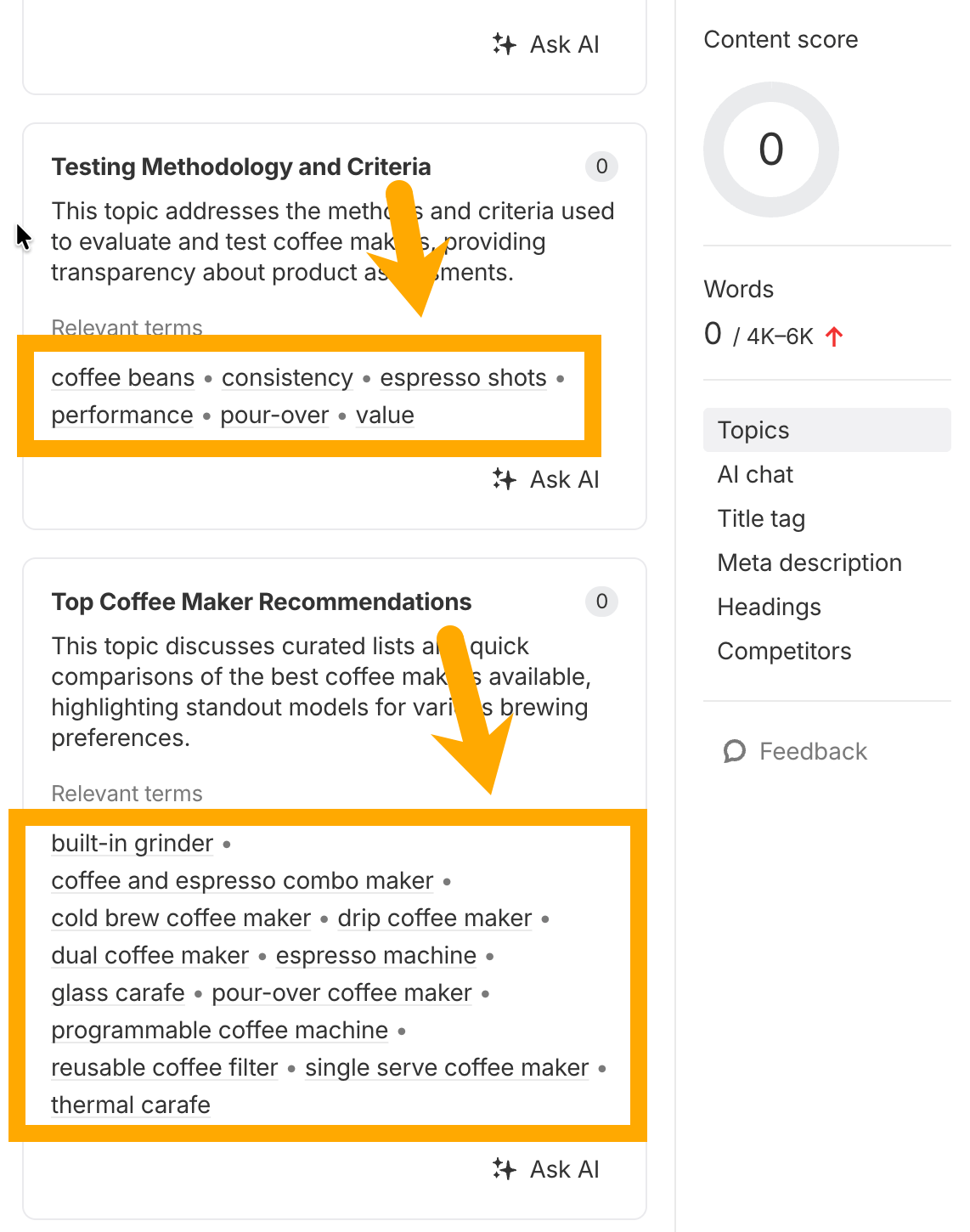
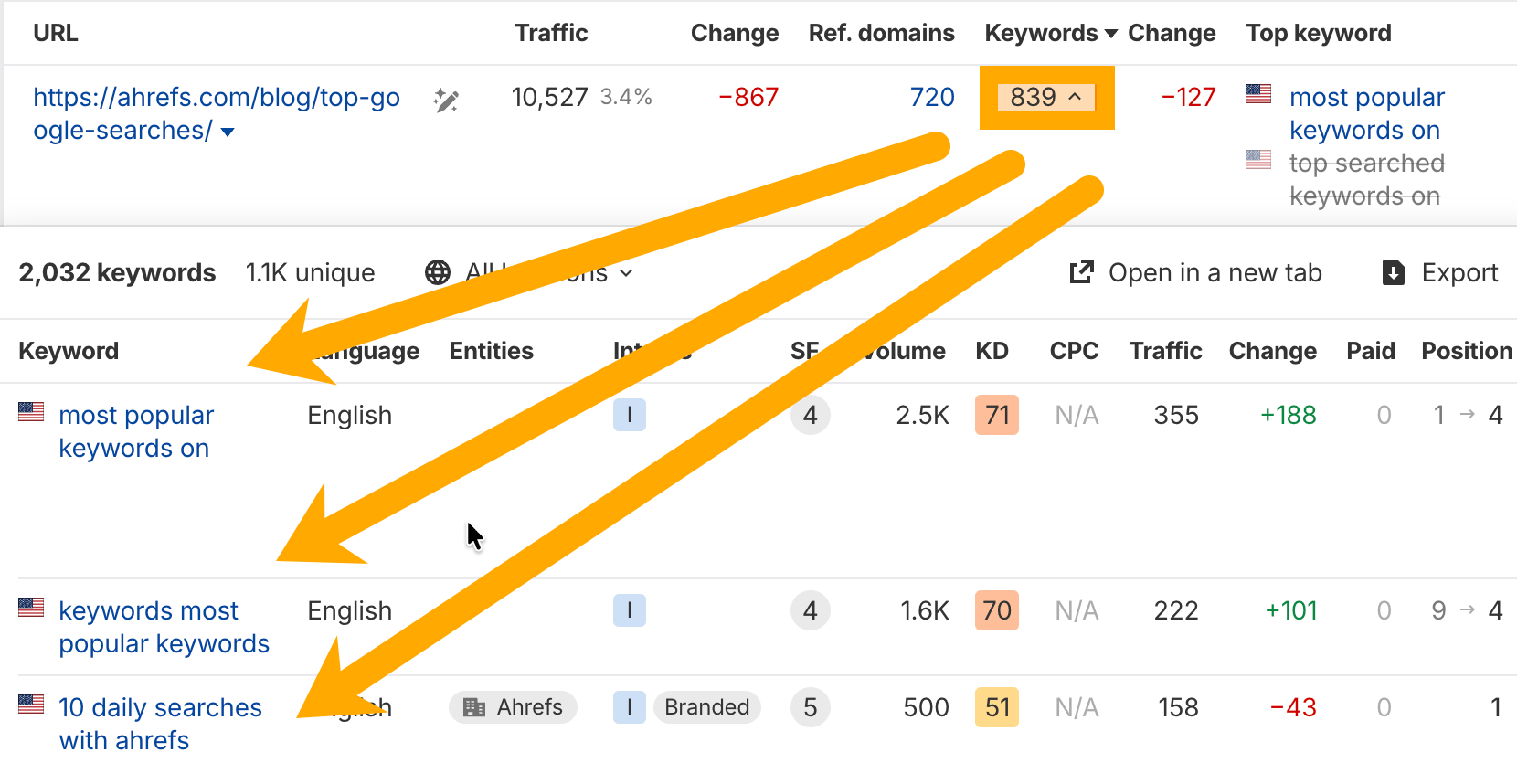
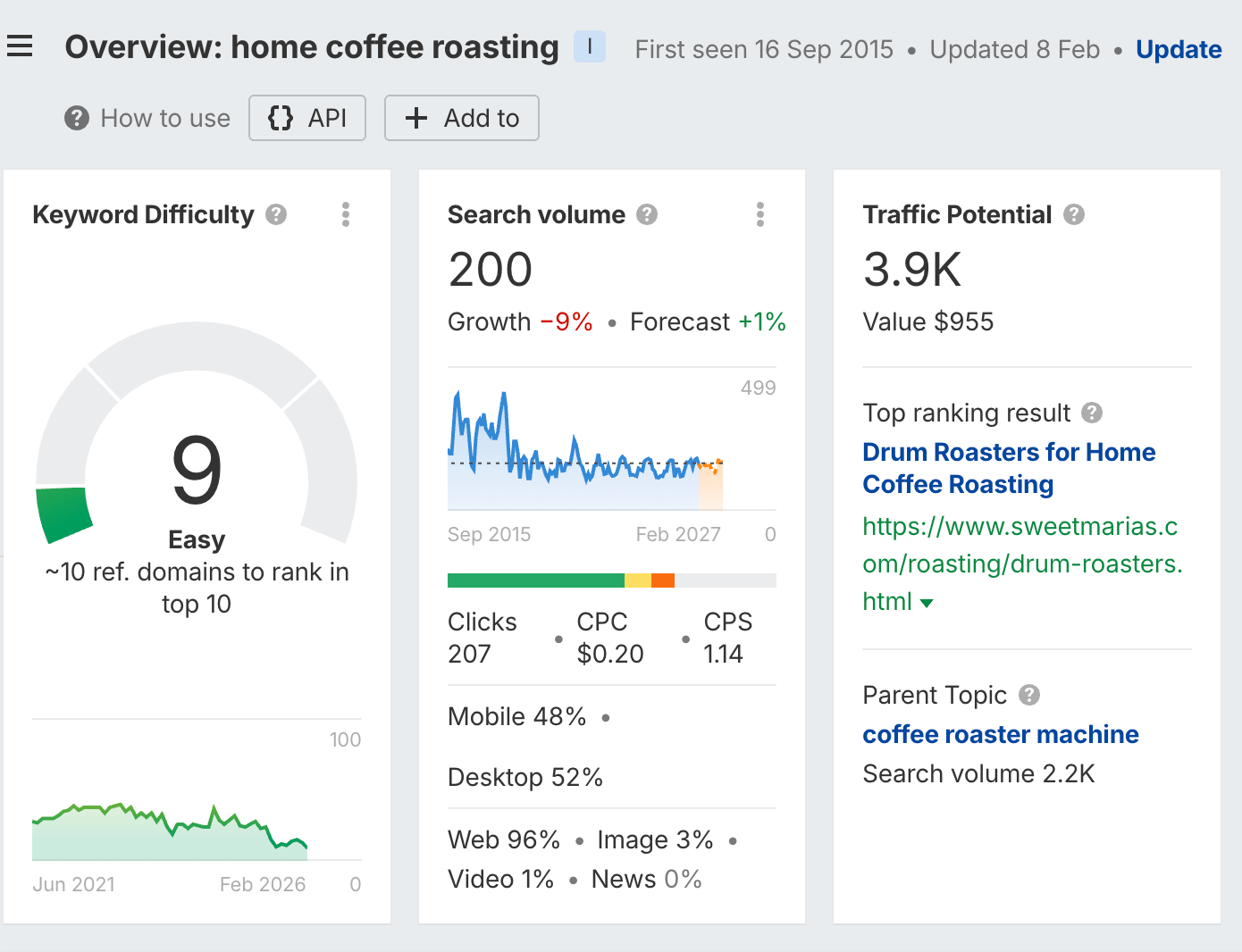
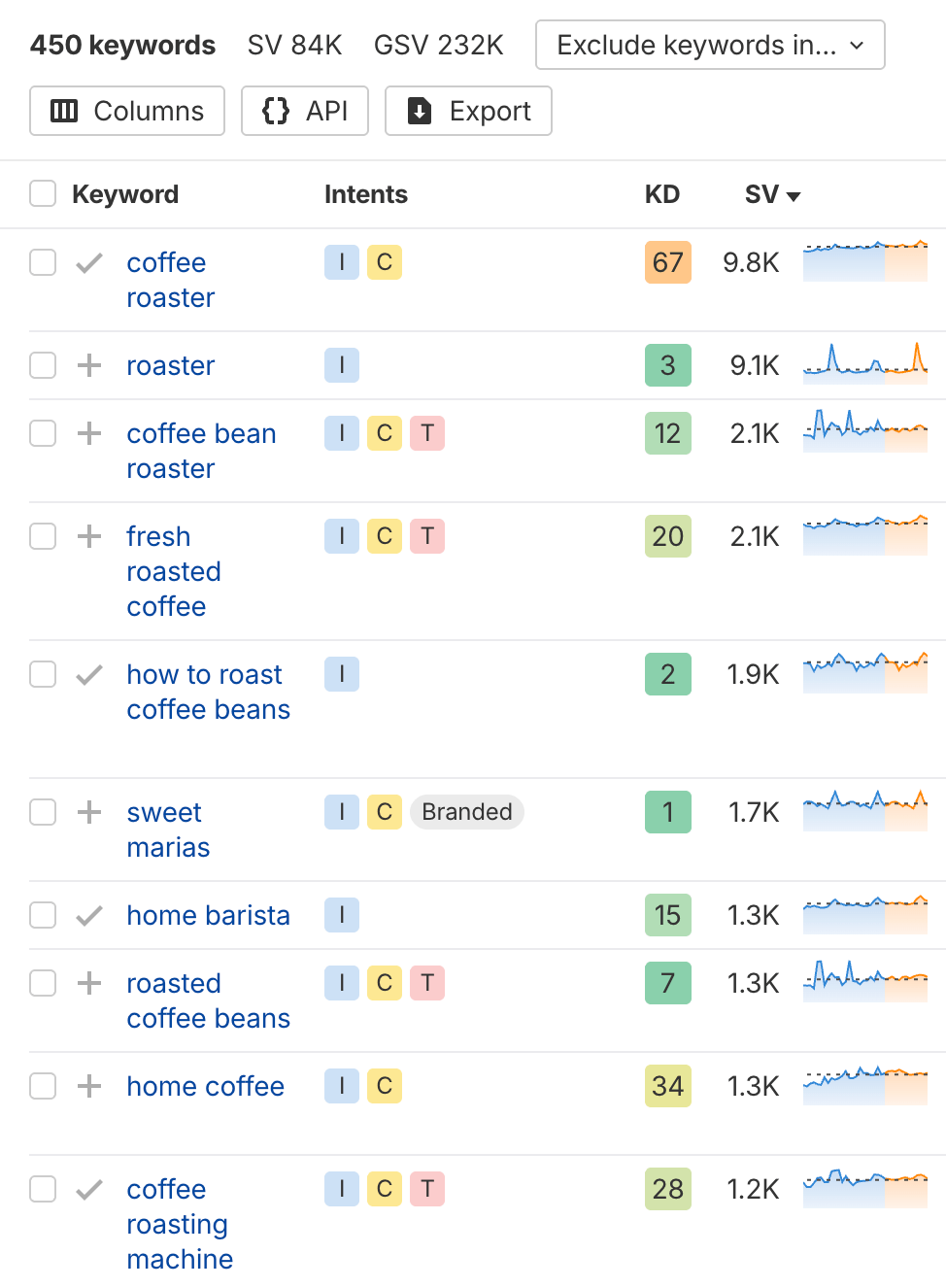
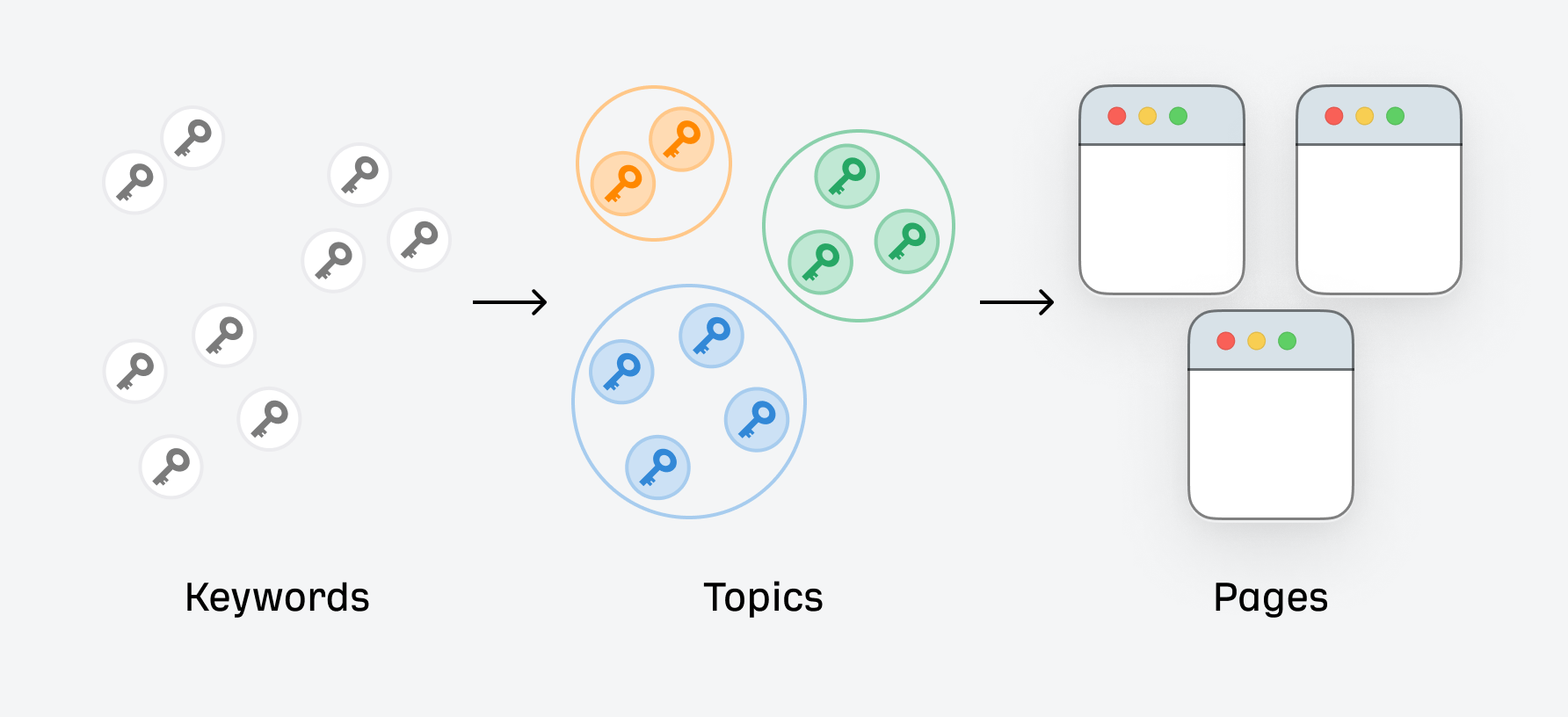
Most pages that rank #1 for a keyword don’t just rank for that one term. They rank for hundreds—sometimes thousands—of related keywords. Secondary keywords are how you capture that extra traffic. They’re the supporting terms that help your page rank for more searches without creating separate content for each variation. In this guide, you’ll learn what secondary keywords are, how to find them, and how to use them to maximize your content’s reach. Secondary keywords are related search terms that support your primary keyword. They share the same search intent but use different phrasing. Your primary keyword is the main term you’re targeting—the one you’d put in your title and URL. Secondary keywords are the variations and related terms you weave throughout your content. Here’s an example. If your primary keyword is “coffee maker,” your secondary keywords might include: These all relate to the same topic. Someone searching for any of these terms is looking for similar content. By covering them naturally in your article, you can rank for all of them with one page. Secondary keywords aren’t the same as long-tail keywords or that surprisingly popular, surprisingly inaccurate term LSI keywords—though there’s overlap. We’ll cover the differences later. For now, just think of secondary keywords as the other ways people search for your topic. Here’s something most people don’t realize: the average #1-ranking page also ranks for nearly 1,000 other keywords: That’s not a typo. A page targeting “how to make cold brew coffee” might also rank for “cold brew ratio,” “cold brew coffee recipe,” “how long to steep cold brew,” and hundreds of other variations. This matters because your total traffic potential is much higher than any single keyword’s search volume suggests. Take a keyword with 1,000 monthly searches. If you rank #1, you might expect around 300 clicks (roughly 30% CTR for position one, if you’re lucky). But if that page also ranks for 50 secondary keywords with their own search volumes, your actual traffic could be 2-3x higher. Sidenote. This is known as Traffic Potential—the total estimated traffic the #1 ranking page gets from all keywords it ranks for. It’s usually a better metric to look at than individual keyword search volume. Secondary keywords also help search engines understand your content’s depth. When your page naturally covers multiple related terms, it signals comprehensive coverage of the topic. There are three main ways to find secondary keywords. Each gives you a different angle on which terms to cover. The easiest way to find secondary keywords is to see what the top-ranking pages already rank for. Tip In Ahrefs’ Keywords Explorer, enter your primary keyword. Then go to Related terms → Also rank for. This report shows keywords that the top 10 ranking pages for your primary keyword also rank for. These are your best secondary keyword candidates because they’re already proven to work together. Keywords Explorer showing the Related terms → Also rank for report for “coffee maker”. You’ll typically see hundreds or thousands of keywords here. To narrow them down: The Parent Topic filter is particularly useful. Keywords with the same Parent Topic are ones Google thinks belong together—meaning you can usually rank for them with a single page. Another approach: find a page that ranks well for your target keyword and see exactly what other keywords it ranks for. Tip Go to Ahrefs’ Site Explorer and paste in the URL of a top-ranking page. Then head to the Organic keywords report. This shows you every keyword that specific page ranks for. Site Explorer → Organic keywords report showing keywords for a competitor URL. Export this list and look for: This is especially useful when you’re updating existing content. Compare what you rank for versus what competitors rank for to find gaps. The Matching terms report in Keywords Explorer takes a different approach. Instead of showing what other pages rank for, it shows keyword variations that contain your seed terms. You have two modes: The Exact match mode shows keywords that include your exact primary keyword. For example, if your seed keyword is “coffee maker”: This report is particularly good for finding question-based keywords. Filter to include “what,” “how,” or “why” to find questions your article should answer. Ahrefs’ AI Content Helper analyzes the top-ranking pages for your keyword and suggests subtopics you should cover. It works by scanning what the current SERP leaders include in their content, then highlighting gaps in your draft. Instead of manually reading through 10 competing articles, you get an AI-generated list of topics and questions that top pages address. To use it: This is especially useful for comprehensive guides where you might miss important angles. The tool essentially reverse-engineers what’s working in search results and tells you what to include. There’s no magic number. The right amount depends on your topic’s depth and the content format. A rough guideline: 3-5 main secondary keywords per article. These are the ones you’ll intentionally target in your subheadings and throughout your content. But if your content is comprehensive, you’ll naturally rank for many more—sometimes dozens or hundreds. Here’s an Ahrefs article ranking for 839 related keywords. Here’s the key insight: don’t count keywords. Focus on topic coverage. Look at what the top-ranking pages rank for. If they rank for 50 keywords, it’s a sign your content should cover the topics those keywords represent. You don’t need to force every keyword into your text—just make sure you’re addressing the same subtopics. The Parent Topic feature helps here. Keywords with the same Parent Topic are usually safe to target together on one page. If a keyword has a different Parent Topic, it might deserve its own article instead. Sidenote. Don’t force keywords where they don’t fit. If a secondary keyword feels awkward or off-topic, skip it. Readers and search engines both notice when content is stuffed with unnatural keyword placements. Once you’ve identified your secondary keywords, here’s where to place them: Importantly, don’t stuff the same term in unnaturally or force keywords into sentences where they don’t fit. Your title should be reserved for your primary keyword, so avoid cramming secondary keywords in there too. And never sacrifice readability just to squeeze in another keyword placement. The goal is natural integration. If someone reads your article aloud, it should sound normal, not like a robot trying to hit a keyword quota. Two terms often get confused with secondary keywords: long-tail keywords and LSI keywords. Here’s how they differ. Long-tail keywords are defined by their search volume and specificity. They’re typically longer phrases with lower search volume but higher specificity. Secondary keywords are defined by their relationship to your primary keyword. They’re terms you target alongside your main keyword. The categories overlap. A secondary keyword can be long-tail (and often is). “Best drip coffee maker under $50” is both a long-tail keyword and a secondary keyword if your primary is “drip coffee maker.” But not all secondary keywords are long-tail. “Coffee machine” has decent volume and isn’t particularly specific—but it’s still a secondary keyword relative to “coffee maker.” Think of it this way: long-tail vs. short-tail is about the keyword itself. Primary vs. secondary is about the keyword’s role in your content strategy. LSI stands for Latent Semantic Indexing—a technique from the 1980s for understanding relationships between terms in documents. In SEO, “LSI keywords” has become a buzzword that usually just means “related keywords.” The problem is that Google doesn’t actually use LSI. It uses much more sophisticated natural language processing. Here’s Google’s John Mueller with a pretty definitive stance on LSI keywords. Secondary keywords are a simpler and more practical concept. Instead of guessing what Google considers semantically related, you look at what pages actually rank for. It’s based on real search data rather than theoretical relationships. Don’t worry about finding “LSI keywords.” Focus on finding keywords that real pages rank for alongside your primary keyword. Here’s how to find secondary keywords for an article about “home coffee roasting.” Step 1: Check the primary keyword in Keywords Explorer I enter “home coffee roasting” and see: That Traffic Potential tells me the top-ranking page gets about 3,900 visits—far greater than the primary keyword’s volume. Those extra visits come from secondary keywords. I click Related terms → Also rank for and see keywords like: Most of these share the same Parent Topic, confirming I can target them together. Based on these secondary keywords, my outline might include: Each secondary keyword naturally becomes a section of the article. I’m not stuffing keywords; I’m letting the search data guide my content structure. When I write each section, I use the keywords where they fit naturally. The H2 for the equipment section doesn’t need to be “Coffee Bean Roaster”—it can be “Choosing a Coffee Bean Roaster.” The keyword appears in the content, not forced into the heading. Once you’re comfortable finding secondary keywords, you can take things further with keyword clustering and mapping. These techniques help you organize keywords at scale and align them with your content strategy. Keyword clustering is the process of grouping related keywords based on search intent and SERP overlap. The idea is simple: if two keywords show similar search results, they likely share the same intent—and you can target them with a single page. For example, these keywords would likely cluster together: They all have informational intent and probably return similar pages in search results. A SERP overlap analysis would confirm this by showing that the same URLs rank for multiple keywords in the cluster. Clustering helps you avoid a common mistake: creating multiple pages targeting keywords that should be on one page. This leads to keyword cannibalization—where your own pages compete against each other in search results. Keyword mapping takes clustering a step further. It’s the process of assigning keyword clusters to specific pages in your content hierarchy. A simple keyword map might look like this: This creates a clear content hierarchy where each page owns a cluster. No overlap, no cannibalization. Keyword mapping also reveals content gaps—clusters you’ve identified but don’t have pages for yet. These become your content roadmap. Here’s a practical workflow: Step 1: Export your keyword list Start with a large list of keywords from the Related terms or Matching terms reports. Export to CSV. Step 2: Use the Clusters view In Keywords Explorer, switch to the Clusters by Parent Topic tab. This groups keywords by their parent topic—a proxy for search intent. Step 3: Create your map For each cluster, decide: Map clusters to URLs in a spreadsheet. This becomes your master cluster map for content planning. Step 4: Check for cannibalization Use Site Explorer to see if multiple pages on your site already rank for the same keywords. If they do, consider consolidating content or adjusting your targeting. Tip Clustering and mapping is most valuable for larger sites with hundreds of pages. If you’re just starting out, focus on finding secondary keywords for individual articles first. You can build toward a full cluster map as your content library grows. Secondary keywords are the related terms that help your page rank for more searches. They’re not extra work—they’re how you maximize the return on content you’re already creating. To find them: The goal isn’t to hit a keyword quota. It’s to understand what topics your content should cover. If you address the same subtopics that successful pages cover, you’ll naturally rank for the same secondary keywords.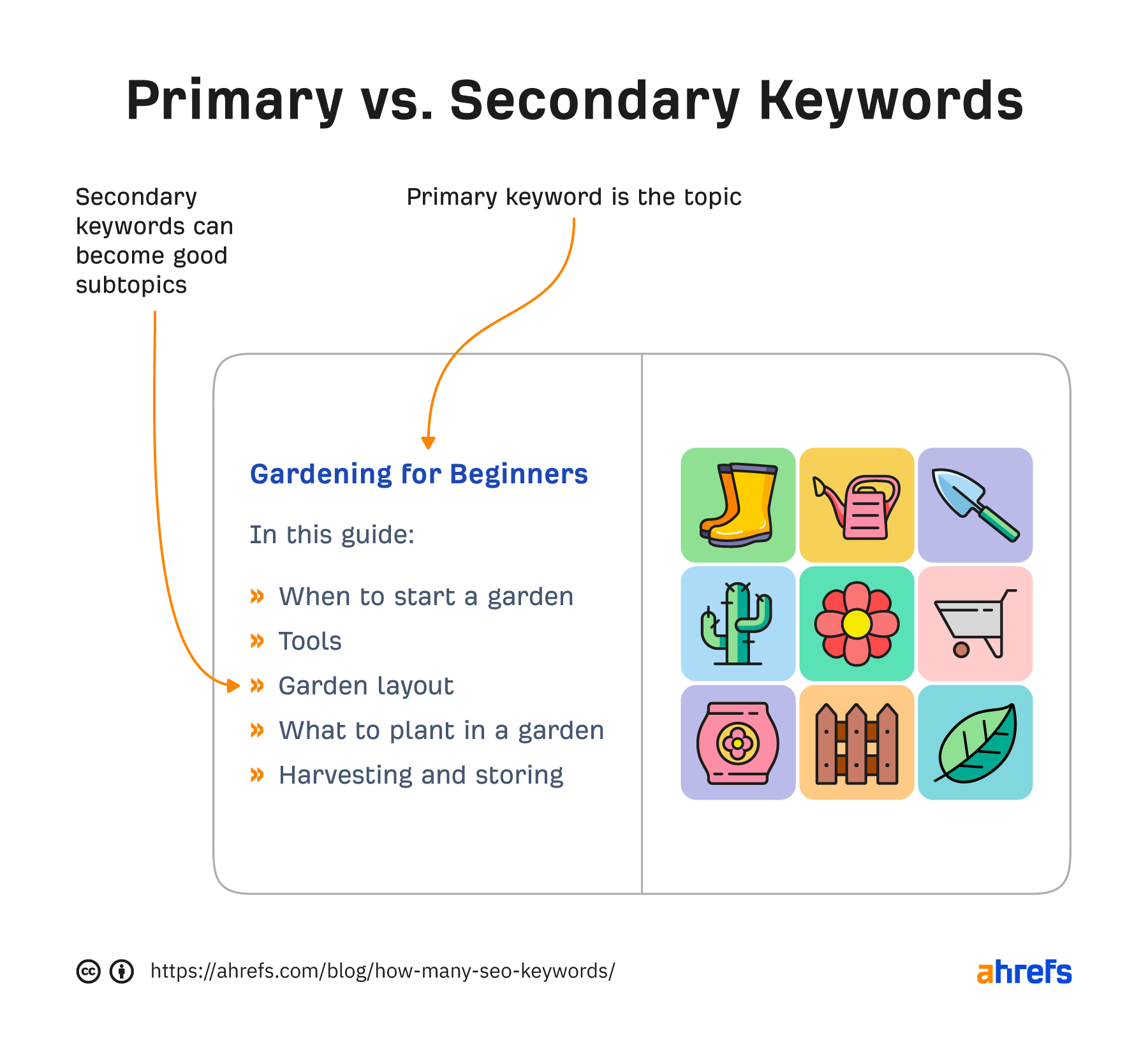
Start with related terms in Keywords Explorer
Check what your competitors rank for
Use the Matching terms report
Use AI Content Helper for subtopic suggestions
Secondary keywords vs. long-tail keywords
Secondary keywords vs. LSI keywords

Step 2: Find secondary keywords via Related terms
Step 3: Map keywords to outline sections
Step 4: Write naturally
What is keyword clustering?
What is keyword mapping?
PagePrimary KeywordSecondary Keywords (Cluster) /espresso-guide/ how to make espresso espresso recipe, espresso brewing, making espresso at home /espresso-machines/ best espresso machine espresso maker, home espresso machine, espresso machine reviews /espresso-vs-coffee/ espresso vs coffee difference between espresso and coffee, is espresso stronger How to cluster and map keywords in Ahrefs





























.jpg&h=630&w=1200&q=100&v=c0f97a310e&c=1)

