Google Chrome could soon let you translate pages right inside Reading Mode
Google is testing a translate button inside Chrome's Reading Mode on Canary, which would translate pages and PDFs without leaving Reading Mode.
 AbJimroe

However, not everyone's seeing it yet, even on Canary.
 Google Chrome
Unsplash
Google Chrome
Unsplash
Chrome‘s Reading Mode just got a new button tucked inside its settings menu. Google is quietly testing a translate option for the feature on Chrome Canary, the browser’s experimental testing channel where new ideas show up long before they’re ready for everyday use.
What does this new translate button actually do?
The option was first spotted by @Leopeva64, who shared a video demo on X highlighting the new button tucked inside Reading Mode’s dropdown menu. It exists alongside the controls for theme, font, images, and links, though it doesn’t actually do anything yet. Once this feature is live, clicking it would translate whatever page or PDF you’re reading into your preferred language, without leaving Reading Mode.
For now, clicking the button does absolutely nothing. Google appears to have added the interface piece first, well before building out the actual translation function behind it. If you need to translate a page today, the existing Google Translate browser extension already covers the same job just fine.
Is it rolling out to everyone on Canary?
Not quite yet, it seems. PiunikaWeb tested this on the latest Chrome Canary build, but the translate button was nowhere to be found. That mismatch suggests Google might be testing this in limited batches rather than pushing it to every Canary user simultaneously, or it could be a platform-specific rollout.
In the last few months, we have seen a bunch of other Chrome upgrades. Google overhauled Reading Mode into a fullscreen, distraction-free view earlier this year, and rolled out vertical tabs alongside it. The company also added split view, PDF annotations, and direct Google Drive saving. Separately, Chrome is working on native lazy loading support for video and audio, a change that could speed up page loads across the board once it ships.

Manisha Priyadarshini is a tech and entertainment writer with over nine years of editorial experience.
Experts find it’s easy to manipulate AI chatbots into coughing up bioweapon recipes
AI’s bioweapon guardrails are easier to crack than you’d hope

AI companies have spent years building safeguards designed to stop their chatbots from helping someone create a biological weapon. The models themselves are becoming so capable that keeping that knowledge behind those barriers is turning into a serious problem.
Researchers at Cisco found they could bypass safeguards on major chatbots including OpenAI’s ChatGPT, Anthropic’s Claude, and Google’s Gemini within five conversational turns, according to a Wall Street Journal investigation. The researchers were able to elicit potentially dangerous answers after gradually steering the conversations around the models’ restrictions. Amy Chang, Cisco’s head of AI threat and security research, told the Journal that no model can be completely protected from a sufficiently persistent user.
Gem Browser imagines an internet where every website is yours to redesign
By generating its own interactive version of a webpage, the experimental browser puts readers in control of the interface and publishers on uncertain ground
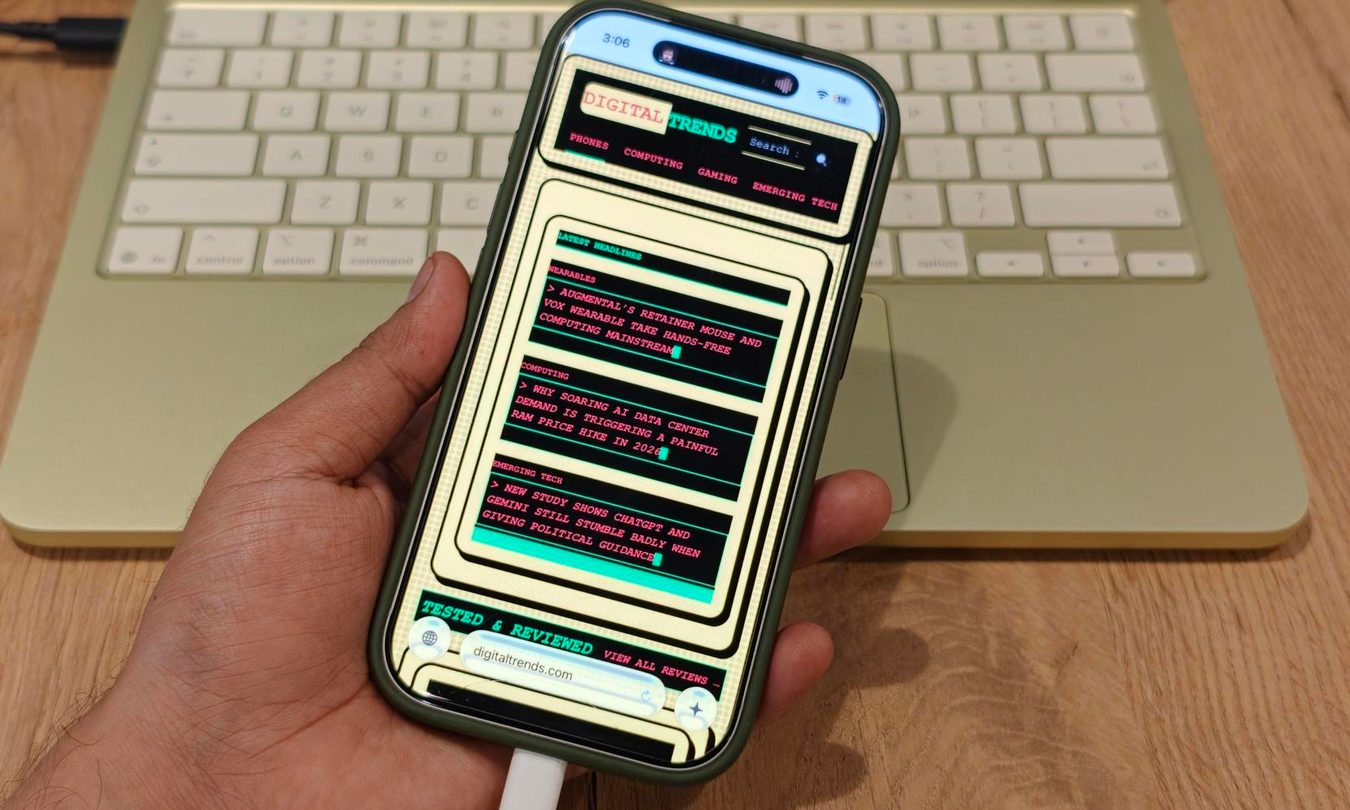
Gem Browser can rebuild an existing webpage around whatever the reader asks for. Google DeepMind designer Vidy Thatte demonstrated the feature in his original announcement, showing how the Apple-only experiment uses Gemini to make a website’s familiar interface optional.
That sounds wonderfully strange if you’ve ever wanted to rearrange the internet to your liking. It’s probably less delightful for whoever built the page being rearranged.
I just found a Mac app that puts volume and brightness sliders on your MacBook’s touchpad edges
Forget the function keys, your trackpad edges do it all now.

Your MacBook has keys to adjust volume and brightness, making it easy to adjust them. But what if you want to adjust the volume at night or you are watching your favorite movie on Netflix and don’t want to hunt for the keys and miss an important moment?
I know these are small annoyances, but small annoyances add up, and I love apps that help me resolve them. Today, I want to share an app that solves this issue by adding volume and brightness sliders to your MacBook’s trackpad.