Meta Description Best Practices for SEO: Tips and Examples for 2026
Key Takeaways You spent time crafting what you thought was a great meta description for your page. You agonized over word choice and character count for what felt like hours, only to have Google ignore it and choose a...
 BigThink

Key Takeaways
Meta descriptions aren’t a direct ranking factor, but they influence click-through rate (CTR), which can affect your SEO success. Google rewrites roughly 70 percent of meta descriptions, but the 30 percent it keeps are your best shot at controlling your search snippet. Google measures snippet length in pixels, not characters. Aim for 150 to 155 characters and front-load the most important information in the first 110. Study top-performing paid ads for your target keyword. Repeated phrases can reveal the benefits and language advertisers believe will attract clicks.You spent time crafting what you thought was a great meta description for your page. You agonized over word choice and character count for what felt like hours, only to have Google ignore it and choose a random sentence from your content to display as the search snippet.
Why?
The short answer is that Google rewrites roughly 70 percent of meta descriptions. A stat like that may have you wondering if it’s even worth writing them on your own.
It is. The 30 percent of descriptions that Google doesn’t rewrite are your best shot at controlling your first impression in search. My team and I have also discovered that the surviving descriptions share a few common traits.
This guide covers those traits, or meta description best practices. I’ll show you what can earn you clicks in 2026, backed by real examples from brands doing it well. By the end, you’ll have a framework you can take to your business immediately.
What Is a Meta Description?
A meta description is a short HTML tag that summarizes the page’s content.
Here’s what it looks like for my blog:
Readers can’t see meta descriptions or title tags for SEO without inspecting the code.
This meta tag’s importance shows up in the snippet on the search engine results page, below the page URL and title.

Its job: to show readers what the page offers and persuade them to click. That’s why people often call it a page’s elevator pitch.
Are Meta Descriptions a Ranking Factor?
The short answer is no. Meta descriptions aren’t a direct ranking factor, and Google has confirmed this explicitly through its search advocate, John Mueller, as well as its own search documentation.
However, many SEOs believe that following meta description best practices can indirectly improve rankings. This is based on the assumptions that:
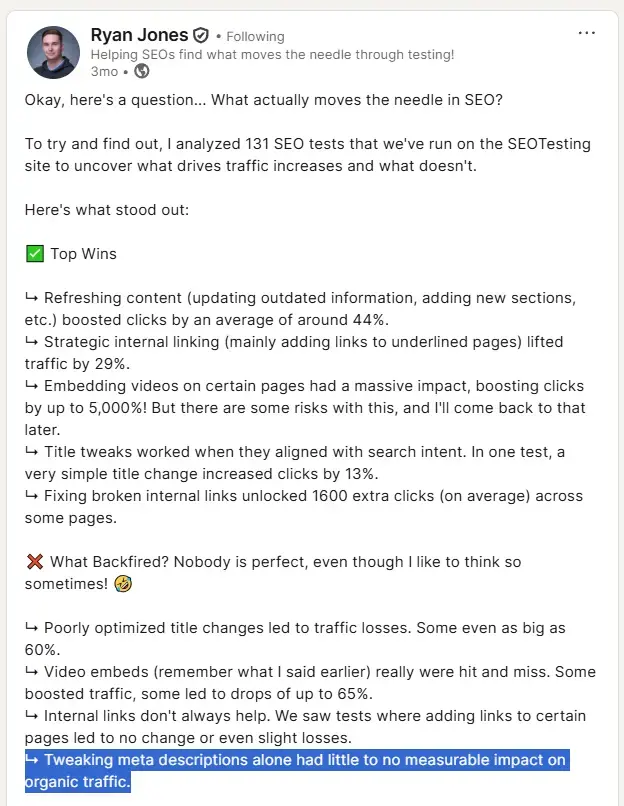
Compelling meta descriptions improve click-through rates (CTRs). CTRs are a user signal that Google considers when ranking pages. More people clicking on your page signals to Google that it satisfies their search intent. Well-written meta descriptions improve the user experience. They show readers what they can find on the page and help them decide if they want to visit it. If they do, they’re less likely to bounce, and bounce rates are a quality signal for Google.That all sounds logical, but no recent large-scale studies confirm the positive impact of meta descriptions on CTR or traffic. Experiments conducted by SEOTesting indicated that optimizing meta descriptions had little effect on traffic, and a case study by SearchPilot showed that removing them improved CTRs.
So why write them at all?
When Google does use your description, a well-written one that follows meta description best practices for SEO gives you real control over your snippet. Google will use your description when it “describes your page better than other parts of the content.”
A strong meta description can also influence how your page appears on social media. Platforms like Facebook and LinkedIn use a protocol called Open Graph (OG) tags to pull in a page’s title, description, and preview image when someone shares a link.
Without Open Graph tags, Meta’s crawler falls back on its own heuristics to formulate its best guess as to what your page is about based on its title and description.
So, while your description might not be a literal ranking signal, it’s still important.
Meta Description Best Practices
These meta description best practices for 2026 give you the best chance of controlling how Google (and internet users at large) view your content.
1. Match Search Intent
Your meta description must reflect the search intent. In other words, spell out what need it satisfies or the problem that it solves.
For example, the article ranking No. 1 for “keto diet” has a definition of the diet and a brief explanation of how it works because the keyword has informational intent, and that’s the kind of information users are after.

In contrast, the meta description for the homepage of Next, the UK retailer, aligns with the transactional/navigational intent. Anyone looking for “Next” is likely shopping, so “Shop the latest women’s, men’s and children’s fashion…” nails it.

An effective meta description should accurately summarize the page’s content and tell potential readers what they can find in the article, helping them decide whether it’s relevant.
That’s what the meta description for the BBC Gardeners World Magazine article on how to build a garden pergola does. It tells them what the article includes (advice and ideas) and how it’s structured (as a list).

Inaccurate or misleading meta descriptions backfire. If the reader expects something else from the page, they bounce. This hurts the page rankings by signaling to Google that the page isn’t relevant.
2. Stay Within the Character Limit (and Front-Load)
Google measures snippet length in pixels, not characters. A wide letter like “W” takes up more room than a narrow one like “i,” which means two descriptions with the same character count can render differently in the search engine results pages (SERPs).
Google cuts off the snippet at 960 pixels on desktop and 680 pixels on mobile. That’s roughly 150-155 and 110-130 characters, respectively.
It’s critical to use the character limits you have wisely.
Start by front-loading the most important information in the first 110 characters. The first line of your description needs to earn the click, whether your reader is on mobile or desktop.
If you’re posting time-sensitive content, such as rankings pages and annual guides, be sure to leave yourself room to add the current year or month to your description. It signals freshness to searchers scanning results and gives you a slight edge over stale-looking competitors.
Writing tools like NEURONWriter feature snippet simulators that let you preview your description as you edit, so it stays packed with information without overflowing.
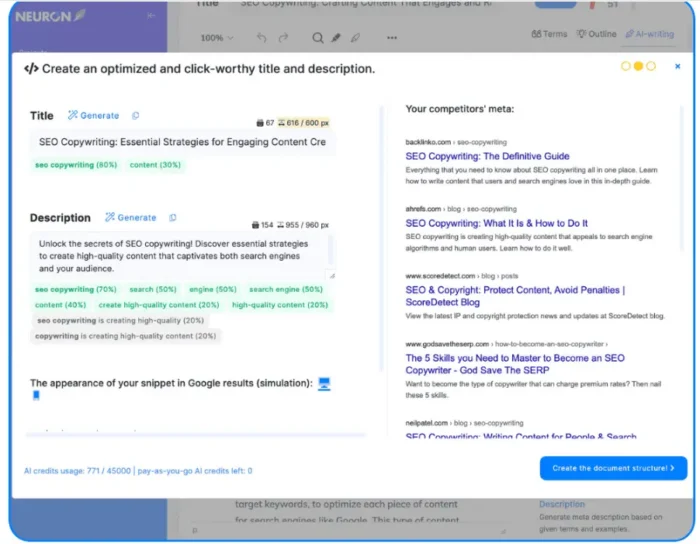
Source: https://neuronwriter.com/features/
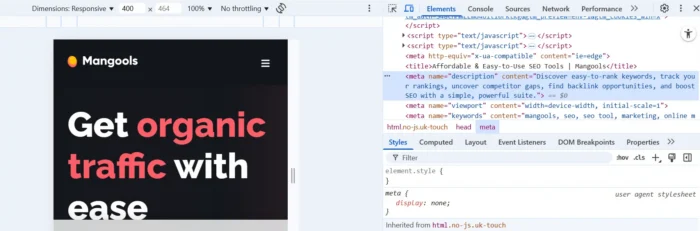
Mangools also has a snippet simulator, or you can use your browser’s DevTools. Open a SERP result and right-click to inspect its source code. You’ll be able to locate the meta description within the HTML, as I have below, and make any necessary changes.
3. Include the Target Keyword Naturally
Including target keywords in your meta description is another way to signal relevance and help it stand out.
How so?
Google bolds words and phrases related to the user query in the snippet.
For example, when I searched for “climbing shoes,” it returned multiple results with the keyword in bold, including the one from the Rock+Run product category page.
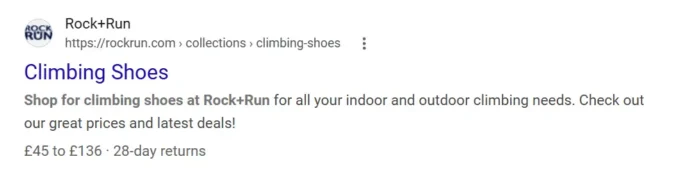
Do embed the keywords naturally, though.
Keyword stuffing makes no sense because meta descriptions aren’t a ranking factor, and Google considers it a spammy practice that will most likely result in a replaced description.
That replacement is actually to your benefit, since keyword stuffing makes copy hard to follow and hurts user experience, which can damage brand perception.
4. Write a Specific, Benefit-Driven Description
To win searchers’ clicks, you have to show them what they will gain. The way you frame that gain depends on the type of page.
A user searching for a blog post or a guide has informational intent (Google calls these Know queries). They’re looking for information, so state what they will learn.
Users looking to buy something have transactional intent (Google calls these Do queries), so lead with your product or service’s value proposition in the meta descriptions of your product or category pages.
The meta description for the guide to fitting kitchen worktops is an example of targeting informational intent because it shows the reader how to install it themselves without hiring a professional fitter.

Slack’s meta description is a perfect example of transactional intent. It explains exactly what the product is and sells the value propositions of saving time and boosting productivity.

Source: https://slack.com/
5. Use an Active Verb or Call to Action (CTA)
An effective meta description drives user action through a compelling CTA. Data tells us that emotional meta descriptions earn a higher click-through rate than neutral ones, but it’s important not to be overly sensational.
Depending on your content, your CTA might be “visit to learn” for a blog, “start free trial now” for a software product page, or “Explore our lineup,” as in the Jeep example below.
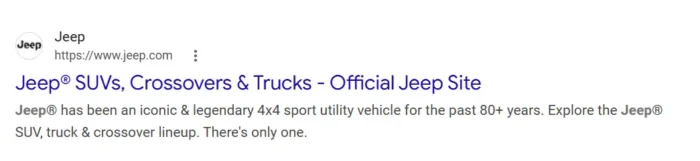
The Jeep meta description uses emotional trigger words like “iconic” and “legendary” to pull readers into the lore and Americana of the Jeep brand. Inviting the reader to explore their vehicle lineup at the end is a powerful CTA and a nice touch.
6. Make It Stand Out
Standout meta descriptions catch user attention and stop them from scrolling past.
You can achieve this with:
Eye-catching phrases Sensory descriptions Rhythms and rhymes Alliterations Witty puns, jokes, and idioms (like in the Oatly example below: “A site filled with everything you could possible (sic) think of, and also probably not think of, related to an oat drink company called Oatly.”)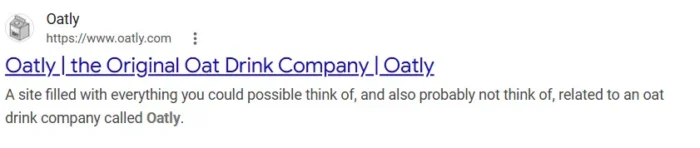
Beware of clickbait, though.
Sensational wording, contrarian opinions, or half-truths. These might be fine for certain sectors, like celebrity news sites, but they won’t cut it in ecommerce or SaaS.
Likewise, spammy claims like “best in the world” don’t inspire confidence, while misleading and overpromising can come back to bite you: users won’t get what they expect and will bounce.
7. Match Your Brand Voice
Whatever the vibe of your home or product pages, match it in the meta descriptions. Nail it, and you’ll build brand recognition. Get it wrong, and you’ll undermine visitor trust.
For example, Naked Coffee’s home page tag perfectly mirrors the tone of its site and social media content.

Its meta description doesn’t waste any characters on generic sales copy or keyword stuffing. Instead, it reads like tasting notes, with sensory language about lime, honey, and black tea that walks you through the flavor profile of their coffee.
That’s the same artisanal, product-first voice you’ll find on their website and social channels.
8. Write Unique Descriptions for Every Page
Google recommends writing unique meta descriptions to differentiate pages.
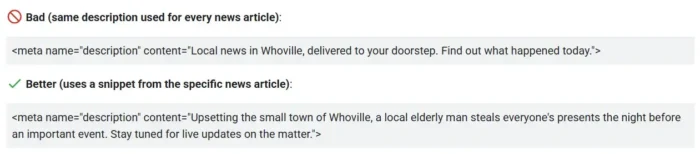
Source: https://developers.google.com/search/docs/appearance/snippet
For large sites, prioritize unique descriptions for high-traffic pages first. Automated descriptions are acceptable for long tail or regional page variations, but unique pages or cornerstone content deserve human-written descriptions.
Just know that Google’s spam policies define scaled content abuse as generating pages at scale primarily to manipulate rankings, so automation should always serve the user, not just the algorithm.
Automated production can also lead to duplicate meta descriptions, which confuse readers and don’t help them choose the right page.
They also signal that you may not care much about the user experience (read “you’re lazy”).
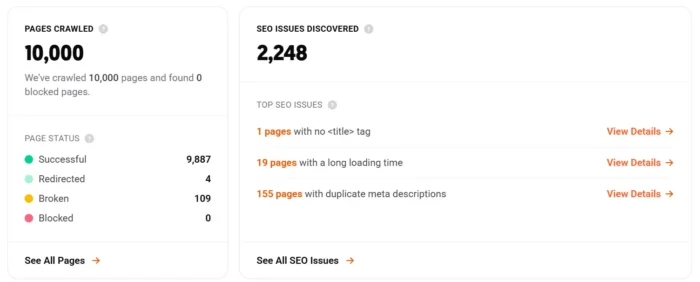
You can quickly identify meta description issues, such as duplicates, by running the SEO Audit with Ubersuggest.
9. Learn from Paid Search
Paid search ads are a free research library sitting at the top of every SERP.
Advertisers running commercial keywords have already tested their ad elements against real-world click data, and Google rewards those that perform well with better placement.
Search your target keyword in Google and scan the ads that appear for phrases that multiple advertisers converge on. You can see how the legal pages below both land on language around a free consultation.
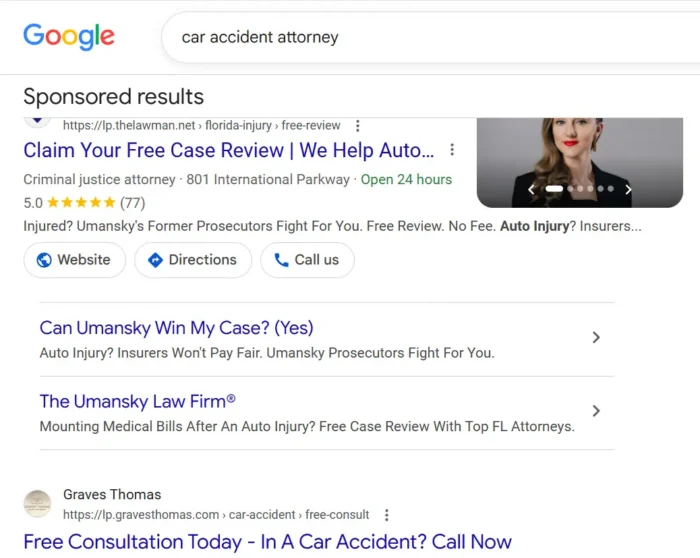
When competing brands independently land on similar wording, that language is almost certainly earning clicks.
Take the strongest phrases as inspiration for your own meta description. Don’t copy verbatim, but treat ad copy as a research source the same way you’d study top-ranking organic descriptions.
This works especially well for transactional-intent pages (product and service pages) where paid competition is heaviest, and advertisers have the strongest incentive to test and refine their copy.
10. Use a Formula (Then Adapt It)
Using a repeatable structure is one of the best tips for writing meta descriptions across dozens or hundreds of pages. It will help you save time and maintain consistent quality. A fill-in-the-blank formula gives you a reliable starting point without making every description sound templated.
Here’s a general-purpose formula that works for most pages:
[What the page delivers] + [Why it matters to the reader] + [Call to action]Two variations for common page types:
Product page: [Product name]. [Key benefit]. [Supporting detail or proof point]. [CTA]. Service page: Find out how [company or service] helps [target audience] [achieve outcome]. [Brief differentiator].Formulas are starting points, but don’t treat them as finished copy. Once the structure is in place, rewrite the description in your brand voice, tighten the phrasing, and make sure it doesn’t read like 50 other pages on your site.
How to Write Meta Descriptions at Scale
For large websites with hundreds or thousands of pages, writing meta descriptions manually isn’t always feasible.
The solution?
Write them manually for mission-critical pages, such as your homepage, category pages, or top-converting product pages. Using Google Search Console might be the fastest way to audit your pages and find missing meta descriptions at scale before you start writing.
Once those pages are handled, you can generate the rest automatically, using:
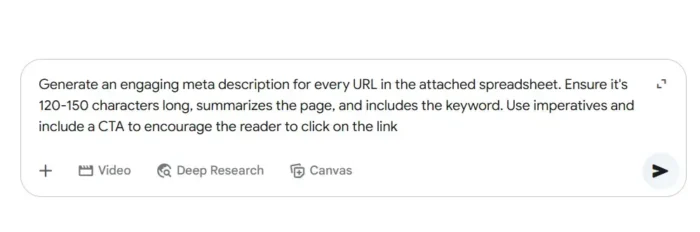
Programmatic SEO: Create content from templates using data from structured databases or spreadsheets. Setting it up requires a certain level of technical expertise, but once done, you can generate thousands of meta descriptions within minutes. AI chatbots: Build a spreadsheet with all your pages, for example, by downloading it from the SEO tool, and prompt ChatGPT, Claude, or Gemini to create the descriptions. Make sure to provide all the details, like the desired length and what it should include. The downside is that you still need to import these to your content management system (CMS) (see the screenshot below). CMS plugins: Install a plugin like SOOZ – AI for SEO (WordPress) or Metagen (Shopify) to generate meta in bulk. You can do it either with AI or by inserting variables, such as the page title or product name.You can also lean on AI-assisted drafting for individual pages. Feed your AI tool the page’s content and ask for three to five description variations. Choose the best one and rewrite it in your brand’s voice.
The rewrite step is a critical part of SEO meta description best practices, since it’s what makes your description sound human and specific.
FAQs
Are meta descriptions a ranking factor?
No. Google has confirmed that meta descriptions don’t directly affect rankings. Well-written ones can improve CTR, though.
How long should a meta description be?
Google measures snippet length in pixels, not characters, but a safe rule of thumb is 150-155 characters. That maps to Google’s cutoff of roughly 960 pixels on desktop and 680 pixels on mobile. Front-load the most important information in the first 110 characters so mobile users see it before the truncation point.
What makes a good meta description?
A good meta description matches search intent and gives the reader a specific reason to click your result over the others. The tips in this guide will help you do exactly that, or, for more on writing copy that earns clicks, see our guide to SEO copywriting.
Should I worry if Google rewrites my Meta description?
Not really. Google rewrites descriptions when it finds text on your page that better matches a specific query. That’s not a penalty. Still write strong ones, though. That way, you have a shot at the roughly 30 percent Google keeps as is.
Conclusion
Meta descriptions may not be a direct ranking signal, but that doesn’t mean they’re not important. A well-written one that follows meta description best practices is the most direct control you’ll have over the first impression your page makes in search.
Writing meta descriptions well costs little and gives up nothing.
However, if you don’t provide a meta description, you voluntarily surrender control over how users see your page in SERPs. That could mean missed opportunities to attract users and shape your brand image online.
That’s why writing meta descriptions is still one of the core best practices for traditional SEO.
Meta descriptions are also increasingly important for answer engine optimization (AEO). AI-powered search tools like Google’s AI Overviews and ChatGPT still crawl and reference page metadata when deciding which sources to surface. Industry research suggests that these systems treat meta descriptions as machine-readable summaries that help determine whether your page is the right source to cite.
Let’s start getting your on-page SEO on point today. Contact my team at NP Digital for an on-page SEO audit, or check out our on-page SEO cheat sheet to tackle it yourself.