Best Marketo alternatives worth evaluating in 2026
Adobe Marketo Engage has long been the go-to for enterprise demand generation teams. But over the past few years, a growing number of marketing operations leaders have started asking a harder question: Is Marketo actually the best tool for...
 ShanonG

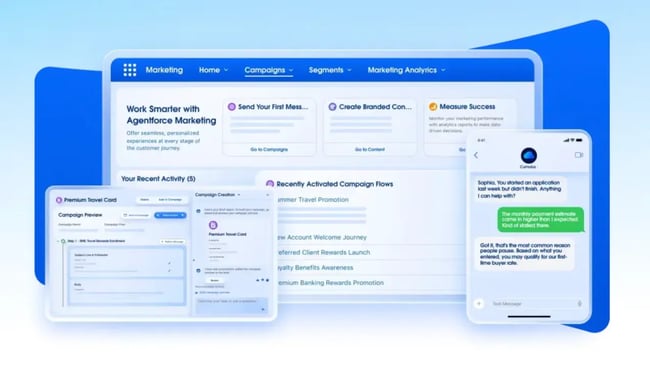
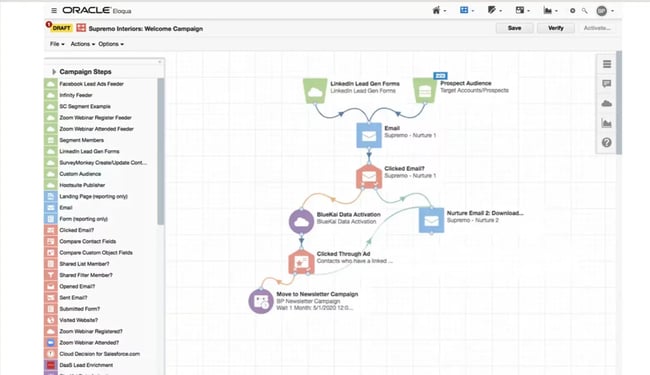
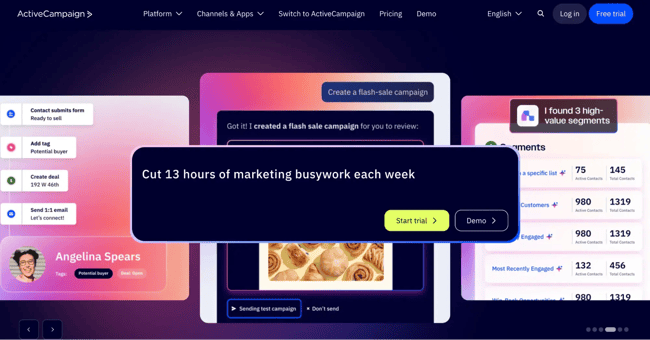
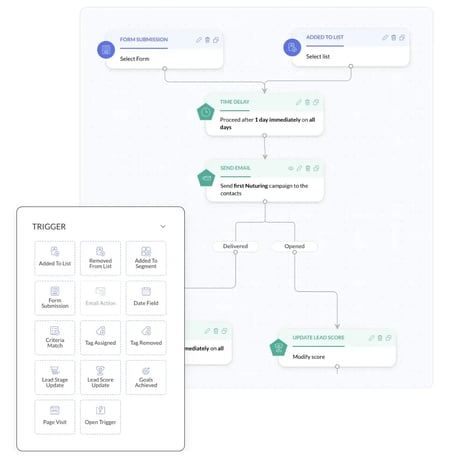
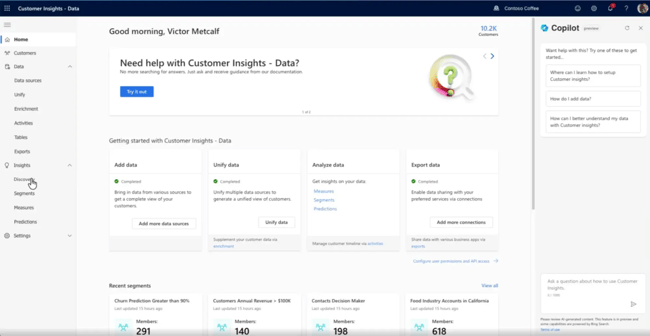
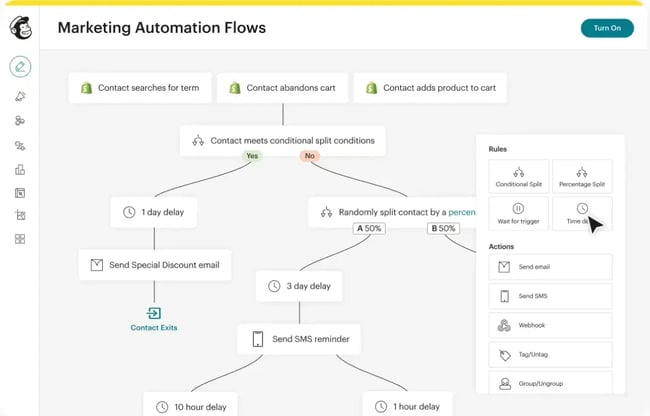
Adobe Marketo Engage has long been the go-to for enterprise demand generation teams. But over the past few years, a growing number of marketing operations leaders have started asking a harder question: Is Marketo actually the best tool for us, or are there Marketo alternatives we should be aware of? Marketing automation has never been more essential. As of 2026, almost half of marketers report leveraging automation to make marketing processes more efficient, and the competition for platform market share has never been more intense. This guide breaks down the top platforms worth evaluating, such as HubSpot’s Marketing Hub and Smart CRM, what to look for during the decision process, and how to migrate without losing momentum. Table of Contents Why Marketers Are Switching from Marketo Now Adobe Marketo Engage is a powerful B2B marketing automation platform built for enterprise-scale demand generation. It supports lead nurturing, email marketing, account-based marketing (ABM), revenue attribution, and CRM integration. It’s been a category standard for over a decade. Primary buyers of Marketo alternatives include B2B marketing leaders, RevOps leaders, and agency principals. So why are teams leaving? There are a few reasons: Marketo’s licensing fees are just the starting point. The total cost of ownership includes license fees, services, admin time, integrations, training, and add-ons. Factor in implementation services, and the real cost of running Marketo often comes as a surprise. Marketo is not a platform most marketers can run independently. Many organizations end up relying on a Marketo-certified admin or a consulting firm just to build campaigns and maintain workflows. That dependency slows execution and adds to operational cost. Marketo integrates with Salesforce, but “integrates with” is not the same as “unified with.” Many teams report data sync delays, inconsistent lead records, and friction in the handoff between the marketing stack and CRM — exactly the problems a modern revenue team can’t afford. Implementation timelines for Marketo routinely run three to six months before teams are fully operational. That window is too long for companies that need pipeline yesterday. Platforms like Marketing Hub and Smart CRM address each of these gaps. HubSpot’s tools have a unified architecture that connects marketing automation and CRM in one system, a visual workflow builder that doesn’t require technical expertise, and onboarding timelines measured in weeks, not quarters. Platform Best For Key Features CRM Integration Starting Price Tradeoffs HubSpot Marketing Hub + Smart CRM Teams wanting unified CRM + marketing automation AI workflows, lead scoring, multi-touch attribution, journey orchestration Native, unified Free tier; Professional plan: $800/mo Scales with contact volume Salesforce Marketing Cloud Account Engagement (Pardot) Existing Salesforce customers Lead scoring, Salesforce-native sync, engagement programs Native (Salesforce only) Starter plan: $25/month Requires Salesforce; limited outside that ecosystem Oracle Eloqua Large enterprise, complex multi-touch programs Advanced segmentation, ABM, global scale Integrates with major CRMs Custom pricing Complex to implement; high cost ActiveCampaign SMBs and mid-market teams Email automation, CRM, segmentation Built-in CRM From $15/mo Lighter on enterprise features Zoho Marketing Automation Budget-conscious teams in the Zoho ecosystem Email, landing pages, lead scoring Native Zoho CRM From $15/mo Best within Zoho stack Microsoft Dynamics 365 Marketing Microsoft-stack organizations Event marketing, B2B journeys, Copilot AI Native Dynamics 365 From $1,700.00/mo Complex licensing; IT-heavy implementation Mailchimp Small teams, early-stage companies Email, automation, audience management Basic integrations Free tier; paid from $13/mo Not built for complex B2B demand gen Buyers evaluating Marketo alternatives need a curated shortlist matched to team size, stack, and use case. AI features matter too: Marketo alternatives’ AI features include predictive scoring, content generation, send-time optimization, summarization, and analytics insights. To get a better idea of the best marketing automation platform alternatives available today, I asked Siddharth Deswal, Founder of Enfra and AI-powered SEO/GEO platform builder, for his firsthand take. Deswal brings 14 years of experience as a marketing leader and has hands-on experience across the full range of marketing automation platforms, making him well-positioned to cut through the marketing and speak to what these tools actually deliver in practice. HubSpot is the most complete alternative to Marketo on this list — not just because of feature depth, but because of how those features fit together. HubSpot was built as a unified system from the ground up, eliminating the need for Marketo’s separate CRM and complex integration layer. A unified CRM and marketing platform, such as HubSpot, reduces data silos across marketing, sales, and service. HubSpot’s Marketing Automation uses a visual workflow builder that marketing teams can operate without technical expertise. Build lead nurture sequences, trigger-based campaigns, and multi-step automation using a drag-and-drop editor — no developer required, no custom code, no waiting on IT. Compared to Marketo’s automation builder, which has a steeper learning curve and often requires admin involvement for anything beyond basic sequences, HubSpot’s approach puts control back in the hands of the marketing team. Best for: Demand gen teams that want enterprise-grade automation without the enterprise-grade complexity. Customer Journey Orchestration enables end-to-end automation across email, social, and messaging channels with real-time CRM data triggering each step. No stitching together separate tools or waiting for data to sync between systems. When a contact’s status changes in the CRM, the journey adapts immediately. Pro tip: Map your current Marketo program logic to HubSpot journeys before migration. The visual canvas makes it easy to spot consolidation opportunities. Many teams find they can simplify their automation significantly in the process. HubSpot’s Lead Scoring uses AI-assisted fit and engagement scoring to automatically prioritize the best leads based on behavior and ICP data. Scores surface directly in the CRM, so marketing and sales always work from the same qualified list, not two separate views of the same contact. What I like: Lead scoring in Marketo often requires significant configuration and ongoing maintenance to stay accurate. HubSpot’s AI-assisted scoring adapts over time, which reduces the manual overhead considerably. Advanced Marketing Reporting provides multi-touch revenue attribution and customer journey analytics so marketing teams can prove which campaigns drive closed revenue, without the custom reporting setup Marketo typically requires. The data lives natively in the platform, which means no exports, no middleware, and no reconciliation between systems. Best for: Revenue teams that need to demonstrate marketing’s impact on pipeline without building custom reporting infrastructure. Marketing Studio brings campaign planning, content creation, and execution into one AI-powered workspace. For teams that currently juggle Marketo alongside separate content tools, briefing docs, and project management platforms, this consolidation reduces the coordination overhead that slows campaigns down. AI-Powered Emails automates personalized 1:1 email content at scale using live CRM data. HubSpot’s AI automatically personalizes messages for each contact, eliminating the manual segmentation and token-building that Marketo requires. Contact Management stores every interaction — emails, form fills, page visits, campaign responses — in a single unified contact record. Marketing and sales always have full context without switching tools or exporting data. Reporting Dashboards surface real-time campaign performance and pipeline contribution in one place, giving marketing leaders the visibility that Marketo requires expensive add-ons to replicate. Pricing: HubSpot Marketing Hub starts with a free edition. Professional plans begin at $800/month and scale with contact volume and features. For most teams, the all-in cost of HubSpot — including CRM — is significantly lower than Marketo’s total cost of ownership when you factor in implementation, admin resources, and integrations. What the experts say: Deswal told me that HubSpot is his favorite alternative to Marketo, and he has been a user since 2013. Adding “Simplicity, power, and great design all in one package. Of course, all of that costs a bit, but it’s well worth the price when you’re a modern brand running sophisticated email campaigns that are based on customer actions, and a list of one.” Salesforce is the strongest option for teams already running Salesforce CRM and wanting marketing automation within that ecosystem. The native integration means contact records, opportunity data, and engagement history all flow between systems without a sync layer. Key Features Pricing: Starts at $25/month for Starter tier; Advanced and Premium tiers are significantly higher. What I like: For organizations where Salesforce is the true system of record and the sales team lives entirely in that platform, it reduces friction in the marketing-to-sales handoff considerably. Tradeoff: Outside the Salesforce ecosystem, Pardot’s value proposition weakens significantly. If your CRM isn’t Salesforce — or if you’re evaluating a CRM change simultaneously — Pardot may not be the right fit. What the experts say: Deswal told me, “We used it for a year, and a lot of the intelligence that was there in HubSpot was simply missing. Not just marketers, but even the web developers on my team complained about Pardot because it simply didn’t have the intelligence or capabilities for landing page creation that we had become used to in HubSpot.” Oracle Eloqua is the platform most comparable to Marketo in terms of enterprise scale and complexity. It supports highly sophisticated multi-touch programs, global deployment, and advanced ABM, and it carries a similar implementation and operational cost. Key Features Pricing: Custom pricing; typically mid-to-high enterprise range. What I like: Eloqua’s data management capabilities are strong. For organizations with complex contact databases and strict data hygiene requirements, the built-in deduplication and normalization tools reduce a real operational burden. Tradeoff: Eloqua and Marketo have similar implementation complexity, cost profiles, and admin dependency. Teams switching from Marketo to Eloqua should evaluate carefully whether they’re actually solving the root problem or trading one complex platform for another. What the experts say: Deswal specifically told me that as a Marketo alternative, Eloque was, “basically an expensive email marketing system with powerful lead management capabilities (de-dupe, etc), but that’s it.” He added, it “felt like it was best suited for large B2C like Insurance who struggled with bad or duplicate data on an enormous scale. It wasn’t a platform built for the modern marketer.” ActiveCampaign targets SMBs and mid-market teams that need strong email automation without enterprise pricing or implementation complexity. Its automation builder is accessible, and marketers can build sophisticated sequences without technical support. Key Features Pricing: Starts at $15/month; enterprise plans are available but scale considerably with contact volume. What I like: ActiveCampaign’s automation builder is great for teams migrating from Marketo who feel the complexity has been holding them back. The operational simplicity is a real breath of fresh air. Tradeoff: ActiveCampaign’s reporting and attribution software are lighter than Marketo’s or HubSpot’s. Teams that rely heavily on multi-touch attribution and revenue analytics will hit a ceiling. Best for: Growing B2B teams that want to replace Marketo’s complexity without replacing their entire stack. Zoho Marketing Automation works best for teams already in the Zoho ecosystem, particularly those using Zoho CRM as their system of record. The native integration between Zoho Marketing Automation and Zoho CRM is seamless, and the combined cost of the Zoho suite is competitive. Key Features Pricing: Starts at $14/month. What I like: Zoho’s breadth within its own ecosystem is impressive. For teams on a constrained budget that need to cover marketing automation, CRM, and basic sales tooling, the Zoho suite punches well above its price point. Tradeoff: Outside the Zoho ecosystem, integration options are more limited. And for teams accustomed to Marketo’s ABM and enterprise segmentation, Zoho Marketing Automation will feel lighter. For organizations running Microsoft 365 and Dynamics CRM, Microsoft Dynamics 365 Customer Insights offers native integration with their existing tech stack, including Teams, SharePoint, and Power BI. Key Features Pricing: From $1,700.00/month for the marketing application; bundled pricing available with other Dynamics 365 modules. What I like: Microsoft’s Copilot integration is genuinely useful for content generation and campaign optimization suggestions. The AI tooling adds meaningful value without requiring third-party add-ons for organizations already invested in the Microsoft ecosystem. Tradeoff: Dynamics 365 Marketing has a licensing structure that can be complex to navigate, and implementation typically requires IT involvement. Non-Microsoft shops should approach with caution. Mailchimp is included here because it frequently appears in early-stage comparisons, but it deserves an honest assessment for teams coming from Marketo: it’s not a like-for-like replacement. Key Features Pricing: Free tier available; paid plans from $13/month. Best for: Small teams and early-stage companies running straightforward email programs. Not a fit for teams with complex B2B nurture sequences, ABM requirements, or multi-touch attribution needs. Pro tip: If you’re on Mailchimp today and growing into the territory where you’re evaluating Marketo, consider jumping straight to HubSpot rather than making an intermediate stop. The migration cost is real, but doing it once is better than doing it twice. What the experts say: Deswal told me that Mailchimp has “very nice email and newsletter designs out of the box.” But, he said, it’s “not all that powerful for sophisticated marketing.” However, he added, “I would easily recommend this to any brand that’s just starting out. It’s perfect for the Small Business with limited needs.” Before shortlisting platforms, automation evaluation should measure branching, triggers, scoring, ABM support, and workflow flexibility. The goal is to avoid trading one capability gap for another. Here’s what to look for when considering the switch: Marketo’s smart campaigns and trigger logic are powerful, but complex. When evaluating alternatives, map your most critical programs first. That usually includes nurture sequences, lead routing workflows, alert triggers, and scoring programs. Ask each vendor to demonstrate how they’d replicate your three most complex programs. 2. CRM Integration and Data Unification Marketo integrates with Salesforce and other CRMs via a sync layer, which can introduce data delays and inconsistencies. Evaluate whether an alternative offers native CRM functionality or a tighter integration model. A unified CRM and marketing platform reduces the data silos between marketing, sales, and service that create friction in the revenue process. Assess how each platform handles demographic fit scoring, behavioral engagement scoring, and score decay. AI-assisted scoring that adapts over time reduces manual maintenance, which is a significant consideration for lean ops teams. Also evaluate segmentation flexibility: can the platform handle your ICP filters, firmographic layering, and persona-based segments without custom code? B2B programs increasingly span email, paid ads, social, and direct channels. Evaluate whether each alternative supports your full channel mix and whether those channels are coordinated within a single workflow or require separate tools and manual handoffs. Marketo’s reporting requires configuration and often additional investment to produce multi-touch attribution analysis. Reporting and attribution should answer funnel conversion, campaign ROI, revenue influence, and sales handoff performance. When evaluating alternatives, ask specifically: The opportunity cost of poor attribution data compounds over time. The teams that switch most successfully plan migration before they sign, not after. Ask vendors to walk you through their standard migration process: Migration feels overwhelming until you break it into a clear sequence. Here’s the process I’d recommend for teams making the switch. Most Marketo instances have a graveyard of programs that haven’t run in 18 months. Before you migrate anything, document what’s actively driving results: which nurture sequences, which scoring rules, which smart lists, which reports. Migrate what works. Leave behind what was never working. Pull contacts, lead scores, activity history, and campaign associations. Clean before you migrate. Duplicate records and bad data don’t improve when you move them to a new platform — they just create problems faster. List every tool currently connected to Marketo: CRM, ad platforms, webinar tools, data enrichment vendors, content tools. Confirm native integration availability in your target platform before you commit. Gaps in integration coverage are easier to address before migration than after. Don’t try to migrate everything simultaneously. Prioritize the programs that support active pipeline: your top-of-funnel nurture sequences, lead routing workflows, and sales alert triggers. Get those running in the new platform before tackling lower-priority content. If your new platform integrates with a CRM, run a parallel test period to confirm that contact records, scoring data, and campaign associations sync correctly. Catch errors before they affect live campaigns. Choose a go-live date that avoids your highest-volume campaign periods. A mid-quarter switch gives your team time to stabilize the new platform before a critical sending window. Allocate structured training time, not just “figure it out” time. Teams that invest in onboarding in the first four to six weeks adopt new platforms faster and revert to old workarounds less. Most migrations from Marketo to another marketing automation platform take between 60 and 180 days, depending on the size of the contact database, the number of active programs being migrated, and the complexity of existing integrations. Teams moving to platforms with strong onboarding support — like HubSpot — often complete core migration in 60 to 90 days. Enterprise migrations with complex CRM sync requirements and large program libraries typically take closer to six months. The most common migration friction points are duplicate contact records, inconsistent lead scoring logic that wasn’t documented, nurture programs built on deprecated Marketo features, and CRM field mappings that don’t translate cleanly to the new platform. Doing a data audit before migration — not during — is the single highest-leverage step teams can take to reduce downstream problems. Running in parallel for a short validation period — typically two to four weeks — is common and advisable for teams with active pipeline programs. It helps catch data sync issues and gives teams confidence before fully switching over. Running in parallel for longer than that usually creates more confusion than clarity, with teams unsure which system is authoritative for which data. Total cost of ownership for marketing automation platforms includes: For Marketo, industry estimates typically put the all-in annual cost at two to three times the license fee alone. When evaluating alternatives, ask vendors for a full TCO estimate — not just a per-seat or contact-tier price — and compare against your current fully loaded Marketo cost. Marketo is a standalone marketing automation platform that requires a separate CRM and integration layer to connect marketing and sales data. HubSpot is a unified platform where marketing automation and CRM are built together, sharing a single contact record. The result is that HubSpot eliminates the data sync delays, integration maintenance, and fragmented reporting that many Marketo users experience. HubSpot also has a significantly shorter implementation timeline and lower operational complexity for most teams. A unified CRM and marketing platform is the right choice when data fragmentation between marketing and sales is creating friction such as delayed lead handoffs, inconsistent contact records, or reporting that doesn’t connect marketing activity to revenue. If your team spends meaningful time reconciling data between your MAP and CRM, or if you’re running attribution analysis with exports and spreadsheets, a unified platform like HubSpot solves those problems structurally rather than procedurally. Yes. HubSpot, ActiveCampaign, and Pardot all support event-based triggers — behavioral actions like page visits, form fills, email clicks, and CRM updates that initiate automation sequences. HubSpot’s real-time CRM data means event triggers fire immediately when a contact’s behavior or status changes, without waiting for a sync cycle. For teams whose programs depend heavily on event-based logic, verifying trigger latency — how quickly the platform responds to a triggering event — is a key part of the evaluation. The right Marketo alternative depends on your biggest pain point: fragmented data, operational complexity, or total cost. Marketing Hub and Smart CRM solve all three in a single, unified platform — with predictive analytics, multi-touch attribution, and AI-powered features that put enterprise-grade capability within reach of teams that don’t have the headcount to support a complex MAP. Whatever platform you choose, the same rules apply: audit what you’re actually using before you migrate, clean your data before you move it, and evaluate against your real use case, not the theoretical one you had when you first signed a Marketo contract.
Why Marketers Are Switching from Marketo Now
1. High Total Cost of Ownership
2. Steep Learning Curves and Admin Dependency
3. Fragmented Data Between Marketing and Sales
4. Slow Time to Value
Marketo Alternatives at a Glance
The Best Marketo Alternatives for Different Teams
1. HubSpot Marketing Hub + Smart CRM
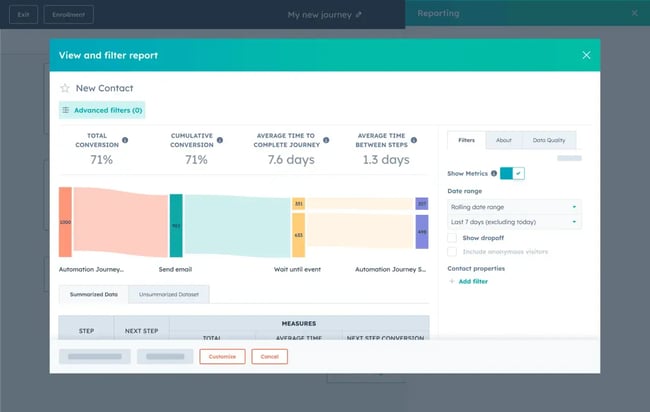
Marketing Automation
Customer Journey Orchestration
AI-Powered Lead Scoring
Advanced Reporting and Revenue Attribution
Marketing Studio
AI-Powered Emails
Contact Management and Smart CRM
2. Salesforce Marketing Cloud
3. Oracle Eloqua
4. ActiveCampaign
5. Zoho Marketing Automation
6. Microsoft Dynamics 365 Customer Insights
7. Mailchimp
The Key Features to Consider When Switching from Marketo
1. Marketing Automation and Workflow Complexity
3. Lead Scoring and Segmentation
4. Multi-Channel Campaign Execution
5. Revenue Attribution and Reporting
6. Ease of Migration and Onboarding
How to Migrate to a Marketo Alternative
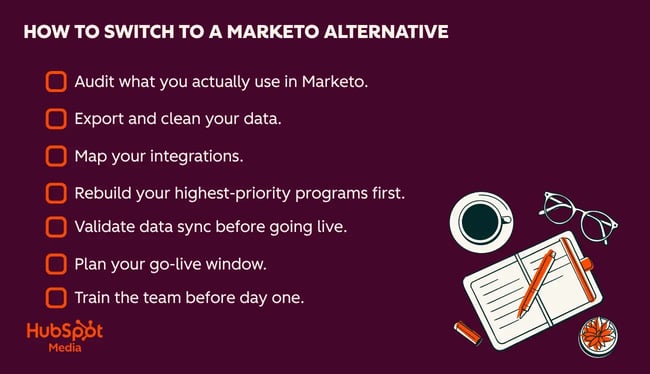
Step 1: Audit what you actually use in Marketo.
Step 2: Export and clean your data.
Step 3: Map your integrations.
Step 4: Rebuild your highest-priority programs first.
Step 5: Validate data sync before going live.
Step 6: Plan your go-live window.
Step 7: Train the team before day one.
Frequently Asked Questions About Marketo Alternatives
How long does it take to migrate off Marketo?
What data and assets usually cause problems during migration?
Should we run Marketo and a new platform in parallel?
How do we estimate total cost beyond licenses?
What’s the difference between Marketo and HubSpot?
When should we choose a unified CRM and marketing platform?
Are there Marketo alternatives with strong event-based triggers?
Choosing the Right Marketo Alternative for Your Team










_1.png)

![How to Create Detailed Buyer Personas for Your Business [+ Free Persona Template]](https://www.hubspot.com/hubfs/buyer-persona-research_1.webp)