Google Developer Knowledge API: Client Libraries vs MCP for AI Coding Assistants
Compare Google Developer Knowledge API client libraries with MCP integration for AI coding assistants, including setup options, trade-offs and use cases.
 Netzender Editorial Team

Editorial scope: Product dates, availability and documented features are attributed to the linked Google sources. API-versus-MCP comparisons, architecture trade-offs and business use cases are Netzender editorial analysis—not Google recommendations or hands-on benchmark results.
If your team is building an AI coding assistant that should answer questions from official Google developer documentation instead of the open web, the timely update is not a brand-new platform launch. The important change is that Google added official Developer Knowledge API client libraries on October 8, 2026 for C#, Go, Java, Node.js, PHP, Python, and Ruby, making implementation more practical across common engineering stacks (source). Google’s client-library page then documented the setup flow and positioned these libraries as a way to avoid hand-rolling raw HTTP calls, with built-in authentication, pagination, and retry handling (source).
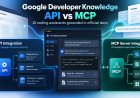
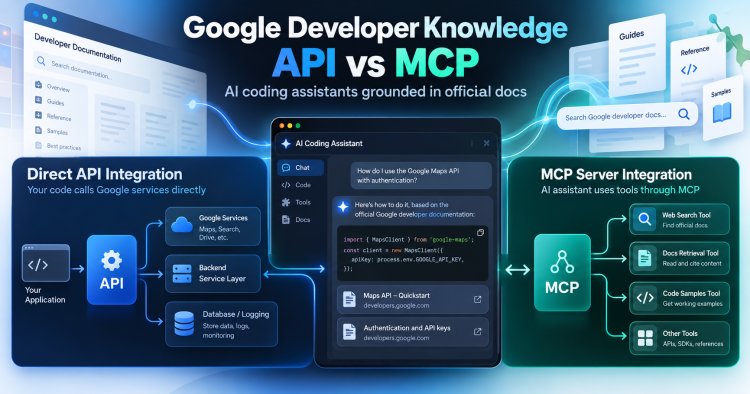
For technical teams, that creates a clean tutorial opportunity: should you connect your assistant directly to the Developer Knowledge API, or should you expose Google’s documentation retrieval through the Developer Knowledge MCP server and let an LLM agent call tools as needed?
The short answer:
- Choose the API path when you want tighter application control, explicit retrieval logic, deterministic backend workflows, and easier integration into an existing service architecture.
- Choose the MCP path when your assistant already uses a tool-calling or agent framework and you want documentation retrieval to behave like a reusable capability rather than a custom backend feature.
This article walks through both paths, where each is strongest, and when either one is a better fit than scraping docs or sending users to generic search.
What changed in October 2026, and what did not
It is worth getting the timeline right before planning implementation.
Google’s release notes say the Developer Knowledge API and the Developer Knowledge MCP server became generally available on April 16, 2026 (source). So October was not the launch of the platform itself.
What changed on October 8 was the arrival of official client libraries for seven languages: C#, Go, Java, Node.js, PHP, Python, and Ruby (source). The official client-libraries page, updated October 9 UTC, frames the benefit clearly: the libraries provide idiomatic types, built-in authentication support, automatic pagination, and retry handling (source).
That matters because teams now have two integration approaches worth evaluating:
- Direct API integration via official client libraries.
- MCP-based integration via the Developer Knowledge MCP server, which the docs reference alongside MCP tools such as
search_documents,answer_query, andget_documentsin the product navigation and release history (source).
Why this is useful for AI coding assistants specifically
For narrowly scoped developer questions, general web search can return less targeted material. Maintaining a separate documentation index can introduce operational and maintenance costs. The Developer Knowledge platform is designed around Google’s official developer documentation corpus, which means your assistant can retrieve from a trusted source set rather than a random blend of forum posts, blog summaries, stale mirrors, and SEO pages.
That is especially relevant in use cases such as:
- IDE assistants that explain APIs, configuration patterns, and product-specific setup steps.
- Internal engineering copilots that need to answer “How do we do this in Google Cloud / Maps / Flutter / Go / Firebase?” with cited documentation context.
- Support bots for developer relations or solutions teams that need fast, grounded responses.
- Doc-chat interfaces embedded inside portals, consoles, or internal wikis.
If your team is also exploring MCP more broadly, our earlier guide on practical MCP workflows is a useful companion because it explains the capability model from a workflow perspective rather than a single vendor’s API design.
API vs MCP: the architecture decision in plain English
Path 1: Direct Developer Knowledge API integration
In this approach, your application backend calls the Developer Knowledge API itself. Your app decides when to search document chunks, when to fetch full documents, and when to call answer generation endpoints. The LLM or UI layer receives the retrieved context from your application.
Best for:
- Backend-first products
- Internal tools with controlled workflows
- Cases where observability, request shaping, and permissions matter
- Teams that want retrieval independent of any one model vendor or agent framework
Advantages:
- You control orchestration end to end.
- You can log, filter, cache, and rank results inside your own service layer.
- You can separate retrieval from generation if your compliance or product design requires that.
- The new client libraries reduce implementation friction in mainstream languages (source).
Trade-offs:
- You need to design your own retrieval workflow.
- You need to decide how and when your assistant should call search versus answer endpoints.
- You need to map your app’s UX to retrieval states yourself.
Path 2: Developer Knowledge MCP server integration
In this approach, your AI assistant connects to the Developer Knowledge MCP server as a tool source. The model or agent can invoke documentation tools like search, answer, or document retrieval when needed, subject to your surrounding agent framework and policies.
Best for:
- Agent-style assistants already designed around tool calling
- Multi-tool environments where docs retrieval is one capability among many
- Rapid experimentation with coding assistants that need dynamic access to official docs
Advantages:
- Documentation retrieval becomes a reusable tool capability.
- You can keep your assistant’s reasoning flow closer to the model/tool interface.
- It fits naturally into environments where the assistant already uses MCP for other systems.
Trade-offs:
- You may have less application-level determinism than in a fully orchestrated API design.
- Debugging can span the model, tool-calling layer, and MCP transport, not just your app backend.
- Your architecture becomes more agent-framework-dependent.
If you are still deciding what kind of assistant should sit on top of the retrieval layer, our comparison of ChatGPT vs Claude vs Gemini for work can help frame the model-side decision separately from the retrieval design.
A simple decision framework
Editorial heuristic: consider the API path if most of these are true
- You already have a backend service where retrieval should live.
- You want explicit control over when searches happen.
- You need custom ranking, filtering, caching, or response templating.
- You want to support more than one LLM without changing the retrieval layer.
- You prefer deterministic workflows over autonomous tool selection.
Editorial heuristic: consider the MCP path if most of these are true
- Your assistant already uses MCP for other tools.
- You want docs retrieval to appear as one more callable capability.
- You are building an agent that decides when to retrieve, inspect, or answer.
- You value speed of composition across tools over maximum orchestration control.
- You can tolerate more indirection in debugging and governance.
Use both if you want a pragmatic hybrid
One possible architecture pattern to evaluate is:
- MCP for interactive assistants in IDEs or chat interfaces.
- Direct API for backend fallback, analytics, or controlled workflows.
Implementation path 1: Direct API integration with the new client libraries
The official client-libraries page positions the libraries as Cloud Client Libraries and gives installation instructions by language (source). That makes this path one practical starting point for teams that favor application-managed retrieval.
Core flow to implement
- Enable the Developer Knowledge API in your Google Cloud project.
- Configure authentication using Application Default Credentials.
- Install the client library for your language.
- Build a retrieval flow using the documented methods such as searching document chunks, fetching documents, or generating grounded answers.
- Return retrieved context and citations to your assistant UI or generation layer.
Language-specific setup notes from the official docs
Google’s documentation includes installation guidance for multiple languages (source).
- Go: add
cloud.google.com/go/developerknowledge/apiv1to your project. - Java: use the
com.google.cloud:google-cloud-developer-knowledgedependency shown in the docs. - Node.js / TypeScript: install
@google/developer-knowledgefrom npm. - PHP: install
google/developer-knowledgewith Composer. - Python: install
google-developer-knowledgewith pip. - Ruby: install the
google-developers-developer_knowledgegem.
The release notes additionally confirm a C# client library is available, although the supplied documentation extract here focuses its setup examples on Go, Java, Node.js/TypeScript, PHP, Python, and Ruby (source).
Authentication notes
The official page says the libraries support Application Default Credentials. For local development, the documented pattern is to install and initialize the gcloud CLI and then run gcloud auth application-default login. For production, the page points teams to standard ADC approaches depending on environment, including attached service accounts in Google Cloud environments and other supported credential setups outside Google Cloud (source).
Best-fit use cases for direct API integration
- Internal doc assistant behind SSO: your backend retrieves official docs, logs queries, adds team-specific prompts, and returns a cited answer.
- Support-side triage tool: support agents search documentation chunks, inspect source documents, and compose responses manually.
- Policy-conscious coding helper: retrieval is separated from generation so your governance team can inspect what context was supplied.
Practical workflow design
A clean backend pattern looks like this:
- User asks a product-specific question.
- Your service decides whether the request needs retrieval.
- Your service calls a search or answer method against Developer Knowledge.
- Your service stores metadata such as query, selected product area, and returned references.
- Your generation layer produces the final response with citations or source links preserved.
This gives you stronger control over answer quality and observability than a tool-calling path where the model decides retrieval timing on its own.
Implementation path 2: MCP server integration for tool-using assistants
The Developer Knowledge documentation and release notes show that Google supports an MCP server for this platform and references MCP tools such as search_documents, answer_query, and get_documents (source). That makes MCP the option worth evaluating for teams building assistants that already operate through tool registries and model-directed workflows.
Core flow to implement
- Connect your assistant environment to the Developer Knowledge MCP server.
- Expose the available documentation tools to the agent.
- Define guardrails for when the assistant should search, answer, or fetch documents.
- Return tool output to the model with citations preserved where available.
- Log tool calls separately from model turns so you can debug behavior.
Best-fit use cases for MCP
- IDE coding assistants: the agent can decide to consult official Google docs when the user asks about a specific SDK, API, or configuration step.
- Multi-tool engineering copilots: the same assistant can inspect internal docs, issue trackers, and official Google docs through separate tools.
- Rapid prototypes: you may reduce initial tool-integration work, depending on the framework.
Where MCP is stronger than direct API work
MCP becomes attractive when retrieval is just one capability in a larger agent. Instead of coding every retrieval branch manually, you give the assistant a documentation tool and let it call that capability in context.
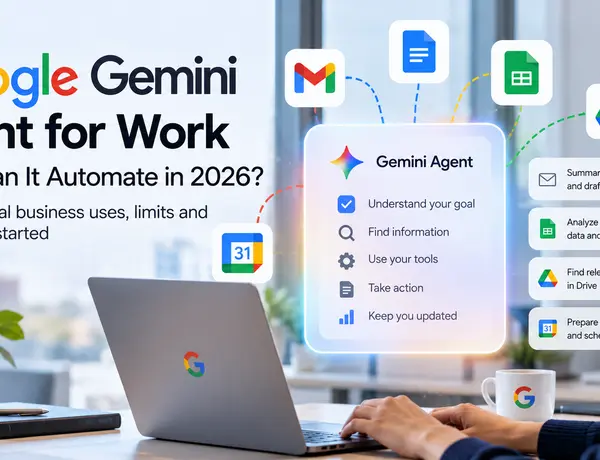
That can be especially useful if your broader roadmap includes agent-driven Google workflows. For adjacent business context, see our piece on the Google Gemini agent for work.
Where MCP can create friction
MCP is not automatically the simpler production choice. The tool abstraction can speed up experimentation, but production teams still need to answer:
- When is the assistant allowed to call documentation tools?
- How do you prevent unnecessary repeated retrieval?
- How do you evaluate tool-selection quality?
- What is the fallback if tool access fails?
Those are solvable questions, but they belong in your design review. MCP simplifies capability exposure; it does not eliminate product decisions.
When this beats scraping docs or generic search
This is one of the most useful editorial angles for technical decision-makers, because many teams still default to one of two bad habits: scraping docs into a homegrown index, or sending user queries to broad web search and hoping for the best.
Prefer official-doc retrieval over scraping when
- You want a source tied to Google’s official documentation corpus rather than maintaining your own crawler.
- You want less operational overhead around parsing, freshness, and site-structure changes.
- You want to avoid building retrieval infrastructure for a corpus Google already exposes as a product.
- You need document retrieval and grounded answers, not just a pile of raw HTML pages.
Prefer official-doc retrieval over generic search when
- Accuracy matters more than breadth.
- You want answers rooted in product documentation rather than blogs, forum posts, or stale tutorials.
- You need citations and source traceability in a support or engineering workflow.
- You want the assistant to answer implementation questions, not just suggest links.
Scraping or generic search may still be better when
- You need sources beyond Google’s documentation corpus.
- You are solving cross-vendor questions where official Google docs are only one input.
- You need highly customized indexing over internal and external content in one retrieval layer.
For teams at the earlier planning stage, our guide on building an AI app workflow can help place this retrieval decision inside a broader product build process.
A practical build checklist for teams
Checklist: use the direct API path if you need backend control
- Define the exact question types that should trigger retrieval.
- Map which API methods your app needs: chunk search, document retrieval, answer generation, or a combination.
- Install the language-specific client library that matches your backend stack.
- Set up Application Default Credentials for local and production environments.
- Log source references and citations for answer review.
- Add fallback behavior when grounded retrieval returns weak or empty results.
Checklist: use the MCP path if your assistant is already tool-native
- Confirm your assistant platform already supports MCP cleanly.
- Expose only the documentation tools you actually want the assistant to use.
- Write tool-selection guidance so the model knows when to retrieve docs.
- Capture tool-call telemetry separately from chat logs.
- Design a fallback for tool unavailability or ambiguous results.
- Test whether autonomous retrieval improves outcomes versus a simpler backend-driven flow.
Checklist: use either approach only if this problem is really about trusted docs
- Are users asking product-specific implementation questions?
- Do users need citations or source traceability?
- Is generic search producing noisy or inconsistent answers?
- Would official Google docs cover a large share of the expected queries?
- Do you want lower maintenance than a custom documentation scraper?
If you answered yes to most of those, this niche is a strong fit.
Suggested product patterns by team type
Platform engineering teams
Start with the direct API path. Platform teams usually benefit from central control, logging, governance, and reusable services. A backend retrieval service can support IDE plugins, chat interfaces, and internal portals at once.
Developer tools startups
If your product already revolves around agent tool use, MCP may get you to a working prototype faster. If your differentiation is answer quality, analytics, or workflow control, direct API integration may age better.
Consultancies and solution builders
From our editorial perspective, this may be a useful implementation niche: connect AI assistants to a trusted Google documentation corpus without requiring clients to build a crawler and ranking stack first. The strongest service angle is usually architecture and workflow design, not generic “AI integration.”
Editorial take: the real opportunity is implementation clarity, not hype
The most interesting part of this update is not that Google has documentation retrieval for AI tools. That story became real earlier in 2026 when the API and MCP server reached general availability (source).
The October opportunity is simpler and more useful: now that official client libraries exist across major languages, more teams can actually ship grounded documentation features without resorting to raw REST plumbing or fragile scraping. That lowers the barrier for practical tutorials, implementation services, and internal developer tooling projects.
In other words, the niche is not “AI coding assistants” in the abstract. The niche is AI coding assistants grounded in official Google docs, implemented through either a direct API service layer or an MCP tool layer.
That is specific enough to be useful, current enough to be timely, and technical enough to attract high-intent readers who are already choosing an architecture.
What to do next
- If you already run a backend service, start with the official client libraries and build a controlled retrieval layer first.
- If you already run a tool-using assistant, evaluate MCP as the faster path to expose Google docs retrieval as a capability.
- If you expect both chat-style exploration and governed backend workflows, design for a hybrid model from day one.
The key is to match the integration style to your product architecture, not to treat API and MCP as interchangeable. They solve related problems, but they optimize for different operating models.
Disclosure: This article was researched and drafted with AI assistance, then reviewed and edited by the Netzender Editorial Team for accuracy, structure, and source transparency. Analysis is limited to the official Google pages supplied for this piece; we did not perform hands-on package installation or live implementation testing for this article.