Amazon Alexa Tablets 2026: Which Model Should You Buy?
Compare Amazon's new Alexa Tablet 8, 11 and 12 Pro. Explore prices, Android features, Alexa+ and which model offers the best value.
 Netzender Editorial Team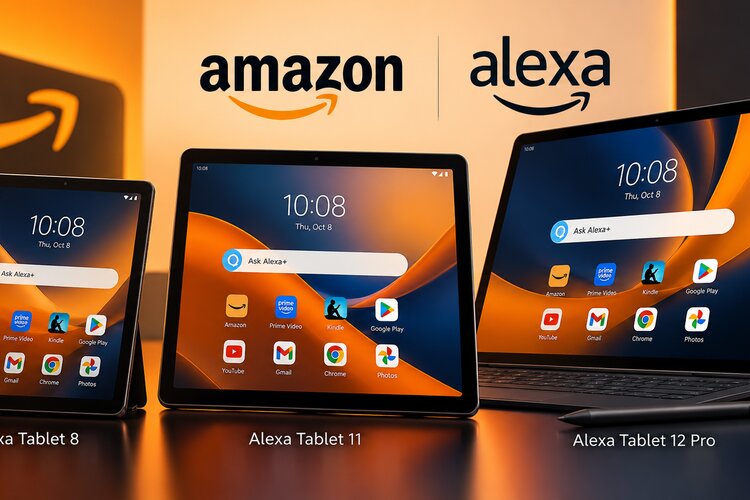
Amazon has introduced a new generation of Alexa Tablets, bringing Android, Google Play access and Alexa+ integration to three devices designed for different budgets and everyday needs.
Announced in October 2026, the lineup includes the compact Alexa Tablet 8, the versatile Alexa Tablet 11 and the productivity-focused Alexa Tablet 12 Pro.
Unlike Amazon's traditionally budget-focused Fire tablets, these devices aim to offer a broader application ecosystem and more premium hardware.
But which Alexa Tablet should you buy? Is the 11-inch model worth the extra money? And does the 12 Pro justify its higher price?
This guide compares announced specifications, starting prices, software features and intended use cases.
Editorial disclosure: This is a specification-based buying guide, not a hands-on review. Netzender has not physically tested or independently benchmarked these devices. Recommendations are based on publicly announced information.
Amazon Alexa Tablets 2026: Quick Verdict
For most buyers, the Alexa Tablet 11 appears to offer the most balanced combination of display size, features and price.
The Alexa Tablet 8 is best suited to readers and casual users who value portability. The Alexa Tablet 12 Pro targets buyers who need a larger display and optional productivity accessories.
- Best compact option: Alexa Tablet 8.
- Best overall value: Alexa Tablet 11.
- Best productivity option: Alexa Tablet 12 Pro.
- Best for glare reduction: Alexa Tablet 12 Pro Nanomatte.
Alexa Tablet 8 vs 11 vs 12 Pro: Price Comparison
| Model | Starting US Price | Display | Best For |
|---|---|---|---|
| Alexa Tablet 8 | $229.99 | 8.7 inches | Reading and portability |
| Alexa Tablet 11 | $329.99 | 11 inches | Entertainment and everyday use |
| Alexa Tablet 12 Pro | $499.99 | 12 inches | Productivity and multitasking |
| Alexa Tablet 12 Pro Nanomatte | $549.99 | 12 inches | Reduced screen reflections |
These are announced starting prices in the United States. Taxes, accessories and configuration upgrades may increase the final cost.
What's New About Amazon's Alexa Tablets?
The most important change is Amazon's move toward a conventional Android tablet experience.
Older Fire tablets relied on Fire OS and Amazon's own application ecosystem. Although affordable, some buyers found application compatibility restrictive.
The new Alexa Tablets support Google Play, making familiar Android applications more accessible.
For consumers who regularly use Gmail, Google Docs, YouTube and other Android services, this improvement may matter more than a modest hardware upgrade.
Amazon also integrates Alexa+ more closely into the tablet experience.
Amazon Alexa Tablet 8: Best for Portability
The Alexa Tablet 8 starts at $229.99 and features an 8.7-inch display.
Its compact design makes it a practical choice for reading, casual browsing, streaming and travel.
Who Should Consider the Alexa Tablet 8?
- Readers who want a portable multipurpose device.
- Travelers who prefer a smaller tablet.
- People who mainly browse websites and watch videos.
- Buyers who want the lowest starting price.
The main compromise is screen space. A smaller display is less comfortable for working with large documents or using multiple applications.
If you use your tablet for several activities throughout the day, the larger Alexa Tablet 11 may justify its additional cost.
Amazon Alexa Tablet 11: Best for Most People
The Alexa Tablet 11 starts at $329.99 and offers a larger display without approaching the Pro model's price.
Its 11-inch screen makes it a stronger all-purpose option for entertainment, browsing, reading documents and communication.
The announced 90Hz display offers a higher refresh rate than the compact model, although actual responsiveness depends on software and workload.
Why the Alexa Tablet 11 Stands Out
For an additional $100 over the entry-level model, buyers receive more screen space and a device better suited to mixed use.
- Streaming movies and television.
- Reading websites and documents.
- Video calls.
- Casual games.
- Email and everyday productivity.
- Smart-home control through Alexa+.
Unless portability or advanced productivity accessories are your main priority, the Alexa Tablet 11 is a reasonable starting point.
Amazon Alexa Tablet 12 Pro: Is It Worth $499.99?
The Alexa Tablet 12 Pro is Amazon's premium option in the new lineup.
Starting at $499.99, it offers a larger 12-inch display and hardware positioned for more demanding applications and multitasking.
The device supports optional accessories intended to expand its usefulness for writing, note-taking and productivity.
Consider the Total Cost
Amazon lists the optional Pro Keyboard at $149.99 and Pro Pen at $89.99.
A base Alexa Tablet 12 Pro with both accessories would cost approximately $739.97 before taxes.
Buyers comparing the device with an iPad or another Android tablet should consider the complete setup rather than the tablet price alone.
Who Should Buy the Pro?
- People who regularly edit documents.
- Users who want more screen space.
- Buyers interested in keyboard and pen accessories.
- Readers who prefer a larger display.
- Consumers looking for the highest-tier model.
A larger screen and stronger processor do not automatically make a tablet a laptop replacement. Application compatibility and software limitations remain important.
Alexa Tablet 12 Pro Nanomatte: Is It Worth the Extra $50?
Amazon offers a Nanomatte version starting at $549.99.
Its display treatment is designed to reduce glare and reflections.
This may appeal to people who read for long periods, work near windows or use tablets in brightly lit environments.
However, some buyers may prefer a conventional glossy screen for movies and photographs.
Buying advice: Consider the Nanomatte version if reducing reflections is a major priority. Otherwise, the standard Pro model may provide better value.
Alexa+ Integration: What Does It Add?
Alexa+ is a defining feature of the new tablet lineup.
Amazon positions its AI-powered assistant as a way to interact with information, supported services and compatible smart-home devices.
Contextual Assistance
One highlighted feature is On-Screen Intelligence.
With appropriate permissions, this capability can use information displayed on the tablet to provide contextual assistance.
Its practical value depends on supported applications, permissions, regional availability and software reliability.
Privacy Considerations
AI assistants that interact with on-screen information introduce privacy questions.
Users should review available permissions and understand how contextual features interact with sensitive information.
Before relying on Alexa+ for personal or business tasks, consult Amazon's current privacy documentation.
Kindle Sanctuary: A More Focused Reading Experience
The new Alexa Tablets emphasize reading through Kindle-related features designed to reduce distractions.
Amazon describes Kindle Sanctuary as a reading-focused experience that can limit interruptions.
For readers who frequently switch between notifications, social media and longer articles, this could be useful.
However, a general-purpose Android tablet is not necessarily a replacement for a dedicated e-reader.
People who spend several hours reading should compare display comfort, weight, battery life and reading habits.
Alexa Tablets vs Older Amazon Fire Tablets
The new lineup differs from traditional Fire tablets in software compatibility, hardware positioning and price.
| Feature | Traditional Fire Tablets | New Alexa Tablets |
|---|---|---|
| Software | Fire OS | Android |
| Google Play | Not officially included | Supported |
| Positioning | Primarily budget-focused | Midrange and premium |
| AI experience | Varies by model | Alexa+ integration |
| Productivity | Depends on model | Expanded options on 12 Pro |
If your current Fire tablet already handles your needs, upgrading may not be necessary.
However, buyers who avoided Fire tablets because of application restrictions may find the new Android-based devices attractive.
Alexa Tablets vs iPad: Which Is Better?
Amazon's new tablets compete with Apple's iPad family and numerous Android manufacturers.
An iPad may be more attractive to users who depend on Apple's ecosystem or iPad-specific applications.
The Alexa Tablets may appeal to consumers who prefer Android applications, Amazon services or Alexa+ integration.
Consider your applications, accessories, software support expectations and total ownership cost before deciding.
Hidden Costs to Consider
Starting prices do not always represent the complete cost of ownership.
- Storage or configuration upgrades.
- Protective cases.
- Keyboard accessories.
- Stylus accessories.
- Entertainment subscriptions.
- Productivity software subscriptions.
- Sales taxes and shipping.
For productivity buyers, calculating the price of a complete setup is particularly important.
Amazon Alexa Tablets Release Date
Amazon announced initial shipping beginning October 14, 2026, in the United States, Canada and Mexico.
Selected European markets are scheduled to follow on October 19.
Availability and delivery estimates vary by region. Check official Amazon listings before ordering.
Which Alexa Tablet Should You Buy?
Choose Alexa Tablet 8 if...
You prioritize portability, casual reading, streaming and a lower starting price.
Choose Alexa Tablet 11 if...
You want a versatile tablet for entertainment, browsing, communication and everyday applications.
Choose Alexa Tablet 12 Pro if...
You need a larger display and expect to use productivity accessories.
Choose Alexa Tablet 12 Pro Nanomatte if...
Reducing screen reflections is particularly important to your reading or working environment.
Frequently Asked Questions
Do Amazon Alexa Tablets run Android?
Yes. The new lineup uses Android and supports Google Play.
How much does the Alexa Tablet 8 cost?
The Alexa Tablet 8 starts at $229.99 in the United States.
How much does the Alexa Tablet 11 cost?
The Alexa Tablet 11 starts at $329.99 in the United States.
How much does the Alexa Tablet 12 Pro cost?
The standard model starts at $499.99, while the Nanomatte version starts at $549.99.
Which Alexa Tablet is best for most people?
Based on announced pricing and product positioning, the Alexa Tablet 11 appears to offer the most balanced option.
Can Alexa Tablets use Google Play?
Yes. Google Play support is one of the key differences compared with traditional Fire tablets.
Are Alexa Tablets better than Fire Tablets?
They offer broader application compatibility and more premium positioning, but older Fire tablets may remain suitable for budget-focused buyers.
Alexa Tablet Buying Checklist: Seven Questions to Ask Before Ordering
Comparing screen sizes and starting prices is useful, but the best tablet is the one that fits your actual routine. Before choosing an Alexa Tablet, consider the following questions.
1. Will You Mostly Read, Watch Videos or Work?
If reading and casual browsing are your priorities, the compact Alexa Tablet 8 may be sufficient. If you frequently watch movies, join video calls or work with documents, a larger screen can make everyday tasks more comfortable. The Tablet 11 offers a middle ground, while the 12 Pro is positioned for people who value additional workspace.
2. Which Android Apps Do You Need?
Google Play support is a major selling point, but buyers should still check their essential applications individually. Availability does not guarantee that every app will provide the same features, layout or performance on every device. Review the apps you use for banking, work, education and entertainment before committing to a purchase.
3. How Important Is AI Assistance?
Alexa+ may be useful for information retrieval, smart-home control and contextual tasks. However, AI features should not be the only reason to buy a tablet. Consider whether the assistant supports your preferred services and whether its capabilities are available in your country.
For a broader explanation of how specialized AI hardware can affect device experiences, read our guide to on-device AI and neural processing units. Not every AI feature runs locally, so hardware marketing and actual privacy or performance characteristics should be evaluated separately.
4. Do You Need a Keyboard or Stylus?
Optional accessories can make a tablet more versatile, but they also increase the total price. The Alexa Tablet 12 Pro starts at $499.99, and adding the announced keyboard and pen raises the estimated hardware cost to $739.97 before taxes. Compare that total with alternative tablets and lightweight laptops, particularly if you expect to type for long periods.
5. Will the Tablet Help You Focus?
A tablet can be a useful reading or study device, but notifications and entertainment apps can easily interrupt concentration. Reading-focused features may help, although their effectiveness depends on how you configure the device.
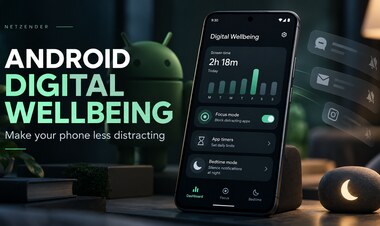
Our guide to Digital Wellbeing on Android explains practical ways to reduce distractions. Students may also benefit from a structured approach to planning and focused study, covered in our student productivity guide.
6. What Privacy Settings Will You Review?
Voice assistants and contextual AI features can involve microphones, account information and application permissions. Before enabling these capabilities, examine the relevant settings and understand what information may be processed or shared. Avoid assuming that a feature is private simply because it appears directly on your device.
For additional steps that apply beyond tablets, see our online privacy checklist, including account protection and permission reviews.
7. Should You Buy Immediately or Wait for Reviews?
Early product announcements describe intended capabilities, but independent testing provides a better picture of battery endurance, thermal behavior, software stability and long-term usability. If you need a replacement device immediately, compare the published specifications with your current requirements. If your existing tablet still works well, waiting for hands-on reviews may help you avoid paying for features that do not improve your daily experience.
Bottom line: Choose the smallest and least expensive model that comfortably handles your essential tasks. Upgrade to a larger or more expensive model only when you can identify a practical benefit.
Final Verdict
Amazon's 2026 Alexa Tablets introduce a more ambitious approach to tablet hardware.
Android and Google Play support address a major limitation associated with older Fire tablets, while Alexa+ provides another point of differentiation.
The Alexa Tablet 8 is the compact choice, the Alexa Tablet 11 offers the strongest apparent balance, and the Alexa Tablet 12 Pro targets buyers interested in productivity.
Before purchasing, compare the complete configuration cost and consider independent performance reviews if battery life or long-term reliability is important.
Official Sources and Editorial Methodology
Methodology: Netzender compared announced prices, display sizes, software compatibility, accessories and intended use cases. We did not physically test the devices or independently verify performance claims.
Editorial review: October 9, 2026.